

Overview
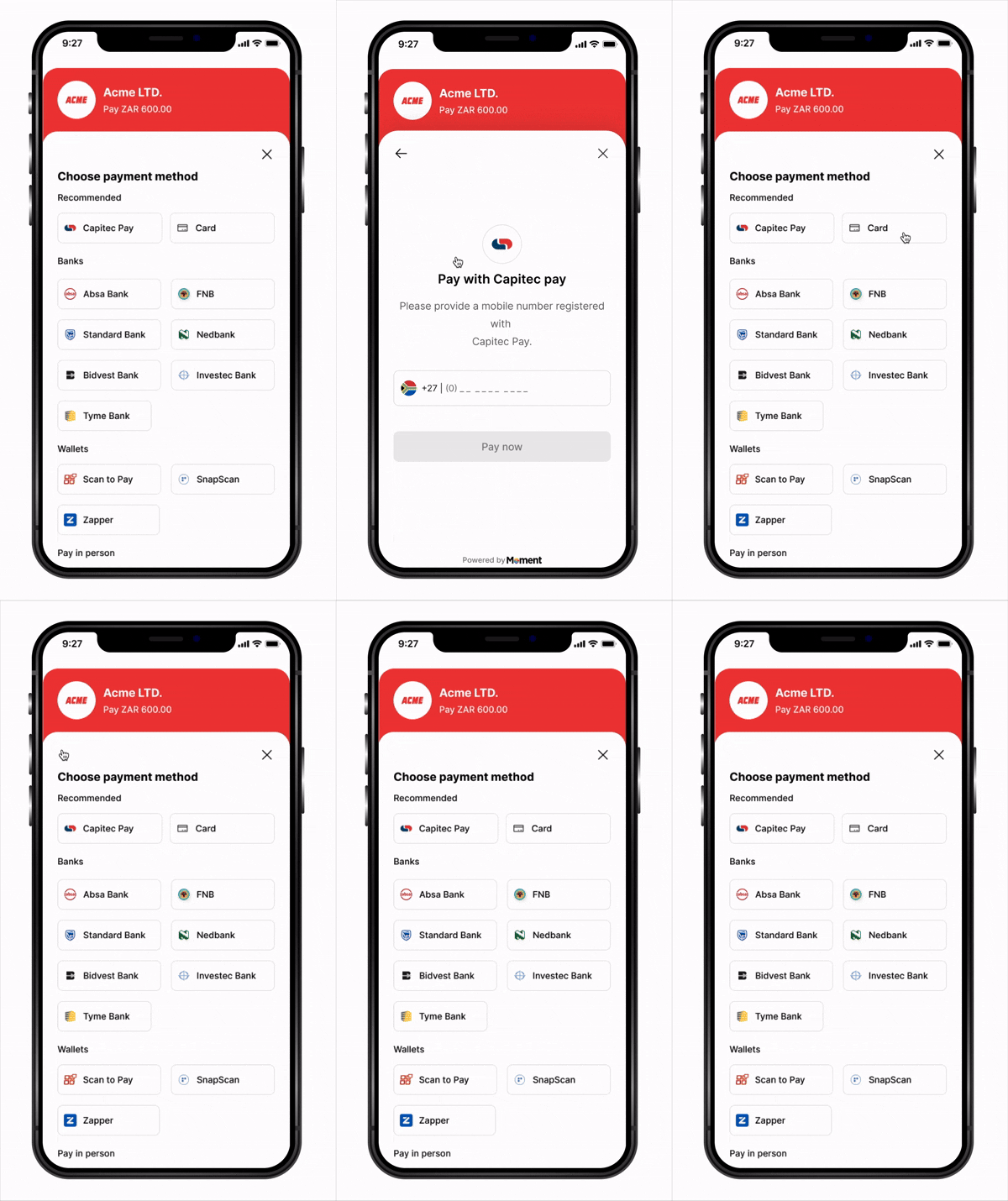
The Moment Swift SDK enables seamless payment integration into any native iOS application. The SDK provides a clean, idiomatic Swift API with fullasync/await support to handle the entire payment flow through a native bottom sheet experience.
Built for iOS with Swift, the SDK supports both UIKit and SwiftUI workflows.
Key Features
- async/await API – Modern Swift concurrency with no callback pyramid
- Native Experience – Bottom sheet presentation using native iOS sheet APIs
- UIKit & SwiftUI – Works seamlessly with both UI frameworks
- Type-Safe – Fully typed closures and result types with Swift-first design
- Flexible Callbacks – Handle success, failure, cancellation, retry, and expiry events
- Secure – Sensitive payment data handled entirely in Moment’s secure WebView
- PCI Compliant – No card data touches your application
How It Works
- App launches —
Moment(clientKey:)creates the SDK instance;moment.checkout(...)creates and returns thecheckoutinstance, registering yourfetchClientToken,fetchSessionStatus, and event closures - Customer taps Pay —
checkout.launch()is called - SDK calls
fetchClientToken— your closure creates a session on your backend (with asuccess_urldeep link) and returns theclient_token - Checkout opens in a native bottom sheet
- Customer submits payment — Moment takes over and redirects to the authentication page
- Customer completes authentication on the external page
- Customer is redirected back to your app via redirect link with
?session_id=abc123 - SDK detects the redirect link and calls your
fetchSessionStatus("abc123")closure automatically - Your closure fetches the status from your backend, which queries Moment API
- SDK routes to the right handler —
onSuccess,onFailure,onExpired, oronCancel - Webhooks are delivered to your backend regardless of outcome
Installation
Swift Package Manager (Recommended)
In Xcode, go to File → Add Package Dependencies and enter:https://github.com/momentpay/sdk/swift
Package.swift:
dependencies: [
    .package(url: "https://github.com/momentpay/sdk/swift", from: "1.0.0")
]
CocoaPods
Add to yourPodfile:
pod 'MomentSDK'
pod install
Platform Configuration
Requirements
- iOS 15.0+
- Swift 5.7+
- Xcode 14+
Quick Start
1. Initialize the SDK and configure checkout
Create the SDK instance withMoment(clientKey:) and configure the checkout product by calling moment.checkout(...). Both are set up once when your app launches — in AppDelegate or your SwiftUI App initializer. You provide two async throwing closures — the SDK calls them automatically at the right moments.
Backend endpoints:
- Node.js
- Python
- Go
- Firebase
- Supabase
- Lambda
server.js
// Called by fetchClientToken when checkout.launch() is triggered
app.post('/api/create-payment-session', async (req, res) => {
  const response = await fetch('https://api.momentpay.net/collect/payment_sessions', {
    method: 'POST',
    headers: {
      'Authorization': 'Bearer sk_test_your_secret_key',
      'Content-Type': 'application/json',
    },
    body: JSON.stringify({
      amount: 10000, // Amount in cents (e.g., R100.00)
      currency: 'ZAR',
      type: 'one_time',
      options: {
        checkout_options: {
          presentation_mode: { mode: 'embedded' },
          success_url: 'yourapp://checkout?session_id={SESSION_ID}', // deep link back to app
        },
      },
    }),
  });
  const { client_token } = await response.json();
  res.json({ client_token });
});

// Called by fetchSessionStatus after customer returns via deep link.
app.get('/api/session-status', async (req, res) => {
  const sessionId = req.query.session_id;
  const response = await fetch(
    `https://api.momentpay.net/collect/payment_sessions/${sessionId}`,
    { headers: { 'Authorization': 'Bearer sk_test_your_secret_key' } }
  );
  const session = await response.json();
  res.json({ status: session.status, ...session });
});
server.py
import requests
from flask import Flask, request, jsonify

app = Flask(__name__)
SECRET_KEY = 'sk_test_your_secret_key'

# Called by fetchClientToken when checkout.launch() is triggered
@app.route('/api/create-payment-session', methods=['POST'])
def create_payment_session():
    response = requests.post(
        'https://api.momentpay.net/collect/payment_sessions',
        headers={
            'Authorization': f'Bearer {SECRET_KEY}',
            'Content-Type': 'application/json',
        },
        json={
            'amount': 10000,  # Amount in cents (e.g., R100.00)
            'currency': 'ZAR',
            'type': 'one_time',
            'options': {
                'checkout_options': {
                    'presentation_mode': {'mode': 'embedded'},
                    'success_url': 'yourapp://checkout?session_id={SESSION_ID}',  # deep link back to app
                },
            },
        },
    )
    data = response.json()
    return jsonify({'client_token': data['client_token']})

# Called by fetchSessionStatus after customer returns via deep link.
@app.route('/api/session-status', methods=['GET'])
def get_session_status():
    session_id = request.args.get('session_id')
    response = requests.get(
        f'https://api.momentpay.net/collect/payment_sessions/{session_id}',
        headers={'Authorization': f'Bearer {SECRET_KEY}'},
    )
    session = response.json()
    return jsonify({'status': session['status'], **session})
server.go
package main

import (
    "bytes"
    "encoding/json"
    "fmt"
    "io"
    "net/http"
)

const secretKey = "sk_test_your_secret_key"
const momentAPI = "https://api.momentpay.net"

// Called by fetchClientToken when checkout.launch() is triggered
func createPaymentSession(w http.ResponseWriter, r *http.Request) {
    payload, _ := json.Marshal(map[string]any{
        "amount":   10000, // Amount in cents (e.g., R100.00)
        "currency": "ZAR",
        "type":     "one_time",
        "options": map[string]any{
            "checkout_options": map[string]any{
                "presentation_mode": map[string]string{"mode": "embedded"},
                "success_url":       "yourapp://checkout?session_id={SESSION_ID}", // deep link back to app
            },
        },
    })

    req, _ := http.NewRequest("POST", momentAPI+"/collect/payment_sessions", bytes.NewBuffer(payload))
    req.Header.Set("Authorization", "Bearer "+secretKey)
    req.Header.Set("Content-Type", "application/json")

    resp, _ := http.DefaultClient.Do(req)
    defer resp.Body.Close()

    var result map[string]any
    json.NewDecoder(resp.Body).Decode(&result)

    w.Header().Set("Content-Type", "application/json")
    json.NewEncoder(w).Encode(map[string]any{"client_token": result["client_token"]})
}

// Called by fetchSessionStatus after customer returns via deep link.
func getSessionStatus(w http.ResponseWriter, r *http.Request) {
    sessionID := r.URL.Query().Get("session_id")

    req, _ := http.NewRequest("GET", fmt.Sprintf("%s/collect/payment_sessions/%s", momentAPI, sessionID), nil)
    req.Header.Set("Authorization", "Bearer "+secretKey)

    resp, _ := http.DefaultClient.Do(req)
    defer resp.Body.Close()

    body, _ := io.ReadAll(resp.Body)
    w.Header().Set("Content-Type", "application/json")
    w.Write(body)
}

func main() {
    http.HandleFunc("/api/create-payment-session", createPaymentSession)
    http.HandleFunc("/api/session-status", getSessionStatus)
    http.ListenAndServe(":8080", nil)
}
functions/index.js
const { onCall } = require('firebase-functions/v2/https');
const axios = require('axios');

// Called by fetchClientToken — creates a payment session
exports.createPaymentSession = onCall(async (request) => {
  const { amount, currency } = request.data;
  const { data } = await axios.post(
    'https://api.momentpay.net/collect/payment_sessions',
    {
      amount,
      currency,
      type: 'one_time',
      options: {
        checkout_options: {
          presentation_mode: { mode: 'embedded' },
          success_url: 'yourapp://checkout?session_id={SESSION_ID}', // deep link back to app
        },
      },
    },
    {
      headers: {
        Authorization: `Bearer ${process.env.MOMENT_SECRET_KEY}`,
        'Content-Type': 'application/json',
      },
    }
  );
  return { client_token: data.client_token };
});

// Called by fetchSessionStatus — retrieves session status after deep link redirect
exports.getSessionStatus = onCall(async (request) => {
  const { sessionId } = request.data;
  const { data } = await axios.get(
    `https://api.momentpay.net/collect/payment_sessions/${sessionId}`,
    { headers: { Authorization: `Bearer ${process.env.MOMENT_SECRET_KEY}` } }
  );
  return { status: data.status, ...data };
});
supabase/functions/create-payment-session/index.ts
import { serve } from 'https://deno.land/std/http/server.ts';

// Invoked by fetchClientToken
serve(async () => {
  const response = await fetch('https://api.momentpay.net/collect/payment_sessions', {
    method: 'POST',
    headers: {
      Authorization: `Bearer ${Deno.env.get('MOMENT_SECRET_KEY')}`,
      'Content-Type': 'application/json',
    },
    body: JSON.stringify({
      amount: 10000,
      currency: 'ZAR',
      type: 'one_time',
      options: {
        checkout_options: {
          presentation_mode: { mode: 'embedded' },
          success_url: 'yourapp://checkout?session_id={SESSION_ID}', // deep link back to app
        },
      },
    }),
  });
  const { client_token } = await response.json();
  return new Response(JSON.stringify({ client_token }), {
    headers: { 'Content-Type': 'application/json' },
  });
});
supabase/functions/get-session-status/index.ts
import { serve } from 'https://deno.land/std/http/server.ts';

// Invoked by fetchSessionStatus
serve(async (req) => {
  const { session_id } = await req.json();
  const response = await fetch(
    `https://api.momentpay.net/collect/payment_sessions/${session_id}`,
    { headers: { Authorization: `Bearer ${Deno.env.get('MOMENT_SECRET_KEY')}` } }
  );
  const session = await response.json();
  return new Response(JSON.stringify({ status: session.status, ...session }), {
    headers: { 'Content-Type': 'application/json' },
  });
});
handler.js
// Called by fetchClientToken — POST /api/create-payment-session
exports.createPaymentSession = async (event) => {
  const response = await fetch('https://api.momentpay.net/collect/payment_sessions', {
    method: 'POST',
    headers: {
      Authorization: `Bearer ${process.env.MOMENT_SECRET_KEY}`,
      'Content-Type': 'application/json',
    },
    body: JSON.stringify({
      amount: 10000,
      currency: 'ZAR',
      type: 'one_time',
      options: {
        checkout_options: {
          presentation_mode: { mode: 'embedded' },
          success_url: 'yourapp://checkout?session_id={SESSION_ID}', // deep link back to app
        },
      },
    }),
  });
  const { client_token } = await response.json();
  return {
    statusCode: 200,
    headers: { 'Content-Type': 'application/json' },
    body: JSON.stringify({ client_token }),
  };
};

// Called by fetchSessionStatus — GET /api/session-status?session_id=abc123
exports.getSessionStatus = async (event) => {
  const sessionId = event.queryStringParameters?.session_id;
  const response = await fetch(
    `https://api.momentpay.net/collect/payment_sessions/${sessionId}`,
    { headers: { Authorization: `Bearer ${process.env.MOMENT_SECRET_KEY}` } }
  );
  const session = await response.json();
  return {
    statusCode: 200,
    headers: { 'Content-Type': 'application/json' },
    body: JSON.stringify({ status: session.status, ...session }),
  };
};
- UIKit · URLSession
- UIKit · Alamofire
- UIKit · Firebase
- UIKit · Supabase
- SwiftUI · URLSession
- SwiftUI · Alamofire
- SwiftUI · Firebase
- SwiftUI · Supabase
AppDelegate.swift
import MomentSDK

let moment = Moment(clientKey: "pk_your_key_here")
var checkout: MomentCheckout!

@UIApplicationMain
class AppDelegate: UIResponder, UIApplicationDelegate {

    func application(
        _ application: UIApplication,
        didFinishLaunchingWithOptions launchOptions: [UIApplication.LaunchOptionsKey: Any]?
    ) -> Bool {

        checkout = moment.checkout(
            // SDK calls this when checkout.launch() is triggered to get a fresh session token
            fetchClientToken: {
                var request = URLRequest(
                    url: URL(string: "https://your-backend.com/api/create-payment-session")!
                )
                request.httpMethod = "POST"
                request.setValue("application/json", forHTTPHeaderField: "Content-Type")
                let (data, _) = try await URLSession.shared.data(for: request)
                let json = try JSONDecoder().decode([String: String].self, from: data)
                return json["client_token"] ?? ""
            },

            // SDK calls this automatically when a deep link with session_id is detected.
            // Happens after a customer returns from a redirect-based payment (3DS, bank redirect, EFT).
            // Must resolve to a MomentSessionStatus with at least a status field.
            fetchSessionStatus: { sessionId in
                let url = URL(
                    string: "https://your-backend.com/api/session-status?session_id=\(sessionId)"
                )!
                let (data, _) = try await URLSession.shared.data(from: url)
                return try JSONDecoder().decode(MomentSessionStatus.self, from: data)
            },

            onSuccess: { result in
                print("Payment successful: \(result)")
                // Navigate to success screen or update UI
            },
            onFailure: { result in
                print("Payment failed: \(result)")
                // Show error message
            },
            onCancel: { result in
                print("Payment cancelled")
                // Allow user to retry
            },
            onAttemptFailed: { result in
                print("Payment attempt failed: \(result)")
                // User can retry within the checkout
            },
            onExpired: { result in
                print("Payment session expired")
                // Request a new session and retry
            }
        )

        return true
    }

    // Forward deep links to the SDK for redirect payment handling
    func application(
        _ app: UIApplication,
        open url: URL,
        options: [UIApplication.OpenURLOptionsKey: Any] = [:]
    ) -> Bool {
        return moment.handleDeepLink(url)
    }
}
AppDelegate.swift
import MomentSDK
import Alamofire

let moment = Moment(clientKey: "pk_your_key_here")
var checkout: MomentCheckout!

@UIApplicationMain
class AppDelegate: UIResponder, UIApplicationDelegate {

    func application(
        _ application: UIApplication,
        didFinishLaunchingWithOptions launchOptions: [UIApplication.LaunchOptionsKey: Any]?
    ) -> Bool {

        checkout = moment.checkout(
            // SDK calls this when checkout.launch() is triggered to get a fresh session token
            fetchClientToken: {
                let response = try await AF
                    .request(
                        "https://your-backend.com/api/create-payment-session",
                        method: .post
                    )
                    .serializingDecodable([String: String].self)
                    .value
                return response["client_token"] ?? ""
            },

            // SDK calls this automatically when a deep link with session_id is detected.
            // Happens after a customer returns from a redirect-based payment (3DS, bank redirect, EFT).
            fetchSessionStatus: { sessionId in
                return try await AF
                    .request(
                        "https://your-backend.com/api/session-status",
                        parameters: ["session_id": sessionId]
                    )
                    .serializingDecodable(MomentSessionStatus.self)
                    .value
            },

            onSuccess: { result in
                print("Payment successful: \(result)")
                // Navigate to success screen or update UI
            },
            onFailure: { result in
                print("Payment failed: \(result)")
                // Show error message
            },
            onCancel: { result in
                print("Payment cancelled")
                // Allow user to retry
            },
            onAttemptFailed: { result in
                print("Payment attempt failed: \(result)")
                // User can retry within the checkout
            },
            onExpired: { result in
                print("Payment session expired")
                // Request a new session and retry
            }
        )

        return true
    }

    func application(
        _ app: UIApplication,
        open url: URL,
        options: [UIApplication.OpenURLOptionsKey: Any] = [:]
    ) -> Bool {
        return moment.handleDeepLink(url)
    }
}
AppDelegate.swift
import MomentSDK
import FirebaseFunctions

let moment = Moment(clientKey: "pk_your_key_here")
var checkout: MomentCheckout!

@UIApplicationMain
class AppDelegate: UIResponder, UIApplicationDelegate {

    func application(
        _ application: UIApplication,
        didFinishLaunchingWithOptions launchOptions: [UIApplication.LaunchOptionsKey: Any]?
    ) -> Bool {

        let functions = Functions.functions()

        checkout = moment.checkout(
            // SDK calls this when checkout.launch() is triggered to get a fresh session token
            fetchClientToken: {
                let result = try await functions
                    .httpsCallable("createPaymentSession")
                    .call(["amount": 10000, "currency": "ZAR"])
                let data = result.data as? [String: Any]
                return data?["client_token"] as? String ?? ""
            },

            // SDK calls this automatically when a deep link with session_id is detected.
            // Happens after a customer returns from a redirect-based payment (3DS, bank redirect, EFT).
            fetchSessionStatus: { sessionId in
                let result = try await functions
                    .httpsCallable("getSessionStatus")
                    .call(["sessionId": sessionId])
                let data = result.data as? [String: Any] ?? [:]
                return try MomentSessionStatus(from: data)
            },

            onSuccess: { result in
                print("Payment successful: \(result)")
                // Navigate to success screen or update UI
            },
            onFailure: { result in
                print("Payment failed: \(result)")
                // Show error message
            },
            onCancel: { result in
                print("Payment cancelled")
                // Allow user to retry
            },
            onAttemptFailed: { result in
                print("Payment attempt failed: \(result)")
                // User can retry within the checkout
            },
            onExpired: { result in
                print("Payment session expired")
                // Request a new session and retry
            }
        )

        return true
    }

    func application(
        _ app: UIApplication,
        open url: URL,
        options: [UIApplication.OpenURLOptionsKey: Any] = [:]
    ) -> Bool {
        return moment.handleDeepLink(url)
    }
}
AppDelegate.swift
import MomentSDK
import Supabase

let moment = Moment(clientKey: "pk_your_key_here")
var checkout: MomentCheckout!

@UIApplicationMain
class AppDelegate: UIResponder, UIApplicationDelegate {

    let supabase = SupabaseClient(
        supabaseURL: URL(string: "https://your-project.supabase.co")!,
        supabaseKey: "your-anon-key"
    )

    func application(
        _ application: UIApplication,
        didFinishLaunchingWithOptions launchOptions: [UIApplication.LaunchOptionsKey: Any]?
    ) -> Bool {

        checkout = moment.checkout(
            // SDK calls this when checkout.launch() is triggered to get a fresh session token.
            // Invokes a Supabase Edge Function named 'create-payment-session'.
            fetchClientToken: { [weak self] in
                guard let self else { throw MomentSDKError.notInitialized }
                let response: [String: String] = try await self.supabase.functions
                    .invoke("create-payment-session")
                return response["client_token"] ?? ""
            },

            // SDK calls this automatically when a deep link with session_id is detected.
            // Happens after a customer returns from a redirect-based payment (3DS, bank redirect, EFT).
            fetchSessionStatus: { [weak self] sessionId in
                guard let self else { throw MomentSDKError.notInitialized }
                return try await self.supabase.functions
                    .invoke(
                        "get-session-status",
                        options: FunctionInvokeOptions(body: ["session_id": sessionId])
                    )
            },

            onSuccess: { result in
                print("Payment successful: \(result)")
                // Navigate to success screen or update UI
            },
            onFailure: { result in
                print("Payment failed: \(result)")
                // Show error message
            },
            onCancel: { result in
                print("Payment cancelled")
                // Allow user to retry
            },
            onAttemptFailed: { result in
                print("Payment attempt failed: \(result)")
                // User can retry within the checkout
            },
            onExpired: { result in
                print("Payment session expired")
                // Request a new session and retry
            }
        )

        return true
    }

    func application(
        _ app: UIApplication,
        open url: URL,
        options: [UIApplication.OpenURLOptionsKey: Any] = [:]
    ) -> Bool {
        return moment.handleDeepLink(url)
    }
}
YourApp.swift
import SwiftUI
import MomentSDK

let moment = Moment(clientKey: "pk_your_key_here")
var checkout: MomentCheckout!

@main
struct YourApp: App {

    init() {
        checkout = moment.checkout(
            // SDK calls this when checkout.launch() is triggered to get a fresh session token
            fetchClientToken: {
                var request = URLRequest(
                    url: URL(string: "https://your-backend.com/api/create-payment-session")!
                )
                request.httpMethod = "POST"
                request.setValue("application/json", forHTTPHeaderField: "Content-Type")
                let (data, _) = try await URLSession.shared.data(for: request)
                let json = try JSONDecoder().decode([String: String].self, from: data)
                return json["client_token"] ?? ""
            },

            // SDK calls this automatically when a deep link with session_id is detected.
            // Happens after a customer returns from a redirect-based payment (3DS, bank redirect, EFT).
            // Must resolve to a MomentSessionStatus with at least a status field.
            fetchSessionStatus: { sessionId in
                let url = URL(
                    string: "https://your-backend.com/api/session-status?session_id=\(sessionId)"
                )!
                let (data, _) = try await URLSession.shared.data(from: url)
                return try JSONDecoder().decode(MomentSessionStatus.self, from: data)
            },

            onSuccess: { result in
                print("Payment successful: \(result)")
                // Navigate to success screen or update UI
            },
            onFailure: { result in
                print("Payment failed: \(result)")
                // Show error message
            },
            onCancel: { result in
                print("Payment cancelled")
                // Allow user to retry
            },
            onAttemptFailed: { result in
                print("Payment attempt failed: \(result)")
                // User can retry within the checkout
            },
            onExpired: { result in
                print("Payment session expired")
                // Request a new session and retry
            }
        )
    }

    var body: some Scene {
        WindowGroup {
            ContentView()
                .onOpenURL { url in
                    moment.handleDeepLink(url)
                }
        }
    }
}
YourApp.swift
import SwiftUI
import MomentSDK
import Alamofire

let moment = Moment(clientKey: "pk_your_key_here")
var checkout: MomentCheckout!

@main
struct YourApp: App {

    init() {
        checkout = moment.checkout(
            // SDK calls this when checkout.launch() is triggered to get a fresh session token
            fetchClientToken: {
                let response = try await AF
                    .request(
                        "https://your-backend.com/api/create-payment-session",
                        method: .post
                    )
                    .serializingDecodable([String: String].self)
                    .value
                return response["client_token"] ?? ""
            },

            // SDK calls this automatically when a deep link with session_id is detected.
            // Happens after a customer returns from a redirect-based payment (3DS, bank redirect, EFT).
            fetchSessionStatus: { sessionId in
                return try await AF
                    .request(
                        "https://your-backend.com/api/session-status",
                        parameters: ["session_id": sessionId]
                    )
                    .serializingDecodable(MomentSessionStatus.self)
                    .value
            },

            onSuccess: { result in
                print("Payment successful: \(result)")
                // Navigate to success screen or update UI
            },
            onFailure: { result in
                print("Payment failed: \(result)")
                // Show error message
            },
            onCancel: { result in
                print("Payment cancelled")
                // Allow user to retry
            },
            onAttemptFailed: { result in
                print("Payment attempt failed: \(result)")
                // User can retry within the checkout
            },
            onExpired: { result in
                print("Payment session expired")
                // Request a new session and retry
            }
        )
    }

    var body: some Scene {
        WindowGroup {
            ContentView()
                .onOpenURL { url in
                    moment.handleDeepLink(url)
                }
        }
    }
}
YourApp.swift
import SwiftUI
import MomentSDK
import FirebaseFunctions

let moment = Moment(clientKey: "pk_your_key_here")
var checkout: MomentCheckout!

@main
struct YourApp: App {

    init() {
        checkout = moment.checkout(
            // SDK calls this when checkout.launch() is triggered to get a fresh session token
            fetchClientToken: {
                let result = try await Functions.functions()
                    .httpsCallable("createPaymentSession")
                    .call(["amount": 10000, "currency": "ZAR"])
                let data = result.data as? [String: Any]
                return data?["client_token"] as? String ?? ""
            },

            // SDK calls this automatically when a deep link with session_id is detected.
            // Happens after a customer returns from a redirect-based payment (3DS, bank redirect, EFT).
            fetchSessionStatus: { sessionId in
                let result = try await Functions.functions()
                    .httpsCallable("getSessionStatus")
                    .call(["sessionId": sessionId])
                let data = result.data as? [String: Any] ?? [:]
                return try MomentSessionStatus(from: data)
            },

            onSuccess: { result in
                print("Payment successful: \(result)")
                // Navigate to success screen or update UI
            },
            onFailure: { result in
                print("Payment failed: \(result)")
                // Show error message
            },
            onCancel: { result in
                print("Payment cancelled")
                // Allow user to retry
            },
            onAttemptFailed: { result in
                print("Payment attempt failed: \(result)")
                // User can retry within the checkout
            },
            onExpired: { result in
                print("Payment session expired")
                // Request a new session and retry
            }
        )
    }

    var body: some Scene {
        WindowGroup {
            ContentView()
                .onOpenURL { url in
                    moment.handleDeepLink(url)
                }
        }
    }
}
YourApp.swift
import SwiftUI
import MomentSDK
import Supabase

let moment = Moment(clientKey: "pk_your_key_here")
var checkout: MomentCheckout!

@main
struct YourApp: App {

    init() {
        let supabase = SupabaseClient(
            supabaseURL: URL(string: "https://your-project.supabase.co")!,
            supabaseKey: "your-anon-key"
        )

        checkout = moment.checkout(
            // SDK calls this when checkout.launch() is triggered to get a fresh session token.
            // Invokes a Supabase Edge Function named 'create-payment-session'.
            fetchClientToken: {
                let response: [String: String] = try await supabase.functions
                    .invoke("create-payment-session")
                return response["client_token"] ?? ""
            },

            // SDK calls this automatically when a deep link with session_id is detected.
            // Happens after a customer returns from a redirect-based payment (3DS, bank redirect, EFT).
            fetchSessionStatus: { sessionId in
                return try await supabase.functions
                    .invoke(
                        "get-session-status",
                        options: FunctionInvokeOptions(body: ["session_id": sessionId])
                    )
            },

            onSuccess: { result in
                print("Payment successful: \(result)")
                // Navigate to success screen or update UI
            },
            onFailure: { result in
                print("Payment failed: \(result)")
                // Show error message
            },
            onCancel: { result in
                print("Payment cancelled")
                // Allow user to retry
            },
            onAttemptFailed: { result in
                print("Payment attempt failed: \(result)")
                // User can retry within the checkout
            },
            onExpired: { result in
                print("Payment session expired")
                // Request a new session and retry
            }
        )
    }

    var body: some Scene {
        WindowGroup {
            ContentView()
                .onOpenURL { url in
                    moment.handleDeepLink(url)
                }
        }
    }
}
2. Launch Checkout
- UIKit
- SwiftUI
CheckoutViewController.swift
import UIKit
import MomentSDK

class CheckoutViewController: UIViewController {

    @IBAction func payButtonTapped(_ sender: UIButton) {
        // SDK calls fetchClientToken internally — no token management needed here
        checkout.launch(from: self)
    }
}
CheckoutView.swift
import SwiftUI
import MomentSDK

struct CheckoutView: View {
    var body: some View {
        Button("Pay Now") {
            // SDK calls fetchClientToken internally — no token management needed here
            checkout.launch()
        }
        .buttonStyle(.borderedProminent)
    }
}
API Reference
Moment(clientKey:)
Creates the SDK instance. Call once when your app launches — typically stored as a globallet before your AppDelegate class or App struct.
| Parameter | Type | Required | Description |
|---|---|---|---|
clientKey | String | Yes | Your publishable key (pk_test_... or pk_live_...) |
let moment = Moment(clientKey: "pk_test_abc123")
moment.checkout(config)
Creates and returns aMomentCheckout instance for the checkout product. Registers your fetch closures and event handlers — the SDK calls them automatically at the right moments. Typically called in AppDelegate or your SwiftUI App init() and assigned to a global var checkout: MomentCheckout!.
| Parameter | Type | Required | Description |
|---|---|---|---|
fetchClientToken | () async throws -> String | Yes | Async throwing closure returning a fresh client token. Called by the SDK when checkout.launch() is invoked. |
fetchSessionStatus | ((String) async throws -> MomentSessionStatus)? | No | Async throwing closure receiving a sessionId, returning session status. Called when a deep link with session_id is detected after a redirect-based payment. Required only if you use redirect mode. |
onSuccess | ((MomentResult) -> Void)? | No | Closure fired when payment succeeds (both embedded and redirect flows) |
onFailure | ((MomentResult) -> Void)? | No | Closure fired when payment fails |
onCancel | ((MomentResult) -> Void)? | No | Closure fired when user cancels |
onAttemptFailed | ((MomentResult) -> Void)? | No | Closure fired when a payment attempt fails (user can retry) |
onExpired | ((MomentResult) -> Void)? | No | Closure fired when the payment session expires |
checkout = moment.checkout(
    fetchClientToken: {
        var request = URLRequest(url: URL(string: "https://your-backend.com/api/create-payment-session")!)
        request.httpMethod = "POST"
        let (data, _) = try await URLSession.shared.data(for: request)
        let json = try JSONDecoder().decode([String: String].self, from: data)
        return json["client_token"] ?? ""
    },
    // Only needed if using redirect mode
    fetchSessionStatus: { sessionId in
        let url = URL(string: "https://your-backend.com/api/session-status?session_id=\(sessionId)")!
        let (data, _) = try await URLSession.shared.data(from: url)
        return try JSONDecoder().decode(MomentSessionStatus.self, from: data)
        // MomentSessionStatus must have at minimum: status: "completed" | "failed" | "expired" | "cancelled"
    },
    onSuccess: { result in print("Success:", result) },
    onFailure: { result in print("Failed:", result) },
    onCancel: { result in print("Cancelled") },
    onAttemptFailed: { result in print("Attempt failed:", result) },
    onExpired: { result in print("Expired") }
)
checkout.launch()
Opens the payment checkout in a native bottom sheet. Internally calls yourfetchClientToken closure to retrieve a fresh token.
| Parameter | Type | Required | Description |
|---|---|---|---|
from | UIViewController | UIKit only | The presenting view controller |
// UIKit
checkout.launch(from: viewController)

// SwiftUI
checkout.launch()
checkout.close()
Manually dismisses the bottom sheet checkout.checkout.close()
Security Best Practices
- Never embed your secret key (
sk_...) in your iOS app — it must only live on your backend - Always create sessions server-side via your backend API
- Validate webhooks to confirm payment state before fulfilling orders
- Use HTTPS for all backend communication
- Handle token expiry — the SDK calls
fetchClientTokenon everyopen(), so tokens are always fresh - Use the Keychain to store any persistent credentials — never
UserDefaults - Avoid logging sensitive data — do not log
client_tokenor session IDs in production builds
Next Steps
- View Sample Applications for end-to-end examples
- Create your first Payment Session
- Configure Webhooks
- Test your integration in Sandbox mode