

Overview
The Moment React Native SDK enables seamless payment integration into any React Native application. The SDK provides a simple, declarative API with React hooks to handle the entire payment flow through a native bottom sheet experience. Built with React Native and modern hooks, the SDK works with both iOS and Android platforms and integrates naturally with your React Native workflow.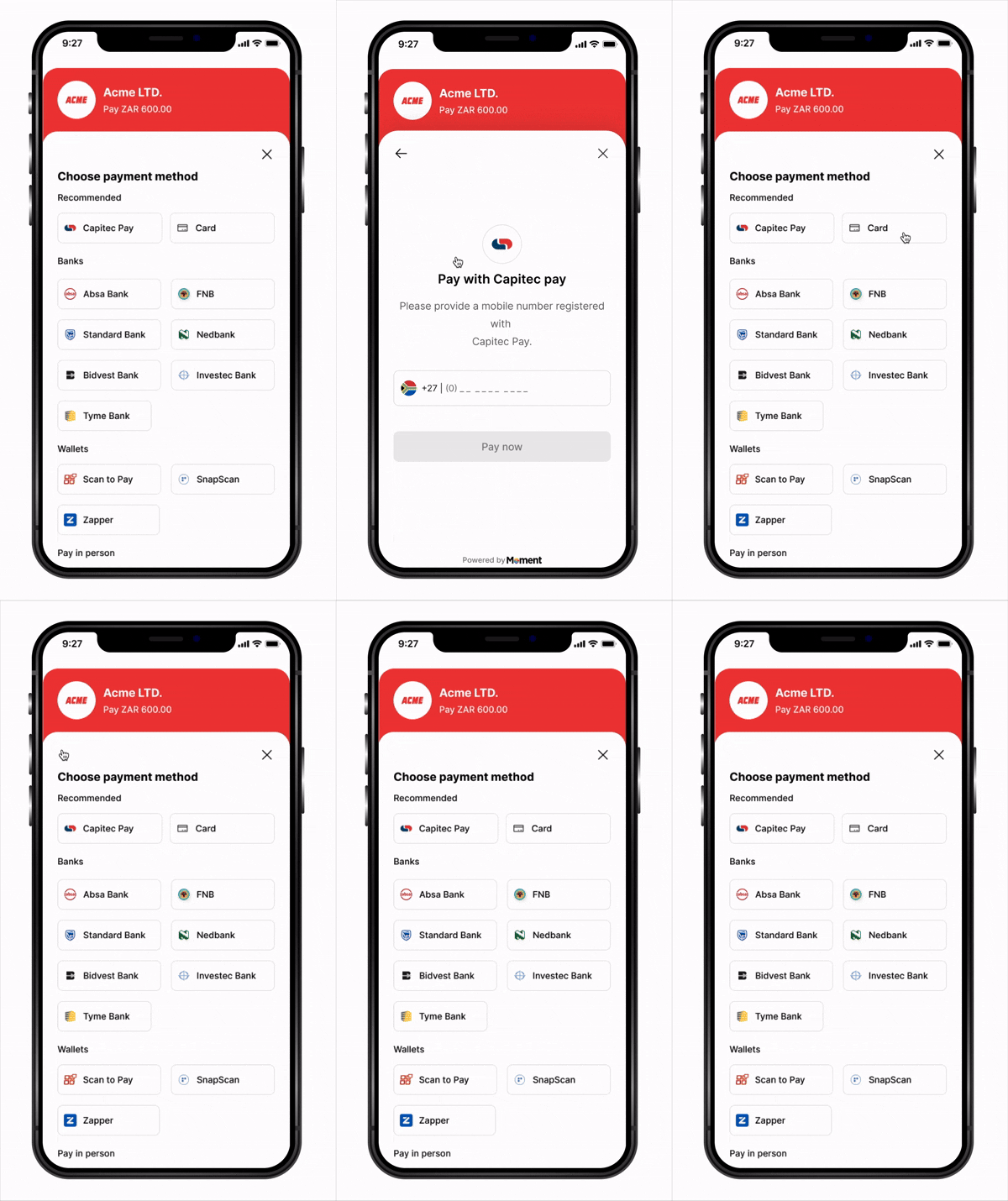
Key Features
- React Hooks API – Declarative interface with
useCheckouthook - Native Experience – Bottom sheet presentation feels native on both platforms
- TypeScript Support – Full type definitions included
- Flexible Callbacks – Handle success, failure, cancellation, retry, and expiry events
- Secure – Sensitive payment data handled entirely in Moment’s secure WebView
- Cross-Platform – Single codebase for iOS and Android
- PCI Compliant – No card data touches your application
How It Works
- App starts —
MomentProvider+MomentCheckoutProvidermount, registering yourfetchClientToken,fetchSessionStatus, and event callbacks (onSuccess,onFailure, etc.) - Customer taps Pay —
checkout.launch()is called from your component - SDK calls
fetchClientToken— your callback creates a session on your backend (with asuccess_urldeep link) and returns theclient_token - Checkout opens in a native bottom sheet
- Customer submits payment — Moment takes over and redirects to the authentication page
- Customer completes authentication on the external page
- Customer is redirected back to your app via redirect link with
?session_id=abc123 - SDK detects the redirect link and calls your
fetchSessionStatus('abc123')callback automatically - Your callback fetches the status from your backend, which queries Moment API
- SDK routes to the right handler —
onSuccess,onFailure,onExpired, oronCancel - Webhooks are delivered to your backend regardless of outcome
Installation
NPM (Bare React Native)
Yarn (Bare React Native)
Expo
Expo vs Bare React Native: If you’re using Expo, use the Expo CLI installation. For bare React Native projects, use npm/yarn and follow the iOS pod install instructions below.
Install iOS Dependencies (Bare React Native Only)
Platform Configuration
For Expo Projects: Most platform configurations are handled automatically by Expo. Ensure you’re using Expo SDK 49 or later. If you need custom native configurations, you may need to use a development build.
Bare React Native Setup
iOS Setup
Add toios/YourApp/Info.plist:
ios/Podfile:
Android Setup
Add toandroid/app/src/main/AndroidManifest.xml:
android/app/build.gradle:
Quick Start
1. Initialize the SDK
Wrap your app withMomentProvider (SDK level) at the root, then nest MomentCheckoutProvider (checkout product) inside it with your fetch callbacks and event handlers — the SDK calls them automatically at the right moments, so you never manage tokens or session IDs manually.
Backend endpoints:
- Node.js
- Python
- Go
- Firebase
- Supabase
- Lambda
server.js
MomentProvider + MomentCheckoutProvider:
- Fetch (Native)
- Axios
- Firebase
- Supabase
- Lambda
App.tsx
2. Open Checkout
AdduseCheckout to any component and call checkout.launch() to trigger checkout:
CheckoutScreen.tsx
API Reference
MomentProvider (SDK level)
Wraps your React Native app and initializes the SDK. Must be a parent ofMomentCheckoutProvider and any component using useCheckout.
MomentCheckoutProvider (checkout product)
React Native’s equivalent ofmoment.checkout() — configures the checkout product and makes it available to any child component via useCheckout. Must be a child of MomentProvider.
Example:
useCheckout(config)
React Native hook that returns acheckout instance for triggering checkout from any component. Callbacks defined here are component-level and fire alongside any global callbacks on MomentCheckoutProvider.
Returns a
checkout object — checkout.launch(), checkout.close(), and checkout.submit().
checkout.launch()
Opens the payment checkout in a native bottom sheet. Internally callsfetchClientToken from MomentCheckoutProvider to retrieve a fresh token.
Promise that resolves once the checkout is open.
checkout.close()
Manually closes the bottom sheet checkout.Callback Strategies
The Moment React Native SDK offers flexible callback handling at both the global (provider) and component (hook) levels. Understanding when to use each approach helps you write cleaner, more maintainable code.Global Callbacks (MomentCheckoutProvider Level)
Define callbacks once at theMomentCheckoutProvider level to apply consistent behavior across your entire application.
✅ Best for:
- App-wide analytics tracking
- Global error logging
- Consistent navigation patterns
- Shared alert/toast notifications
App.tsx
Component-Level Callbacks (useCheckout Hook)
Override or supplement global callbacks with component-specific behavior. ✅ Best for:- Component-specific state updates
- Different flows for different payment contexts
- Local UI feedback
- Context-aware error handling
SubscriptionScreen.tsx
Callback Precedence
Important: Component-level callbacks do not override global callbacks. Both will fire:- Component-level callback fires first (if defined)
- Global callback fires second (if defined)
Advanced Usage
Custom Hook for Payment Logic
hooks/usePayment.ts
Using the Custom Hook
ProductScreen.tsx
Security Best Practices
- Never expose your secret key (
sk_...) in your React Native app - Always create sessions server-side via your backend API
- Validate webhooks to confirm payment state before fulfilling orders
- Use HTTPS for all backend communication
- Handle token expiry — the SDK calls
fetchClientTokenon everyopen(), so tokens are always fresh - Secure your backend endpoints with proper authentication
- Use environment variables for sensitive keys (use
react-native-config)
Troubleshooting
Expo Build Issues
If you encounter issues with Expo: 1. Rebuild your project:iOS Build Issues (Bare React Native)
If you encounter build issues on iOS:Android Build Issues (Bare React Native)
If you encounter build issues on Android:Next Steps
- View Sample Applications for end-to-end examples
- Create your first Payment Session
- Configure Webhooks
- Test your integration in Sandbox mode