

Prerequisites
- A test API key. See Authentication.
- A registered webhook endpoint. See Webhook Setup to register your URL and obtain your signing key.
Step 1: Create a payment session
Create a session server-side using your secret key. The minimum required fields areamount and currency.
amount is always specified in minor units. See Monetary Amounts for details.session_url (the hosted checkout page your customer will use to complete payment) and an id you will use to match the subsequent webhook event.
Saving a payment method
To save the customer’s payment method at checkout, addoptions.checkout_options.save_payment_method to the request body.
prompt— the customer is given the choice to save their payment method at checkout.always— the payment method is saved automatically with no prompt.
Card details are tokenized and stored securely by Moment. Your server never handles or stores raw card numbers.
customer_id identifying the saved customer. Store this against your own customer record so you can present their saved payment methods on future checkouts.
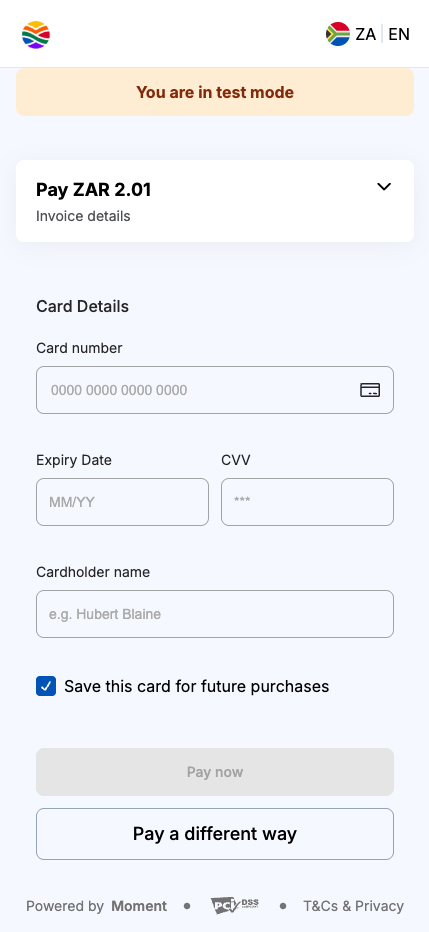
The customer is prompted with the option to save their card for future checkouts.
Step 2: Launch the checkout
Redirect your customer to thesession_url, or embed it using the JavaScript SDK for an in-page modal or inline experience.
The session remains active until the customer completes payment or the session expires. Do not poll for status. Use the webhook in the next step instead.
Step 3: Handle the completion webhook
When the customer completes payment, Moment sends apayment_session.completed event to your registered webhook endpoint.
data.id in the event to the session you created in Step 1 to confirm which order was paid.
Before processing, verify the event signature to confirm it originated from Moment. See Webhook Verification for the full verification steps and code samples.
Respond with a 2xx status code to acknowledge receipt. If your endpoint does not respond in time, Moment will retry delivery.
Presenting a returning customer with their saved payment method
When a customer with a saved payment method returns, pass the savedcustomer_id in the options.customer field. Moment will present their saved payment methods at checkout, enabling a faster checkout experience.
save_payment_method for returning customers. Set it to "prompt" to give them the option to save a new payment method at checkout.
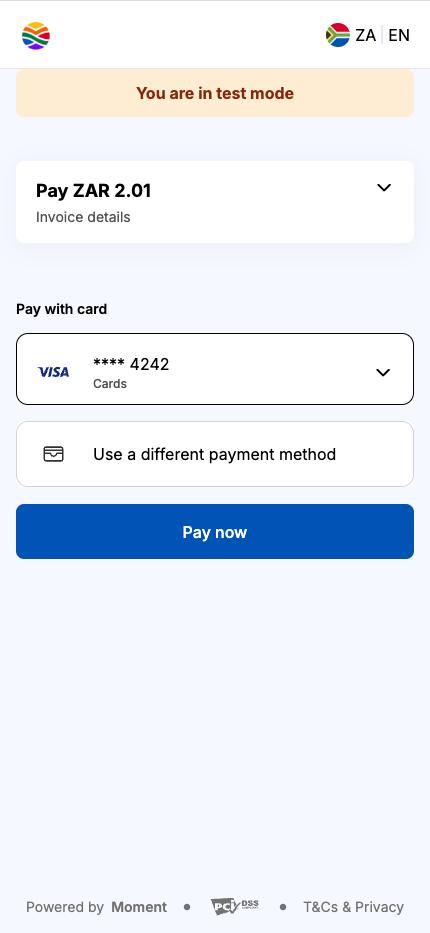
The customer is presented with their saved payment methods at checkout.
Saveable payment methods
The following payment methods can be saved for faster checkout on future transactions:- Cards — Visa, Mastercard, and other supported card schemes
- Capitec Pay — Customers can save their Capitec Pay phone number for quicker checkout without re-entering details
Testing
Use test card4242 4242 4242 4242 with any future expiry date and any 3-digit CVC to simulate a successful payment. See Integration Testing for the full list of test cards and error scenarios.
Next steps
Quickstart: Recurring Payments
Set up a mandate and collect future payments without customer interaction.
Authorisation and Capture
Reserve funds at checkout and capture or void them later.
Payment Method Verification
Verify and save a card without charging the customer.
JavaScript SDK
Embed checkout directly in your page with the Moment JS SDK.