Overview
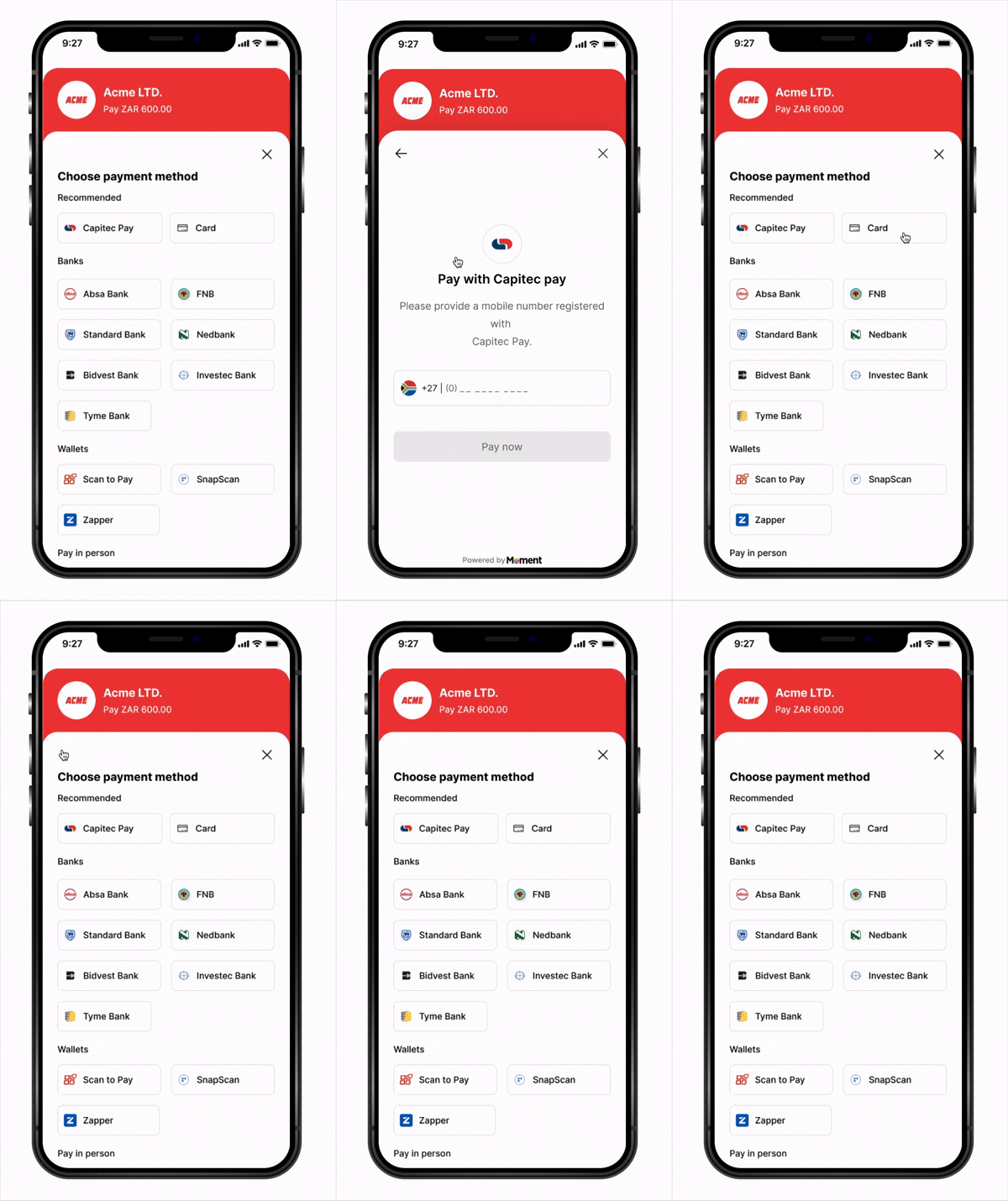
The Moment React Native SDK enables seamless payment integration into any React Native application. The SDK provides a simple, declarative API with React hooks to handle the entire payment flow through a native bottom sheet experience.
Built with React Native and modern hooks, the SDK works with both iOS and Android platforms and integrates naturally with your React Native workflow.
Key Features
- React Hooks API – Declarative interface with
useCheckout hook
- Native Experience – Bottom sheet presentation feels native on both platforms
- TypeScript Support – Full type definitions included
- Flexible Callbacks – Handle success, failure, cancellation, retry, and expiry events
- Secure – Sensitive payment data handled entirely in Moment’s secure WebView
- Cross-Platform – Single codebase for iOS and Android
- PCI Compliant – No card data touches your application
How It Works
- App starts —
MomentProvider + MomentCheckoutProvider mount, registering your fetchClientToken, fetchSessionStatus, and event callbacks (onSuccess, onFailure, etc.)
- Customer taps Pay —
checkout.launch() is called from your component
- SDK calls
fetchClientToken — your callback creates a session on your backend (with a success_url deep link) and returns the client_token
- Checkout opens in a native bottom sheet
- Customer submits payment — Moment takes over and redirects to the authentication page
- Customer completes authentication on the external page
- Customer is redirected back to your app via redirect link with
?session_id=abc123
- SDK detects the redirect link and calls your
fetchSessionStatus('abc123') callback automatically
- Your callback fetches the status from your backend, which queries Moment API
- SDK routes to the right handler —
onSuccess, onFailure, onExpired, or onCancel
- Webhooks are delivered to your backend regardless of outcome
Installation
NPM (Bare React Native)
Yarn (Bare React Native)
Expo
npx expo install momentpay
Expo vs Bare React Native: If you’re using Expo, use the Expo CLI installation. For bare React Native projects, use npm/yarn and follow the iOS pod install instructions below.
Install iOS Dependencies (Bare React Native Only)
cd ios && pod install && cd ..
For Expo Projects: Most platform configurations are handled automatically by Expo. Ensure you’re using Expo SDK 49 or later. If you need custom native configurations, you may need to use a development build. Bare React Native Setup
iOS Setup
Add to ios/YourApp/Info.plist:
<key>NSAppTransportSecurity</key>
<dict>
  <key>NSAllowsArbitraryLoads</key>
  <false/>
</dict>
ios/Podfile:
Android Setup
Add to android/app/src/main/AndroidManifest.xml:
<uses-permission android:name="android.permission.INTERNET"/>
android/app/build.gradle:
android {
    defaultConfig {
        minSdkVersion 21
        targetSdkVersion 33
    }
}
Quick Start
1. Initialize the SDK
Wrap your app with MomentProvider (SDK level) at the root, then nest MomentCheckoutProvider (checkout product) inside it with your fetch callbacks and event handlers — the SDK calls them automatically at the right moments, so you never manage tokens or session IDs manually.
Backend endpoints:
Node.js
Python
Go
Firebase
Supabase
Lambda
// Called by fetchClientToken when checkout.launch() is triggered
app.post('/api/create-payment-session', async (req, res) => {
  const response = await fetch('https://api.momentpay.net/collect/payment_sessions', {
    method: 'POST',
    headers: {
      'Authorization': 'Bearer sk_test_your_secret_key',
      'Content-Type': 'application/json',
    },
    body: JSON.stringify({
      amount: 10000, // Amount in cents (e.g., R100.00)
      currency: 'ZAR',
      type: 'one_time',
      options: {
        checkout_options: {
          presentation_mode: { mode: 'embedded' },
          success_url: 'yourapp://checkout?session_id={SESSION_ID}', // deep link back to app
        },
      },
    }),
  });
  const { client_token } = await response.json();
  res.json({ client_token });
});

// Called by fetchSessionStatus after customer returns via deep link.
// The SDK extracts session_id from the deep link and passes it here.
app.get('/api/session-status', async (req, res) => {
  const sessionId = req.query.session_id;
  const response = await fetch(
    `https://api.momentpay.net/collect/payment_sessions/${sessionId}`,
    { headers: { 'Authorization': 'Bearer sk_test_your_secret_key' } }
  );
  const session = await response.json();
  res.json({ status: session.status, ...session });
});
import requests
from flask import Flask, request, jsonify

app = Flask(__name__)
SECRET_KEY = 'sk_test_your_secret_key'

# Called by fetchClientToken when checkout.launch() is triggered
@app.route('/api/create-payment-session', methods=['POST'])
def create_payment_session():
    response = requests.post(
        'https://api.momentpay.net/collect/payment_sessions',
        headers={
            'Authorization': f'Bearer {SECRET_KEY}',
            'Content-Type': 'application/json',
        },
        json={
            'amount': 10000,  # Amount in cents (e.g., R100.00)
            'currency': 'ZAR',
            'type': 'one_time',
            'options': {
                'checkout_options': {
                    'presentation_mode': {'mode': 'embedded'},
                    'success_url': 'yourapp://checkout?session_id={SESSION_ID}',  # deep link back to app
                },
            },
        },
    )
    data = response.json()
    return jsonify({'client_token': data['client_token']})

# Called by fetchSessionStatus after customer returns via deep link.
# The SDK extracts session_id from the deep link and passes it here.
@app.route('/api/session-status', methods=['GET'])
def get_session_status():
    session_id = request.args.get('session_id')
    response = requests.get(
        f'https://api.momentpay.net/collect/payment_sessions/{session_id}',
        headers={'Authorization': f'Bearer {SECRET_KEY}'},
    )
    session = response.json()
    return jsonify({'status': session['status'], **session})
package main

import (
    "bytes"
    "encoding/json"
    "fmt"
    "io"
    "net/http"
)

const secretKey = "sk_test_your_secret_key"
const momentAPI = "https://api.momentpay.net"

// Called by fetchClientToken when checkout.launch() is triggered
func createPaymentSession(w http.ResponseWriter, r *http.Request) {
    payload, _ := json.Marshal(map[string]any{
        "amount":   10000, // Amount in cents (e.g., R100.00)
        "currency": "ZAR",
        "type":     "one_time",
        "options": map[string]any{
            "checkout_options": map[string]any{
                "presentation_mode": map[string]string{"mode": "embedded"},
                "success_url":       "yourapp://checkout?session_id={SESSION_ID}", // deep link back to app
            },
        },
    })

    req, _ := http.NewRequest("POST", momentAPI+"/collect/payment_sessions", bytes.NewBuffer(payload))
    req.Header.Set("Authorization", "Bearer "+secretKey)
    req.Header.Set("Content-Type", "application/json")

    resp, _ := http.DefaultClient.Do(req)
    defer resp.Body.Close()

    var result map[string]any
    json.NewDecoder(resp.Body).Decode(&result)

    w.Header().Set("Content-Type", "application/json")
    json.NewEncoder(w).Encode(map[string]any{"client_token": result["client_token"]})
}

// Called by fetchSessionStatus after customer returns via deep link.
// The SDK extracts session_id from the deep link and passes it here.
func getSessionStatus(w http.ResponseWriter, r *http.Request) {
    sessionID := r.URL.Query().Get("session_id")

    req, _ := http.NewRequest("GET", fmt.Sprintf("%s/collect/payment_sessions/%s", momentAPI, sessionID), nil)
    req.Header.Set("Authorization", "Bearer "+secretKey)

    resp, _ := http.DefaultClient.Do(req)
    defer resp.Body.Close()

    body, _ := io.ReadAll(resp.Body)
    w.Header().Set("Content-Type", "application/json")
    w.Write(body)
}

func main() {
    http.HandleFunc("/api/create-payment-session", createPaymentSession)
    http.HandleFunc("/api/session-status", getSessionStatus)
    http.ListenAndServe(":8080", nil)
}
const { onCall } = require('firebase-functions/v2/https');
const axios = require('axios');

// Called by fetchClientToken — creates a payment session
exports.createPaymentSession = onCall(async (request) => {
  const { amount, currency } = request.data;
  const { data } = await axios.post(
    'https://api.momentpay.net/collect/payment_sessions',
    {
      amount,
      currency,
      type: 'one_time',
      options: {
        checkout_options: {
          presentation_mode: { mode: 'embedded' },
          success_url: 'yourapp://checkout?session_id={SESSION_ID}', // deep link back to app
        },
      },
    },
    {
      headers: {
        Authorization: `Bearer ${process.env.MOMENT_SECRET_KEY}`,
        'Content-Type': 'application/json',
      },
    }
  );
  return { client_token: data.client_token };
});

// Called by fetchSessionStatus — retrieves session status after deep link redirect
exports.getSessionStatus = onCall(async (request) => {
  const { sessionId } = request.data;
  const { data } = await axios.get(
    `https://api.momentpay.net/collect/payment_sessions/${sessionId}`,
    { headers: { Authorization: `Bearer ${process.env.MOMENT_SECRET_KEY}` } }
  );
  return { status: data.status, ...data };
});
supabase/functions/create-payment-session/index.ts
import { serve } from 'https://deno.land/std/http/server.ts';

// Invoked by fetchClientToken
serve(async () => {
  const response = await fetch('https://api.momentpay.net/collect/payment_sessions', {
    method: 'POST',
    headers: {
      Authorization: `Bearer ${Deno.env.get('MOMENT_SECRET_KEY')}`,
      'Content-Type': 'application/json',
    },
    body: JSON.stringify({
      amount: 10000,
      currency: 'ZAR',
      type: 'one_time',
      options: {
        checkout_options: {
          presentation_mode: { mode: 'embedded' },
          success_url: 'yourapp://checkout?session_id={SESSION_ID}', // deep link back to app
        },
      },
    }),
  });
  const { client_token } = await response.json();
  return new Response(JSON.stringify({ client_token }), {
    headers: { 'Content-Type': 'application/json' },
  });
});
supabase/functions/get-session-status/index.ts
import { serve } from 'https://deno.land/std/http/server.ts';

// Invoked by fetchSessionStatus
serve(async (req) => {
  const { session_id } = await req.json();
  const response = await fetch(
    `https://api.momentpay.net/collect/payment_sessions/${session_id}`,
    { headers: { Authorization: `Bearer ${Deno.env.get('MOMENT_SECRET_KEY')}` } }
  );
  const session = await response.json();
  return new Response(JSON.stringify({ status: session.status, ...session }), {
    headers: { 'Content-Type': 'application/json' },
  });
});
// Called by fetchClientToken — POST /api/create-payment-session
exports.createPaymentSession = async (event) => {
  const response = await fetch('https://api.momentpay.net/collect/payment_sessions', {
    method: 'POST',
    headers: {
      Authorization: `Bearer ${process.env.MOMENT_SECRET_KEY}`,
      'Content-Type': 'application/json',
    },
    body: JSON.stringify({
      amount: 10000,
      currency: 'ZAR',
      type: 'one_time',
      options: {
        checkout_options: {
          presentation_mode: { mode: 'embedded' },
          success_url: 'yourapp://checkout?session_id={SESSION_ID}', // deep link back to app
        },
      },
    }),
  });
  const { client_token } = await response.json();
  return {
    statusCode: 200,
    headers: { 'Content-Type': 'application/json' },
    body: JSON.stringify({ client_token }),
  };
};

// Called by fetchSessionStatus — GET /api/session-status?session_id=abc123
exports.getSessionStatus = async (event) => {
  const sessionId = event.queryStringParameters?.session_id;
  const response = await fetch(
    `https://api.momentpay.net/collect/payment_sessions/${sessionId}`,
    { headers: { Authorization: `Bearer ${process.env.MOMENT_SECRET_KEY}` } }
  );
  const session = await response.json();
  return {
    statusCode: 200,
    headers: { 'Content-Type': 'application/json' },
    body: JSON.stringify({ status: session.status, ...session }),
  };
};
MomentProvider + MomentCheckoutProvider:
Fetch (Native)
Axios
Firebase
Supabase
Lambda
import { MomentProvider, MomentCheckoutProvider } from 'momentpay';
import { NavigationContainer } from '@react-navigation/native';

function App() {
  return (
    <NavigationContainer>
      <MomentProvider clientKey="pk_your_key_here">
        <MomentCheckoutProvider
          // SDK calls this when checkout.launch() is invoked to get a fresh session token
          fetchClientToken={async () => {
            const response = await fetch('https://your-backend.com/api/create-payment-session', {
              method: 'POST',
              headers: { 'Content-Type': 'application/json' },
            });
            const data = await response.json();
            return data.client_token;
          }}

          // SDK calls this automatically when a deep link with session_id is detected.
          // Happens after a customer returns from a redirect-based payment (3DS, bank redirect, EFT).
          // Must return: { status: 'completed' | 'failed' | 'expired' | 'cancelled', ... }
          fetchSessionStatus={async (sessionId) => {
            const response = await fetch(
              `https://your-backend.com/api/session-status?session_id=${sessionId}`
            );
            return response.json();
          }}

          onSuccess={(result) => {
            console.log('Payment successful!', result);
            // Navigate to success screen
          }}
          onFailure={(result) => {
            console.log('Payment failed', result);
            // Show error alert
          }}
          onCancel={(result) => {
            console.log('Payment cancelled', result);
            // Allow user to retry
          }}
          onAttemptFailed={(result) => {
            console.log('Payment attempt failed', result);
            // User can retry within the checkout
          }}
          onExpired={(result) => {
            console.log('Payment session expired', result);
            // Request a new session and retry
          }}
        >
          <YourApp />
        </MomentCheckoutProvider>
      </MomentProvider>
    </NavigationContainer>
  );
}

export default App;
import { MomentProvider, MomentCheckoutProvider } from 'momentpay';
import { NavigationContainer } from '@react-navigation/native';
import axios from 'axios';

const api = axios.create({ baseURL: 'https://your-backend.com' });

function App() {
  return (
    <NavigationContainer>
      <MomentProvider clientKey="pk_your_key_here">
        <MomentCheckoutProvider
          // SDK calls this when checkout.launch() is invoked to get a fresh session token
          fetchClientToken={async () => {
            const { data } = await api.post('/api/create-payment-session');
            return data.client_token;
          }}

          // SDK calls this automatically when a deep link with session_id is detected.
          // Happens after a customer returns from a redirect-based payment (3DS, bank redirect, EFT).
          // Must return: { status: 'completed' | 'failed' | 'expired' | 'cancelled', ... }
          fetchSessionStatus={async (sessionId) => {
            const { data } = await api.get('/api/session-status', {
              params: { session_id: sessionId },
            });
            return data;
          }}

          onSuccess={(result) => {
            console.log('Payment successful!', result);
            // Navigate to success screen
          }}
          onFailure={(result) => {
            console.log('Payment failed', result);
            // Show error alert
          }}
          onCancel={(result) => {
            console.log('Payment cancelled', result);
            // Allow user to retry
          }}
          onAttemptFailed={(result) => {
            console.log('Payment attempt failed', result);
            // User can retry within the checkout
          }}
          onExpired={(result) => {
            console.log('Payment session expired', result);
            // Request a new session and retry
          }}
        >
          <YourApp />
        </MomentCheckoutProvider>
      </MomentProvider>
    </NavigationContainer>
  );
}

export default App;
import { MomentProvider, MomentCheckoutProvider } from 'momentpay';
import { NavigationContainer } from '@react-navigation/native';
import functions from '@react-native-firebase/functions';

const createPaymentSession = functions().httpsCallable('createPaymentSession');
const getSessionStatus = functions().httpsCallable('getSessionStatus');

function App() {
  return (
    <NavigationContainer>
      <MomentProvider clientKey="pk_your_key_here">
        <MomentCheckoutProvider
          // SDK calls this when checkout.launch() is invoked to get a fresh session token
          fetchClientToken={async () => {
            const result = await createPaymentSession({ amount: 10000, currency: 'ZAR' });
            return result.data.client_token;
          }}

          // SDK calls this automatically when a deep link with session_id is detected.
          // Happens after a customer returns from a redirect-based payment (3DS, bank redirect, EFT).
          // Must return: { status: 'completed' | 'failed' | 'expired' | 'cancelled', ... }
          fetchSessionStatus={async (sessionId) => {
            const result = await getSessionStatus({ sessionId });
            return result.data;
          }}

          onSuccess={(result) => {
            console.log('Payment successful!', result);
            // Navigate to success screen
          }}
          onFailure={(result) => {
            console.log('Payment failed', result);
            // Show error alert
          }}
          onCancel={(result) => {
            console.log('Payment cancelled', result);
            // Allow user to retry
          }}
          onAttemptFailed={(result) => {
            console.log('Payment attempt failed', result);
            // User can retry within the checkout
          }}
          onExpired={(result) => {
            console.log('Payment session expired', result);
            // Request a new session and retry
          }}
        >
          <YourApp />
        </MomentCheckoutProvider>
      </MomentProvider>
    </NavigationContainer>
  );
}

export default App;
import { MomentProvider, MomentCheckoutProvider } from 'momentpay';
import { NavigationContainer } from '@react-navigation/native';
import { createClient } from '@supabase/supabase-js';

const supabase = createClient('https://your-project.supabase.co', 'your-anon-key');

function App() {
  return (
    <NavigationContainer>
      <MomentProvider clientKey="pk_your_key_here">
        <MomentCheckoutProvider
          // SDK calls this when checkout.launch() is invoked to get a fresh session token.
          // Invokes a Supabase Edge Function named 'create-payment-session'.
          fetchClientToken={async () => {
            const { data, error } = await supabase.functions.invoke('create-payment-session');
            if (error) throw error;
            return data.client_token;
          }}

          // SDK calls this automatically when a deep link with session_id is detected.
          // Happens after a customer returns from a redirect-based payment (3DS, bank redirect, EFT).
          // Must return: { status: 'completed' | 'failed' | 'expired' | 'cancelled', ... }
          fetchSessionStatus={async (sessionId) => {
            const { data, error } = await supabase.functions.invoke('get-session-status', {
              body: { session_id: sessionId },
            });
            if (error) throw error;
            return data;
          }}

          onSuccess={(result) => {
            console.log('Payment successful!', result);
            // Navigate to success screen
          }}
          onFailure={(result) => {
            console.log('Payment failed', result);
            // Show error alert
          }}
          onCancel={(result) => {
            console.log('Payment cancelled', result);
            // Allow user to retry
          }}
          onAttemptFailed={(result) => {
            console.log('Payment attempt failed', result);
            // User can retry within the checkout
          }}
          onExpired={(result) => {
            console.log('Payment session expired', result);
            // Request a new session and retry
          }}
        >
          <YourApp />
        </MomentCheckoutProvider>
      </MomentProvider>
    </NavigationContainer>
  );
}

export default App;
import { MomentProvider, MomentCheckoutProvider } from 'momentpay';
import { NavigationContainer } from '@react-navigation/native';

const API_BASE = 'https://your-api-id.execute-api.us-east-1.amazonaws.com/prod';

function App() {
  return (
    <NavigationContainer>
      <MomentProvider clientKey="pk_your_key_here">
        <MomentCheckoutProvider
          // SDK calls this when checkout.launch() is invoked to get a fresh session token.
          // Calls your Lambda function via API Gateway.
          fetchClientToken={async () => {
            const response = await fetch(`${API_BASE}/create-payment-session`, {
              method: 'POST',
              headers: { 'Content-Type': 'application/json' },
            });
            const data = await response.json();
            return data.client_token;
          }}

          // SDK calls this automatically when a deep link with session_id is detected.
          // Happens after a customer returns from a redirect-based payment (3DS, bank redirect, EFT).
          // Must return: { status: 'completed' | 'failed' | 'expired' | 'cancelled', ... }
          fetchSessionStatus={async (sessionId) => {
            const response = await fetch(
              `${API_BASE}/session-status?session_id=${sessionId}`
            );
            return response.json();
          }}

          onSuccess={(result) => {
            console.log('Payment successful!', result);
            // Navigate to success screen
          }}
          onFailure={(result) => {
            console.log('Payment failed', result);
            // Show error alert
          }}
          onCancel={(result) => {
            console.log('Payment cancelled', result);
            // Allow user to retry
          }}
          onAttemptFailed={(result) => {
            console.log('Payment attempt failed', result);
            // User can retry within the checkout
          }}
          onExpired={(result) => {
            console.log('Payment session expired', result);
            // Request a new session and retry
          }}
        >
          <YourApp />
        </MomentCheckoutProvider>
      </MomentProvider>
    </NavigationContainer>
  );
}

export default App;
2. Open Checkout
Add useCheckout to any component and call checkout.launch() to trigger checkout:
import React, { useState } from 'react';
import { View, TouchableOpacity, Text, ActivityIndicator } from 'react-native';
import { useCheckout } from 'momentpay';

function CheckoutScreen() {
  const [loading, setLoading] = useState(false);

  const checkout = useCheckout({
    onSuccess: (result) => {
      console.log('Payment successful!', result);
      // Navigate to success screen
    },
    onFailure: (result) => {
      console.log('Payment failed', result);
      // Show error alert
    },
    onCancel: (result) => {
      console.log('Payment cancelled', result);
      // Allow user to retry
    },
    onAttemptFailed: (result) => {
      console.log('Payment attempt failed', result);
      // User can retry within the checkout
    },
  });

  const handlePayment = async () => {
    setLoading(true);
    try {
      // SDK calls fetchClientToken internally — no token management needed here
      await checkout.launch();
    } catch (error) {
      console.error('Error:', error);
    } finally {
      setLoading(false);
    }
  };

  return (
    <View style={{ flex: 1, justifyContent: 'center', alignItems: 'center' }}>
      <TouchableOpacity
        onPress={handlePayment}
        disabled={loading}
        style={{
          backgroundColor: loading ? '#ccc' : '#007AFF',
          padding: 16,
          borderRadius: 8,
        }}
      >
        {loading ? (
          <ActivityIndicator color="white" />
        ) : (
          <Text style={{ color: 'white', fontSize: 16 }}>Pay Now</Text>
        )}
      </TouchableOpacity>
    </View>
  );
}

export default CheckoutScreen;
API Reference
MomentProvider (SDK level)
Wraps your React Native app and initializes the SDK. Must be a parent of MomentCheckoutProvider and any component using useCheckout.
| Prop | Type | Required | Description |
|---|
clientKey | string | Yes | Your publishable key (pk_test_... or pk_live_...). Determines sandbox vs. production environment. |
<MomentProvider clientKey="pk_test_abc123">
  <MomentCheckoutProvider ...>
    <App />
  </MomentCheckoutProvider>
</MomentProvider>
MomentCheckoutProvider (checkout product)
React Native’s equivalent of moment.checkout() — configures the checkout product and makes it available to any child component via useCheckout. Must be a child of MomentProvider.
| Prop | Type | Required | Description |
|---|
fetchClientToken | function | Yes | Async function returning Promise<string> — a fresh client token. Called by the SDK when checkout.launch() is invoked. |
fetchSessionStatus | function | No | Async function receiving a sessionId string, returning Promise<{ status: string, ... }>. Called when a deep link with session_id is detected after a redirect-based payment. Required only if you use redirect mode. |
onSuccess | function | No | Global callback fired when payment succeeds (both embedded and redirect flows) |
onFailure | function | No | Global callback fired when payment fails |
onCancel | function | No | Global callback fired when user cancels |
onAttemptFailed | function | No | Global callback fired when a payment attempt fails (user can retry) |
onExpired | function | No | Global callback fired when the payment session expires |
<MomentProvider clientKey="pk_test_abc123">
  <MomentCheckoutProvider
    fetchClientToken={async () => {
      const res = await fetch('https://your-backend.com/api/create-payment-session', { method: 'POST' });
      const data = await res.json();
      return data.client_token;
    }}
    // Only needed if using redirect mode
    fetchSessionStatus={async (sessionId) => {
      const res = await fetch(`https://your-backend.com/api/session-status?session_id=${sessionId}`);
      return res.json();
      // Must return: { status: 'completed' | 'failed' | 'expired' | 'cancelled', ... }
    }}
    onSuccess={(result) => console.log('Success:', result)}
    onFailure={(result) => console.log('Failed:', result)}
    onCancel={(result) => console.log('Cancelled:', result)}
    onAttemptFailed={(result) => console.log('Attempt failed:', result)}
    onExpired={(result) => console.log('Expired:', result)}
  >
    <App />
  </MomentCheckoutProvider>
</MomentProvider>
useCheckout(config)
React Native hook that returns a checkout instance for triggering checkout from any component. Callbacks defined here are component-level and fire alongside any global callbacks on MomentCheckoutProvider.
| Parameter | Type | Required | Description |
|---|
onSuccess | function | No | Component-level callback fired when payment succeeds |
onFailure | function | No | Component-level callback fired when payment fails |
onCancel | function | No | Component-level callback fired when user cancels |
onAttemptFailed | function | No | Component-level callback fired when a payment attempt fails (user can retry) |
onExpired | function | No | Component-level callback fired when the payment session expires |
checkout object — checkout.launch(), checkout.close(), and checkout.submit().
checkout.launch()
Opens the payment checkout in a native bottom sheet. Internally calls fetchClientToken from MomentCheckoutProvider to retrieve a fresh token.
// SDK calls fetchClientToken automatically — no token management needed
checkout.launch();
Promise that resolves once the checkout is open.
checkout.close()
Manually closes the bottom sheet checkout.
Callback Strategies
The Moment React Native SDK offers flexible callback handling at both the global (provider) and component (hook) levels. Understanding when to use each approach helps you write cleaner, more maintainable code.
Global Callbacks (MomentCheckoutProvider Level)
Define callbacks once at the MomentCheckoutProvider level to apply consistent behavior across your entire application.
✅ Best for:
- App-wide analytics tracking
- Global error logging
- Consistent navigation patterns
- Shared alert/toast notifications
import { MomentProvider, MomentCheckoutProvider } from 'momentpay';
import { useNavigation } from '@react-navigation/native';
import { Alert } from 'react-native';
import { trackEvent } from './analytics';

function App() {
  const navigation = useNavigation();

  return (
    <MomentProvider clientKey="pk_your_key_here">
      <MomentCheckoutProvider
        fetchClientToken={async () => {
          const res = await fetch('https://your-backend.com/api/create-payment-session', { method: 'POST' });
          const data = await res.json();
          return data.client_token;
        }}
        onSuccess={(result) => {
          // Global success behavior
          trackEvent('payment_success', { transaction_id: result.transaction_id });
          Alert.alert('Success', 'Payment completed successfully!');
          navigation.navigate('OrderConfirmation');
        }}
        onFailure={(result) => {
          // Global failure behavior
          trackEvent('payment_failure', { error: result.error });
          Alert.alert('Payment Failed', 'Please try again.');
        }}
        onCancel={() => {
          trackEvent('payment_cancelled');
        }}
      >
        <YourApp />
      </MomentCheckoutProvider>
    </MomentProvider>
  );
}
Component-Level Callbacks (useCheckout Hook)
Override or supplement global callbacks with component-specific behavior.
✅ Best for:
- Component-specific state updates
- Different flows for different payment contexts
- Local UI feedback
- Context-aware error handling
import { useCheckout } from 'momentpay';

function SubscriptionScreen() {
  const [subscriptionActive, setSubscriptionActive] = useState(false);

  const checkout = useCheckout({
    onSuccess: (result) => {
      // Component-specific behavior
      setSubscriptionActive(true);
      // This will ALSO trigger the global onSuccess from MomentCheckoutProvider
    },
    onFailure: (result) => {
      setSubscriptionActive(false);
      // This will ALSO trigger the global onFailure from MomentCheckoutProvider
    }
  });

  // ... rest of component
}
Callback Precedence
Important: Component-level callbacks do not override global callbacks. Both will fire:
- Component-level callback fires first (if defined)
- Global callback fires second (if defined)
This allows you to handle both component-specific and app-wide logic.
Advanced Usage
Custom Hook for Payment Logic
import { useState, useCallback } from 'react';
import { Alert } from 'react-native';
import { useCheckout } from 'momentpay';
import { useNavigation } from '@react-navigation/native';

export function usePayment() {
  const [loading, setLoading] = useState(false);
  const [error, setError] = useState<string | null>(null);
  const navigation = useNavigation();

  const checkout = useCheckout({
    onSuccess: (result) => {
      setLoading(false);
      setError(null);
      navigation.navigate('Success', { transactionId: result.transaction_id });
    },
    onFailure: (result) => {
      setError(result.error?.message || 'Payment failed');
      setLoading(false);
      Alert.alert('Payment Failed', result.error?.message);
    },
    onCancel: () => {
      setLoading(false);
      setError(null);
    }
  });

  const processPayment = useCallback(async () => {
    setLoading(true);
    setError(null);

    try {
      // SDK calls fetchClientToken from MomentCheckoutProvider automatically
      await checkout.launch();
    } catch (err) {
      setError(err instanceof Error ? err.message : 'Unknown error');
      setLoading(false);
      Alert.alert('Error', 'Failed to initialize payment');
    }
  }, [checkout]);

  return { processPayment, loading, error };
}
Using the Custom Hook
import { usePayment } from './hooks/usePayment';
import { TouchableOpacity, Text, ActivityIndicator } from 'react-native';

function ProductScreen({ product }) {
  const { processPayment, loading, error } = usePayment();

  return (
    <TouchableOpacity onPress={processPayment} disabled={loading}>
      {loading ? (
        <ActivityIndicator />
      ) : (
        <Text>Buy {product.name} - R{product.price.toFixed(2)}</Text>
      )}
    </TouchableOpacity>
  );
}
Security Best Practices
- Never expose your secret key (
sk_...) in your React Native app
- Always create sessions server-side via your backend API
- Validate webhooks to confirm payment state before fulfilling orders
- Use HTTPS for all backend communication
- Handle token expiry — the SDK calls
fetchClientToken on every open(), so tokens are always fresh
- Secure your backend endpoints with proper authentication
- Use environment variables for sensitive keys (use
react-native-config)
Troubleshooting
Expo Build Issues
If you encounter issues with Expo:
1. Rebuild your project:
npx expo prebuild --clean
npx expo run:ios
# or
npx expo run:android
iOS Build Issues (Bare React Native)
If you encounter build issues on iOS:
cd ios
pod deintegrate
pod install
cd ..
npx react-native run-ios
Android Build Issues (Bare React Native)
If you encounter build issues on Android:
cd android
./gradlew clean
cd ..
npx react-native run-android
Next Steps

