> ## Documentation Index
> Fetch the complete documentation index at: https://docs.momentco.io/llms.txt
> Use this file to discover all available pages before exploring further.
# React Native
> Embed secure payment checkout experiences directly into your React Native mobile application
## Overview
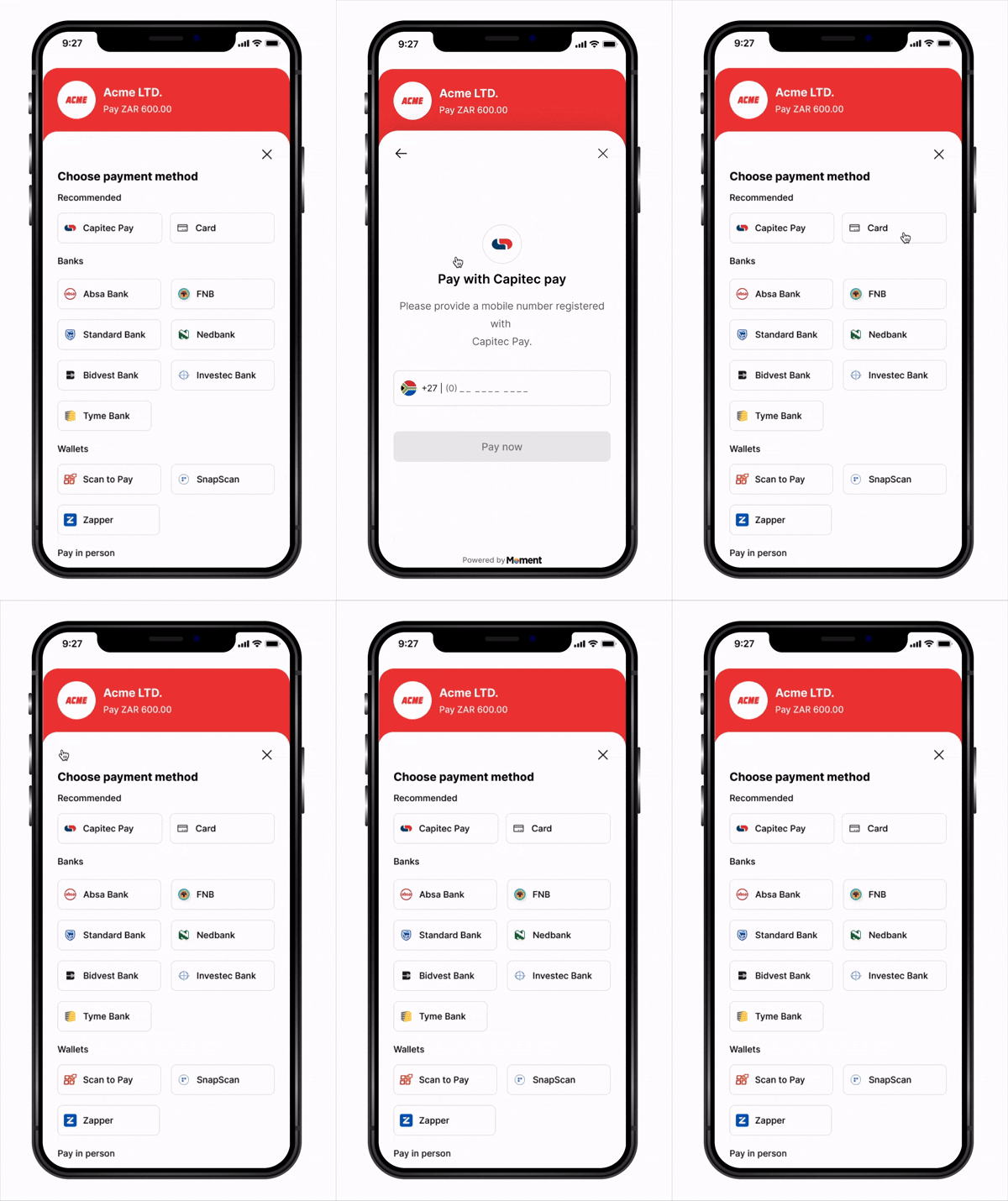
The **Moment React Native SDK** enables seamless payment integration into any React Native application. The SDK provides a simple, declarative API with React hooks to handle the entire payment flow through a native bottom sheet experience.
Built with **React Native** and modern hooks, the SDK works with both **iOS** and **Android** platforms and integrates naturally with your React Native workflow.
 ***
## Key Features
* **React Hooks API** – Declarative interface with `useCheckout` hook
* **Native Experience** – Bottom sheet presentation feels native on both platforms
* **TypeScript Support** – Full type definitions included
* **Flexible Callbacks** – Handle success, failure, cancellation, retry, and expiry events
* **Secure** – Sensitive payment data handled entirely in Moment's secure WebView
* **Cross-Platform** – Single codebase for iOS and Android
* **PCI Compliant** – No card data touches your application
***
## How It Works
```mermaid theme={"system"}
sequenceDiagram
participant Customer
participant RN App
participant Your Backend
participant Moment API
participant Moment Checkout
participant 3DS / Bank Page
Note over RN App: App starts — MomentProvider + MomentCheckoutProvider mount
RN App->>RN App: Registers fetchClientToken, fetchSessionStatus & event callbacks
Customer->>RN App: Taps "Pay Now"
RN App->>Moment Checkout: checkout.launch()
Moment Checkout->>RN App: fetchClientToken() callback fires
RN App->>Your Backend: POST /api/create-payment-session
Your Backend->>Moment API: POST /collect/payment_sessions (with success_url)
Moment API-->>Your Backend: Returns client_token (JWT)
Your Backend-->>RN App: Returns client_token
RN App-->>Moment Checkout: Resolves with client_token
Moment Checkout-->>Customer: Displays checkout UI (Bottom Sheet)
Customer->>Moment Checkout: Submits payment
Moment Checkout->>3DS / Bank Page: Redirects customer
Customer->>3DS / Bank Page: Completes authentication
3DS / Bank Page-->>RN App: redirect to link http://checkout.com?session_id=abc123
Note over RN App: SDK detects the redirect — fetchSessionStatus fires
Moment Checkout->>RN App: fetchSessionStatus('abc123') callback fires
RN App->>Your Backend: GET /api/session-status?session_id=abc123
Your Backend->>Moment API: GET /collect/payment_sessions/abc123
Moment API-->>Your Backend: Returns session status
Your Backend-->>RN App: Returns { status: 'completed', ... }
RN App-->>Moment Checkout: Resolves with status
Moment Checkout->>RN App: onSuccess(result) fires — shows confirmation
```
1. **App starts** — `MomentProvider` + `MomentCheckoutProvider` mount, registering your `fetchClientToken`, `fetchSessionStatus`, and event callbacks (`onSuccess`, `onFailure`, etc.)
2. **Customer taps Pay** — `checkout.launch()` is called from your component
3. **SDK calls `fetchClientToken`** — your callback creates a session on your backend (with a `success_url` deep link) and returns the `client_token`
4. **Checkout opens** in a native bottom sheet
5. **Customer submits payment** — Moment takes over and redirects to the authentication page
6. **Customer completes authentication** on the external page
7. **Customer is redirected back** to your app via redirect link with `?session_id=abc123`
8. **SDK detects the redirect link** and calls your `fetchSessionStatus('abc123')` callback automatically
9. **Your callback fetches the status** from your backend, which queries Moment API
10. **SDK routes to the right handler** — `onSuccess`, `onFailure`, `onExpired`, or `onCancel`
11. **Webhooks** are delivered to your backend regardless of outcome
***
## Installation
### **NPM (Bare React Native)**
```bash theme={"system"}
npm install momentpay
```
### **Yarn (Bare React Native)**
```bash theme={"system"}
yarn add momentpay
```
### **Expo**
```bash theme={"system"}
npx expo install momentpay
```
**Expo vs Bare React Native**: If you're using Expo, use the Expo CLI installation. For bare React Native projects, use npm/yarn and follow the iOS pod install instructions below.
### **Install iOS Dependencies (Bare React Native Only)**
```bash theme={"system"}
cd ios && pod install && cd ..
```
***
## Platform Configuration
**For Expo Projects**: Most platform configurations are handled automatically by Expo. Ensure you're using Expo SDK 49 or later. If you need custom native configurations, you may need to use a [development build](https://docs.expo.dev/develop/development-builds/introduction/).
### Bare React Native Setup
#### iOS Setup
Add to `ios/YourApp/Info.plist`:
```xml theme={"system"}
NSAppTransportSecurity
NSAllowsArbitraryLoads
```
Minimum iOS version in `ios/Podfile`:
```ruby theme={"system"}
platform :ios, '13.0'
```
#### Android Setup
Add to `android/app/src/main/AndroidManifest.xml`:
```xml theme={"system"}
```
Ensure minimum SDK version in `android/app/build.gradle`:
```gradle theme={"system"}
android {
defaultConfig {
minSdkVersion 21
targetSdkVersion 33
}
}
```
***
## **Quick Start**
### **1. Initialize the SDK**
Wrap your app with `MomentProvider` (SDK level) at the root, then nest `MomentCheckoutProvider` (checkout product) inside it with your fetch callbacks and event handlers — the SDK calls them automatically at the right moments, so you never manage tokens or session IDs manually.
**Backend endpoints:**
```javascript server.js theme={"system"}
// Called by fetchClientToken when checkout.launch() is triggered
app.post('/api/create-payment-session', async (req, res) => {
const response = await fetch('https://api.momentpay.net/collect/payment_sessions', {
method: 'POST',
headers: {
'Authorization': 'Bearer sk_test_your_secret_key',
'Content-Type': 'application/json',
},
body: JSON.stringify({
amount: 10000, // Amount in cents (e.g., R100.00)
currency: 'ZAR',
type: 'one_time',
options: {
checkout_options: {
presentation_mode: { mode: 'embedded' },
success_url: 'yourapp://checkout?session_id={SESSION_ID}', // deep link back to app
},
},
}),
});
const { client_token } = await response.json();
res.json({ client_token });
});
// Called by fetchSessionStatus after customer returns via deep link.
// The SDK extracts session_id from the deep link and passes it here.
app.get('/api/session-status', async (req, res) => {
const sessionId = req.query.session_id;
const response = await fetch(
`https://api.momentpay.net/collect/payment_sessions/${sessionId}`,
{ headers: { 'Authorization': 'Bearer sk_test_your_secret_key' } }
);
const session = await response.json();
res.json({ status: session.status, ...session });
});
```
```python server.py theme={"system"}
import requests
from flask import Flask, request, jsonify
app = Flask(__name__)
SECRET_KEY = 'sk_test_your_secret_key'
# Called by fetchClientToken when checkout.launch() is triggered
@app.route('/api/create-payment-session', methods=['POST'])
def create_payment_session():
response = requests.post(
'https://api.momentpay.net/collect/payment_sessions',
headers={
'Authorization': f'Bearer {SECRET_KEY}',
'Content-Type': 'application/json',
},
json={
'amount': 10000, # Amount in cents (e.g., R100.00)
'currency': 'ZAR',
'type': 'one_time',
'options': {
'checkout_options': {
'presentation_mode': {'mode': 'embedded'},
'success_url': 'yourapp://checkout?session_id={SESSION_ID}', # deep link back to app
},
},
},
)
data = response.json()
return jsonify({'client_token': data['client_token']})
# Called by fetchSessionStatus after customer returns via deep link.
# The SDK extracts session_id from the deep link and passes it here.
@app.route('/api/session-status', methods=['GET'])
def get_session_status():
session_id = request.args.get('session_id')
response = requests.get(
f'https://api.momentpay.net/collect/payment_sessions/{session_id}',
headers={'Authorization': f'Bearer {SECRET_KEY}'},
)
session = response.json()
return jsonify({'status': session['status'], **session})
```
```go server.go theme={"system"}
package main
import (
"bytes"
"encoding/json"
"fmt"
"io"
"net/http"
)
const secretKey = "sk_test_your_secret_key"
const momentAPI = "https://api.momentpay.net"
// Called by fetchClientToken when checkout.launch() is triggered
func createPaymentSession(w http.ResponseWriter, r *http.Request) {
payload, _ := json.Marshal(map[string]any{
"amount": 10000, // Amount in cents (e.g., R100.00)
"currency": "ZAR",
"type": "one_time",
"options": map[string]any{
"checkout_options": map[string]any{
"presentation_mode": map[string]string{"mode": "embedded"},
"success_url": "yourapp://checkout?session_id={SESSION_ID}", // deep link back to app
},
},
})
req, _ := http.NewRequest("POST", momentAPI+"/collect/payment_sessions", bytes.NewBuffer(payload))
req.Header.Set("Authorization", "Bearer "+secretKey)
req.Header.Set("Content-Type", "application/json")
resp, _ := http.DefaultClient.Do(req)
defer resp.Body.Close()
var result map[string]any
json.NewDecoder(resp.Body).Decode(&result)
w.Header().Set("Content-Type", "application/json")
json.NewEncoder(w).Encode(map[string]any{"client_token": result["client_token"]})
}
// Called by fetchSessionStatus after customer returns via deep link.
// The SDK extracts session_id from the deep link and passes it here.
func getSessionStatus(w http.ResponseWriter, r *http.Request) {
sessionID := r.URL.Query().Get("session_id")
req, _ := http.NewRequest("GET", fmt.Sprintf("%s/collect/payment_sessions/%s", momentAPI, sessionID), nil)
req.Header.Set("Authorization", "Bearer "+secretKey)
resp, _ := http.DefaultClient.Do(req)
defer resp.Body.Close()
body, _ := io.ReadAll(resp.Body)
w.Header().Set("Content-Type", "application/json")
w.Write(body)
}
func main() {
http.HandleFunc("/api/create-payment-session", createPaymentSession)
http.HandleFunc("/api/session-status", getSessionStatus)
http.ListenAndServe(":8080", nil)
}
```
```javascript functions/index.js theme={"system"}
const { onCall } = require('firebase-functions/v2/https');
const axios = require('axios');
// Called by fetchClientToken — creates a payment session
exports.createPaymentSession = onCall(async (request) => {
const { amount, currency } = request.data;
const { data } = await axios.post(
'https://api.momentpay.net/collect/payment_sessions',
{
amount,
currency,
type: 'one_time',
options: {
checkout_options: {
presentation_mode: { mode: 'embedded' },
success_url: 'yourapp://checkout?session_id={SESSION_ID}', // deep link back to app
},
},
},
{
headers: {
Authorization: `Bearer ${process.env.MOMENT_SECRET_KEY}`,
'Content-Type': 'application/json',
},
}
);
return { client_token: data.client_token };
});
// Called by fetchSessionStatus — retrieves session status after deep link redirect
exports.getSessionStatus = onCall(async (request) => {
const { sessionId } = request.data;
const { data } = await axios.get(
`https://api.momentpay.net/collect/payment_sessions/${sessionId}`,
{ headers: { Authorization: `Bearer ${process.env.MOMENT_SECRET_KEY}` } }
);
return { status: data.status, ...data };
});
```
```typescript supabase/functions/create-payment-session/index.ts theme={"system"}
import { serve } from 'https://deno.land/std/http/server.ts';
// Invoked by fetchClientToken
serve(async () => {
const response = await fetch('https://api.momentpay.net/collect/payment_sessions', {
method: 'POST',
headers: {
Authorization: `Bearer ${Deno.env.get('MOMENT_SECRET_KEY')}`,
'Content-Type': 'application/json',
},
body: JSON.stringify({
amount: 10000,
currency: 'ZAR',
type: 'one_time',
options: {
checkout_options: {
presentation_mode: { mode: 'embedded' },
success_url: 'yourapp://checkout?session_id={SESSION_ID}', // deep link back to app
},
},
}),
});
const { client_token } = await response.json();
return new Response(JSON.stringify({ client_token }), {
headers: { 'Content-Type': 'application/json' },
});
});
```
```typescript supabase/functions/get-session-status/index.ts theme={"system"}
import { serve } from 'https://deno.land/std/http/server.ts';
// Invoked by fetchSessionStatus
serve(async (req) => {
const { session_id } = await req.json();
const response = await fetch(
`https://api.momentpay.net/collect/payment_sessions/${session_id}`,
{ headers: { Authorization: `Bearer ${Deno.env.get('MOMENT_SECRET_KEY')}` } }
);
const session = await response.json();
return new Response(JSON.stringify({ status: session.status, ...session }), {
headers: { 'Content-Type': 'application/json' },
});
});
```
```javascript handler.js theme={"system"}
// Called by fetchClientToken — POST /api/create-payment-session
exports.createPaymentSession = async (event) => {
const response = await fetch('https://api.momentpay.net/collect/payment_sessions', {
method: 'POST',
headers: {
Authorization: `Bearer ${process.env.MOMENT_SECRET_KEY}`,
'Content-Type': 'application/json',
},
body: JSON.stringify({
amount: 10000,
currency: 'ZAR',
type: 'one_time',
options: {
checkout_options: {
presentation_mode: { mode: 'embedded' },
success_url: 'yourapp://checkout?session_id={SESSION_ID}', // deep link back to app
},
},
}),
});
const { client_token } = await response.json();
return {
statusCode: 200,
headers: { 'Content-Type': 'application/json' },
body: JSON.stringify({ client_token }),
};
};
// Called by fetchSessionStatus — GET /api/session-status?session_id=abc123
exports.getSessionStatus = async (event) => {
const sessionId = event.queryStringParameters?.session_id;
const response = await fetch(
`https://api.momentpay.net/collect/payment_sessions/${sessionId}`,
{ headers: { Authorization: `Bearer ${process.env.MOMENT_SECRET_KEY}` } }
);
const session = await response.json();
return {
statusCode: 200,
headers: { 'Content-Type': 'application/json' },
body: JSON.stringify({ status: session.status, ...session }),
};
};
```
**React Native — wrap your app with `MomentProvider` + `MomentCheckoutProvider`:**
```tsx App.tsx theme={"system"}
import { MomentProvider, MomentCheckoutProvider } from 'momentpay';
import { NavigationContainer } from '@react-navigation/native';
function App() {
return (
{
const response = await fetch('https://your-backend.com/api/create-payment-session', {
method: 'POST',
headers: { 'Content-Type': 'application/json' },
});
const data = await response.json();
return data.client_token;
}}
// SDK calls this automatically when a deep link with session_id is detected.
// Happens after a customer returns from a redirect-based payment (3DS, bank redirect, EFT).
// Must return: { status: 'completed' | 'failed' | 'expired' | 'cancelled', ... }
fetchSessionStatus={async (sessionId) => {
const response = await fetch(
`https://your-backend.com/api/session-status?session_id=${sessionId}`
);
return response.json();
}}
onSuccess={(result) => {
console.log('Payment successful!', result);
// Navigate to success screen
}}
onFailure={(result) => {
console.log('Payment failed', result);
// Show error alert
}}
onCancel={(result) => {
console.log('Payment cancelled', result);
// Allow user to retry
}}
onAttemptFailed={(result) => {
console.log('Payment attempt failed', result);
// User can retry within the checkout
}}
onExpired={(result) => {
console.log('Payment session expired', result);
// Request a new session and retry
}}
>
);
}
export default App;
```
```tsx App.tsx theme={"system"}
import { MomentProvider, MomentCheckoutProvider } from 'momentpay';
import { NavigationContainer } from '@react-navigation/native';
import axios from 'axios';
const api = axios.create({ baseURL: 'https://your-backend.com' });
function App() {
return (
{
const { data } = await api.post('/api/create-payment-session');
return data.client_token;
}}
// SDK calls this automatically when a deep link with session_id is detected.
// Happens after a customer returns from a redirect-based payment (3DS, bank redirect, EFT).
// Must return: { status: 'completed' | 'failed' | 'expired' | 'cancelled', ... }
fetchSessionStatus={async (sessionId) => {
const { data } = await api.get('/api/session-status', {
params: { session_id: sessionId },
});
return data;
}}
onSuccess={(result) => {
console.log('Payment successful!', result);
// Navigate to success screen
}}
onFailure={(result) => {
console.log('Payment failed', result);
// Show error alert
}}
onCancel={(result) => {
console.log('Payment cancelled', result);
// Allow user to retry
}}
onAttemptFailed={(result) => {
console.log('Payment attempt failed', result);
// User can retry within the checkout
}}
onExpired={(result) => {
console.log('Payment session expired', result);
// Request a new session and retry
}}
>
);
}
export default App;
```
```tsx App.tsx theme={"system"}
import { MomentProvider, MomentCheckoutProvider } from 'momentpay';
import { NavigationContainer } from '@react-navigation/native';
import functions from '@react-native-firebase/functions';
const createPaymentSession = functions().httpsCallable('createPaymentSession');
const getSessionStatus = functions().httpsCallable('getSessionStatus');
function App() {
return (
{
const result = await createPaymentSession({ amount: 10000, currency: 'ZAR' });
return result.data.client_token;
}}
// SDK calls this automatically when a deep link with session_id is detected.
// Happens after a customer returns from a redirect-based payment (3DS, bank redirect, EFT).
// Must return: { status: 'completed' | 'failed' | 'expired' | 'cancelled', ... }
fetchSessionStatus={async (sessionId) => {
const result = await getSessionStatus({ sessionId });
return result.data;
}}
onSuccess={(result) => {
console.log('Payment successful!', result);
// Navigate to success screen
}}
onFailure={(result) => {
console.log('Payment failed', result);
// Show error alert
}}
onCancel={(result) => {
console.log('Payment cancelled', result);
// Allow user to retry
}}
onAttemptFailed={(result) => {
console.log('Payment attempt failed', result);
// User can retry within the checkout
}}
onExpired={(result) => {
console.log('Payment session expired', result);
// Request a new session and retry
}}
>
);
}
export default App;
```
```tsx App.tsx theme={"system"}
import { MomentProvider, MomentCheckoutProvider } from 'momentpay';
import { NavigationContainer } from '@react-navigation/native';
import { createClient } from '@supabase/supabase-js';
const supabase = createClient('https://your-project.supabase.co', 'your-anon-key');
function App() {
return (
{
const { data, error } = await supabase.functions.invoke('create-payment-session');
if (error) throw error;
return data.client_token;
}}
// SDK calls this automatically when a deep link with session_id is detected.
// Happens after a customer returns from a redirect-based payment (3DS, bank redirect, EFT).
// Must return: { status: 'completed' | 'failed' | 'expired' | 'cancelled', ... }
fetchSessionStatus={async (sessionId) => {
const { data, error } = await supabase.functions.invoke('get-session-status', {
body: { session_id: sessionId },
});
if (error) throw error;
return data;
}}
onSuccess={(result) => {
console.log('Payment successful!', result);
// Navigate to success screen
}}
onFailure={(result) => {
console.log('Payment failed', result);
// Show error alert
}}
onCancel={(result) => {
console.log('Payment cancelled', result);
// Allow user to retry
}}
onAttemptFailed={(result) => {
console.log('Payment attempt failed', result);
// User can retry within the checkout
}}
onExpired={(result) => {
console.log('Payment session expired', result);
// Request a new session and retry
}}
>
);
}
export default App;
```
```tsx App.tsx theme={"system"}
import { MomentProvider, MomentCheckoutProvider } from 'momentpay';
import { NavigationContainer } from '@react-navigation/native';
const API_BASE = 'https://your-api-id.execute-api.us-east-1.amazonaws.com/prod';
function App() {
return (
{
const response = await fetch(`${API_BASE}/create-payment-session`, {
method: 'POST',
headers: { 'Content-Type': 'application/json' },
});
const data = await response.json();
return data.client_token;
}}
// SDK calls this automatically when a deep link with session_id is detected.
// Happens after a customer returns from a redirect-based payment (3DS, bank redirect, EFT).
// Must return: { status: 'completed' | 'failed' | 'expired' | 'cancelled', ... }
fetchSessionStatus={async (sessionId) => {
const response = await fetch(
`${API_BASE}/session-status?session_id=${sessionId}`
);
return response.json();
}}
onSuccess={(result) => {
console.log('Payment successful!', result);
// Navigate to success screen
}}
onFailure={(result) => {
console.log('Payment failed', result);
// Show error alert
}}
onCancel={(result) => {
console.log('Payment cancelled', result);
// Allow user to retry
}}
onAttemptFailed={(result) => {
console.log('Payment attempt failed', result);
// User can retry within the checkout
}}
onExpired={(result) => {
console.log('Payment session expired', result);
// Request a new session and retry
}}
>
);
}
export default App;
```
### **2. Open Checkout**
Add `useCheckout` to any component and call `checkout.launch()` to trigger checkout:
```tsx CheckoutScreen.tsx theme={"system"}
import React, { useState } from 'react';
import { View, TouchableOpacity, Text, ActivityIndicator } from 'react-native';
import { useCheckout } from 'momentpay';
function CheckoutScreen() {
const [loading, setLoading] = useState(false);
const checkout = useCheckout({
onSuccess: (result) => {
console.log('Payment successful!', result);
// Navigate to success screen
},
onFailure: (result) => {
console.log('Payment failed', result);
// Show error alert
},
onCancel: (result) => {
console.log('Payment cancelled', result);
// Allow user to retry
},
onAttemptFailed: (result) => {
console.log('Payment attempt failed', result);
// User can retry within the checkout
},
});
const handlePayment = async () => {
setLoading(true);
try {
// SDK calls fetchClientToken internally — no token management needed here
await checkout.launch();
} catch (error) {
console.error('Error:', error);
} finally {
setLoading(false);
}
};
return (
{loading ? (
) : (
Pay Now
)}
);
}
export default CheckoutScreen;
```
***
## **API Reference**
### **MomentProvider** *(SDK level)*
Wraps your React Native app and initializes the SDK. Must be a parent of `MomentCheckoutProvider` and any component using `useCheckout`.
| Prop | Type | Required | Description |
| ----------- | -------- | -------- | ----------------------------------------------------------------------------------------------------- |
| `clientKey` | `string` | Yes | Your publishable key (`pk_test_...` or `pk_live_...`). Determines sandbox vs. production environment. |
```tsx theme={"system"}
```
***
### **MomentCheckoutProvider** *(checkout product)*
React Native's equivalent of `moment.checkout()` — configures the checkout product and makes it available to any child component via `useCheckout`. Must be a child of `MomentProvider`.
| Prop | Type | Required | Description |
| -------------------- | ---------- | -------- | -------------------------------------------------------------------------------------------------------------------------------------------------------------------------------------------------------------------------- |
| `fetchClientToken` | `function` | Yes | Async function returning `Promise` — a fresh client token. Called by the SDK when `checkout.launch()` is invoked. |
| `fetchSessionStatus` | `function` | No | Async function receiving a `sessionId` string, returning `Promise<{ status: string, ... }>`. Called when a deep link with `session_id` is detected after a redirect-based payment. Required only if you use redirect mode. |
| `onSuccess` | `function` | No | Global callback fired when payment succeeds (both embedded and redirect flows) |
| `onFailure` | `function` | No | Global callback fired when payment fails |
| `onCancel` | `function` | No | Global callback fired when user cancels |
| `onAttemptFailed` | `function` | No | Global callback fired when a payment attempt fails (user can retry) |
| `onExpired` | `function` | No | Global callback fired when the payment session expires |
**Example:**
```tsx theme={"system"}
{
const res = await fetch('https://your-backend.com/api/create-payment-session', { method: 'POST' });
const data = await res.json();
return data.client_token;
}}
// Only needed if using redirect mode
fetchSessionStatus={async (sessionId) => {
const res = await fetch(`https://your-backend.com/api/session-status?session_id=${sessionId}`);
return res.json();
// Must return: { status: 'completed' | 'failed' | 'expired' | 'cancelled', ... }
}}
onSuccess={(result) => console.log('Success:', result)}
onFailure={(result) => console.log('Failed:', result)}
onCancel={(result) => console.log('Cancelled:', result)}
onAttemptFailed={(result) => console.log('Attempt failed:', result)}
onExpired={(result) => console.log('Expired:', result)}
>
```
***
### **useCheckout(config)**
React Native hook that returns a `checkout` instance for triggering checkout from any component. Callbacks defined here are component-level and fire alongside any global callbacks on `MomentCheckoutProvider`.
| Parameter | Type | Required | Description |
| ----------------- | ---------- | -------- | ---------------------------------------------------------------------------- |
| `onSuccess` | `function` | No | Component-level callback fired when payment succeeds |
| `onFailure` | `function` | No | Component-level callback fired when payment fails |
| `onCancel` | `function` | No | Component-level callback fired when user cancels |
| `onAttemptFailed` | `function` | No | Component-level callback fired when a payment attempt fails (user can retry) |
| `onExpired` | `function` | No | Component-level callback fired when the payment session expires |
Returns a `checkout` object — `checkout.launch()`, `checkout.close()`, and `checkout.submit()`.
***
### **checkout.launch()**
Opens the payment checkout in a native bottom sheet. Internally calls `fetchClientToken` from `MomentCheckoutProvider` to retrieve a fresh token.
```tsx theme={"system"}
// SDK calls fetchClientToken automatically — no token management needed
checkout.launch();
```
Returns a `Promise` that resolves once the checkout is open.
***
### **checkout.close()**
Manually closes the bottom sheet checkout.
```tsx theme={"system"}
checkout.close();
```
***
## Callback Strategies
The Moment React Native SDK offers flexible callback handling at both the **global** (provider) and **component** (hook) levels. Understanding when to use each approach helps you write cleaner, more maintainable code.
### Global Callbacks (MomentCheckoutProvider Level)
Define callbacks once at the `MomentCheckoutProvider` level to apply consistent behavior across your entire application.
**✅ Best for:**
* App-wide analytics tracking
* Global error logging
* Consistent navigation patterns
* Shared alert/toast notifications
```tsx App.tsx theme={"system"}
import { MomentProvider, MomentCheckoutProvider } from 'momentpay';
import { useNavigation } from '@react-navigation/native';
import { Alert } from 'react-native';
import { trackEvent } from './analytics';
function App() {
const navigation = useNavigation();
return (
{
const res = await fetch('https://your-backend.com/api/create-payment-session', { method: 'POST' });
const data = await res.json();
return data.client_token;
}}
onSuccess={(result) => {
// Global success behavior
trackEvent('payment_success', { transaction_id: result.transaction_id });
Alert.alert('Success', 'Payment completed successfully!');
navigation.navigate('OrderConfirmation');
}}
onFailure={(result) => {
// Global failure behavior
trackEvent('payment_failure', { error: result.error });
Alert.alert('Payment Failed', 'Please try again.');
}}
onCancel={() => {
trackEvent('payment_cancelled');
}}
>
);
}
```
### Component-Level Callbacks (useCheckout Hook)
Override or supplement global callbacks with component-specific behavior.
**✅ Best for:**
* Component-specific state updates
* Different flows for different payment contexts
* Local UI feedback
* Context-aware error handling
```tsx SubscriptionScreen.tsx theme={"system"}
import { useCheckout } from 'momentpay';
function SubscriptionScreen() {
const [subscriptionActive, setSubscriptionActive] = useState(false);
const checkout = useCheckout({
onSuccess: (result) => {
// Component-specific behavior
setSubscriptionActive(true);
// This will ALSO trigger the global onSuccess from MomentCheckoutProvider
},
onFailure: (result) => {
setSubscriptionActive(false);
// This will ALSO trigger the global onFailure from MomentCheckoutProvider
}
});
// ... rest of component
}
```
### Callback Precedence
**Important:** Component-level callbacks **do not override** global callbacks. Both will fire:
1. **Component-level callback** fires first (if defined)
2. **Global callback** fires second (if defined)
This allows you to handle both component-specific and app-wide logic.
***
## Advanced Usage
### Custom Hook for Payment Logic
```tsx hooks/usePayment.ts theme={"system"}
import { useState, useCallback } from 'react';
import { Alert } from 'react-native';
import { useCheckout } from 'momentpay';
import { useNavigation } from '@react-navigation/native';
export function usePayment() {
const [loading, setLoading] = useState(false);
const [error, setError] = useState(null);
const navigation = useNavigation();
const checkout = useCheckout({
onSuccess: (result) => {
setLoading(false);
setError(null);
navigation.navigate('Success', { transactionId: result.transaction_id });
},
onFailure: (result) => {
setError(result.error?.message || 'Payment failed');
setLoading(false);
Alert.alert('Payment Failed', result.error?.message);
},
onCancel: () => {
setLoading(false);
setError(null);
}
});
const processPayment = useCallback(async () => {
setLoading(true);
setError(null);
try {
// SDK calls fetchClientToken from MomentCheckoutProvider automatically
await checkout.launch();
} catch (err) {
setError(err instanceof Error ? err.message : 'Unknown error');
setLoading(false);
Alert.alert('Error', 'Failed to initialize payment');
}
}, [checkout]);
return { processPayment, loading, error };
}
```
### Using the Custom Hook
```tsx ProductScreen.tsx theme={"system"}
import { usePayment } from './hooks/usePayment';
import { TouchableOpacity, Text, ActivityIndicator } from 'react-native';
function ProductScreen({ product }) {
const { processPayment, loading, error } = usePayment();
return (
{loading ? (
) : (
Buy {product.name} - R{product.price.toFixed(2)}
)}
);
}
```
***
## Security Best Practices
1. **Never expose your secret key** (`sk_...`) in your React Native app
2. **Always create sessions server-side** via your backend API
3. **Validate webhooks** to confirm payment state before fulfilling orders
4. **Use HTTPS** for all backend communication
5. **Handle token expiry** — the SDK calls `fetchClientToken` on every `open()`, so tokens are always fresh
6. **Secure your backend** endpoints with proper authentication
7. **Use environment variables** for sensitive keys (use `react-native-config`)
***
## Troubleshooting
### Expo Build Issues
If you encounter issues with Expo:
**1. Rebuild your project:**
```bash theme={"system"}
npx expo prebuild --clean
```
**2. Development builds required:**
If the SDK uses custom native modules, you'll need to create a [development build](https://docs.expo.dev/develop/development-builds/introduction/):
```bash theme={"system"}
npx expo run:ios
# or
npx expo run:android
```
**3. Clear Expo cache:**
```bash theme={"system"}
npx expo start -c
```
### iOS Build Issues (Bare React Native)
If you encounter build issues on iOS:
```bash theme={"system"}
cd ios
pod deintegrate
pod install
cd ..
npx react-native run-ios
```
### Android Build Issues (Bare React Native)
If you encounter build issues on Android:
```bash theme={"system"}
cd android
./gradlew clean
cd ..
npx react-native run-android
```
***
## Next Steps
* View **[Sample Applications](/libraries-and-sdks/mobile/samples)** for end-to-end examples
* Create your first **[Payment Session](/api-reference/collect/payment_sessions/create)**
* Configure **[Webhooks](/api-reference/webhooks/overview)**
* Test your integration in **[Sandbox mode](/api-reference/getting-started/testing)**
***
## Key Features
* **React Hooks API** – Declarative interface with `useCheckout` hook
* **Native Experience** – Bottom sheet presentation feels native on both platforms
* **TypeScript Support** – Full type definitions included
* **Flexible Callbacks** – Handle success, failure, cancellation, retry, and expiry events
* **Secure** – Sensitive payment data handled entirely in Moment's secure WebView
* **Cross-Platform** – Single codebase for iOS and Android
* **PCI Compliant** – No card data touches your application
***
## How It Works
```mermaid theme={"system"}
sequenceDiagram
participant Customer
participant RN App
participant Your Backend
participant Moment API
participant Moment Checkout
participant 3DS / Bank Page
Note over RN App: App starts — MomentProvider + MomentCheckoutProvider mount
RN App->>RN App: Registers fetchClientToken, fetchSessionStatus & event callbacks
Customer->>RN App: Taps "Pay Now"
RN App->>Moment Checkout: checkout.launch()
Moment Checkout->>RN App: fetchClientToken() callback fires
RN App->>Your Backend: POST /api/create-payment-session
Your Backend->>Moment API: POST /collect/payment_sessions (with success_url)
Moment API-->>Your Backend: Returns client_token (JWT)
Your Backend-->>RN App: Returns client_token
RN App-->>Moment Checkout: Resolves with client_token
Moment Checkout-->>Customer: Displays checkout UI (Bottom Sheet)
Customer->>Moment Checkout: Submits payment
Moment Checkout->>3DS / Bank Page: Redirects customer
Customer->>3DS / Bank Page: Completes authentication
3DS / Bank Page-->>RN App: redirect to link http://checkout.com?session_id=abc123
Note over RN App: SDK detects the redirect — fetchSessionStatus fires
Moment Checkout->>RN App: fetchSessionStatus('abc123') callback fires
RN App->>Your Backend: GET /api/session-status?session_id=abc123
Your Backend->>Moment API: GET /collect/payment_sessions/abc123
Moment API-->>Your Backend: Returns session status
Your Backend-->>RN App: Returns { status: 'completed', ... }
RN App-->>Moment Checkout: Resolves with status
Moment Checkout->>RN App: onSuccess(result) fires — shows confirmation
```
1. **App starts** — `MomentProvider` + `MomentCheckoutProvider` mount, registering your `fetchClientToken`, `fetchSessionStatus`, and event callbacks (`onSuccess`, `onFailure`, etc.)
2. **Customer taps Pay** — `checkout.launch()` is called from your component
3. **SDK calls `fetchClientToken`** — your callback creates a session on your backend (with a `success_url` deep link) and returns the `client_token`
4. **Checkout opens** in a native bottom sheet
5. **Customer submits payment** — Moment takes over and redirects to the authentication page
6. **Customer completes authentication** on the external page
7. **Customer is redirected back** to your app via redirect link with `?session_id=abc123`
8. **SDK detects the redirect link** and calls your `fetchSessionStatus('abc123')` callback automatically
9. **Your callback fetches the status** from your backend, which queries Moment API
10. **SDK routes to the right handler** — `onSuccess`, `onFailure`, `onExpired`, or `onCancel`
11. **Webhooks** are delivered to your backend regardless of outcome
***
## Installation
### **NPM (Bare React Native)**
```bash theme={"system"}
npm install momentpay
```
### **Yarn (Bare React Native)**
```bash theme={"system"}
yarn add momentpay
```
### **Expo**
```bash theme={"system"}
npx expo install momentpay
```
**Expo vs Bare React Native**: If you're using Expo, use the Expo CLI installation. For bare React Native projects, use npm/yarn and follow the iOS pod install instructions below.
### **Install iOS Dependencies (Bare React Native Only)**
```bash theme={"system"}
cd ios && pod install && cd ..
```
***
## Platform Configuration
**For Expo Projects**: Most platform configurations are handled automatically by Expo. Ensure you're using Expo SDK 49 or later. If you need custom native configurations, you may need to use a [development build](https://docs.expo.dev/develop/development-builds/introduction/).
### Bare React Native Setup
#### iOS Setup
Add to `ios/YourApp/Info.plist`:
```xml theme={"system"}
NSAppTransportSecurity
NSAllowsArbitraryLoads
```
Minimum iOS version in `ios/Podfile`:
```ruby theme={"system"}
platform :ios, '13.0'
```
#### Android Setup
Add to `android/app/src/main/AndroidManifest.xml`:
```xml theme={"system"}
```
Ensure minimum SDK version in `android/app/build.gradle`:
```gradle theme={"system"}
android {
defaultConfig {
minSdkVersion 21
targetSdkVersion 33
}
}
```
***
## **Quick Start**
### **1. Initialize the SDK**
Wrap your app with `MomentProvider` (SDK level) at the root, then nest `MomentCheckoutProvider` (checkout product) inside it with your fetch callbacks and event handlers — the SDK calls them automatically at the right moments, so you never manage tokens or session IDs manually.
**Backend endpoints:**
```javascript server.js theme={"system"}
// Called by fetchClientToken when checkout.launch() is triggered
app.post('/api/create-payment-session', async (req, res) => {
const response = await fetch('https://api.momentpay.net/collect/payment_sessions', {
method: 'POST',
headers: {
'Authorization': 'Bearer sk_test_your_secret_key',
'Content-Type': 'application/json',
},
body: JSON.stringify({
amount: 10000, // Amount in cents (e.g., R100.00)
currency: 'ZAR',
type: 'one_time',
options: {
checkout_options: {
presentation_mode: { mode: 'embedded' },
success_url: 'yourapp://checkout?session_id={SESSION_ID}', // deep link back to app
},
},
}),
});
const { client_token } = await response.json();
res.json({ client_token });
});
// Called by fetchSessionStatus after customer returns via deep link.
// The SDK extracts session_id from the deep link and passes it here.
app.get('/api/session-status', async (req, res) => {
const sessionId = req.query.session_id;
const response = await fetch(
`https://api.momentpay.net/collect/payment_sessions/${sessionId}`,
{ headers: { 'Authorization': 'Bearer sk_test_your_secret_key' } }
);
const session = await response.json();
res.json({ status: session.status, ...session });
});
```
```python server.py theme={"system"}
import requests
from flask import Flask, request, jsonify
app = Flask(__name__)
SECRET_KEY = 'sk_test_your_secret_key'
# Called by fetchClientToken when checkout.launch() is triggered
@app.route('/api/create-payment-session', methods=['POST'])
def create_payment_session():
response = requests.post(
'https://api.momentpay.net/collect/payment_sessions',
headers={
'Authorization': f'Bearer {SECRET_KEY}',
'Content-Type': 'application/json',
},
json={
'amount': 10000, # Amount in cents (e.g., R100.00)
'currency': 'ZAR',
'type': 'one_time',
'options': {
'checkout_options': {
'presentation_mode': {'mode': 'embedded'},
'success_url': 'yourapp://checkout?session_id={SESSION_ID}', # deep link back to app
},
},
},
)
data = response.json()
return jsonify({'client_token': data['client_token']})
# Called by fetchSessionStatus after customer returns via deep link.
# The SDK extracts session_id from the deep link and passes it here.
@app.route('/api/session-status', methods=['GET'])
def get_session_status():
session_id = request.args.get('session_id')
response = requests.get(
f'https://api.momentpay.net/collect/payment_sessions/{session_id}',
headers={'Authorization': f'Bearer {SECRET_KEY}'},
)
session = response.json()
return jsonify({'status': session['status'], **session})
```
```go server.go theme={"system"}
package main
import (
"bytes"
"encoding/json"
"fmt"
"io"
"net/http"
)
const secretKey = "sk_test_your_secret_key"
const momentAPI = "https://api.momentpay.net"
// Called by fetchClientToken when checkout.launch() is triggered
func createPaymentSession(w http.ResponseWriter, r *http.Request) {
payload, _ := json.Marshal(map[string]any{
"amount": 10000, // Amount in cents (e.g., R100.00)
"currency": "ZAR",
"type": "one_time",
"options": map[string]any{
"checkout_options": map[string]any{
"presentation_mode": map[string]string{"mode": "embedded"},
"success_url": "yourapp://checkout?session_id={SESSION_ID}", // deep link back to app
},
},
})
req, _ := http.NewRequest("POST", momentAPI+"/collect/payment_sessions", bytes.NewBuffer(payload))
req.Header.Set("Authorization", "Bearer "+secretKey)
req.Header.Set("Content-Type", "application/json")
resp, _ := http.DefaultClient.Do(req)
defer resp.Body.Close()
var result map[string]any
json.NewDecoder(resp.Body).Decode(&result)
w.Header().Set("Content-Type", "application/json")
json.NewEncoder(w).Encode(map[string]any{"client_token": result["client_token"]})
}
// Called by fetchSessionStatus after customer returns via deep link.
// The SDK extracts session_id from the deep link and passes it here.
func getSessionStatus(w http.ResponseWriter, r *http.Request) {
sessionID := r.URL.Query().Get("session_id")
req, _ := http.NewRequest("GET", fmt.Sprintf("%s/collect/payment_sessions/%s", momentAPI, sessionID), nil)
req.Header.Set("Authorization", "Bearer "+secretKey)
resp, _ := http.DefaultClient.Do(req)
defer resp.Body.Close()
body, _ := io.ReadAll(resp.Body)
w.Header().Set("Content-Type", "application/json")
w.Write(body)
}
func main() {
http.HandleFunc("/api/create-payment-session", createPaymentSession)
http.HandleFunc("/api/session-status", getSessionStatus)
http.ListenAndServe(":8080", nil)
}
```
```javascript functions/index.js theme={"system"}
const { onCall } = require('firebase-functions/v2/https');
const axios = require('axios');
// Called by fetchClientToken — creates a payment session
exports.createPaymentSession = onCall(async (request) => {
const { amount, currency } = request.data;
const { data } = await axios.post(
'https://api.momentpay.net/collect/payment_sessions',
{
amount,
currency,
type: 'one_time',
options: {
checkout_options: {
presentation_mode: { mode: 'embedded' },
success_url: 'yourapp://checkout?session_id={SESSION_ID}', // deep link back to app
},
},
},
{
headers: {
Authorization: `Bearer ${process.env.MOMENT_SECRET_KEY}`,
'Content-Type': 'application/json',
},
}
);
return { client_token: data.client_token };
});
// Called by fetchSessionStatus — retrieves session status after deep link redirect
exports.getSessionStatus = onCall(async (request) => {
const { sessionId } = request.data;
const { data } = await axios.get(
`https://api.momentpay.net/collect/payment_sessions/${sessionId}`,
{ headers: { Authorization: `Bearer ${process.env.MOMENT_SECRET_KEY}` } }
);
return { status: data.status, ...data };
});
```
```typescript supabase/functions/create-payment-session/index.ts theme={"system"}
import { serve } from 'https://deno.land/std/http/server.ts';
// Invoked by fetchClientToken
serve(async () => {
const response = await fetch('https://api.momentpay.net/collect/payment_sessions', {
method: 'POST',
headers: {
Authorization: `Bearer ${Deno.env.get('MOMENT_SECRET_KEY')}`,
'Content-Type': 'application/json',
},
body: JSON.stringify({
amount: 10000,
currency: 'ZAR',
type: 'one_time',
options: {
checkout_options: {
presentation_mode: { mode: 'embedded' },
success_url: 'yourapp://checkout?session_id={SESSION_ID}', // deep link back to app
},
},
}),
});
const { client_token } = await response.json();
return new Response(JSON.stringify({ client_token }), {
headers: { 'Content-Type': 'application/json' },
});
});
```
```typescript supabase/functions/get-session-status/index.ts theme={"system"}
import { serve } from 'https://deno.land/std/http/server.ts';
// Invoked by fetchSessionStatus
serve(async (req) => {
const { session_id } = await req.json();
const response = await fetch(
`https://api.momentpay.net/collect/payment_sessions/${session_id}`,
{ headers: { Authorization: `Bearer ${Deno.env.get('MOMENT_SECRET_KEY')}` } }
);
const session = await response.json();
return new Response(JSON.stringify({ status: session.status, ...session }), {
headers: { 'Content-Type': 'application/json' },
});
});
```
```javascript handler.js theme={"system"}
// Called by fetchClientToken — POST /api/create-payment-session
exports.createPaymentSession = async (event) => {
const response = await fetch('https://api.momentpay.net/collect/payment_sessions', {
method: 'POST',
headers: {
Authorization: `Bearer ${process.env.MOMENT_SECRET_KEY}`,
'Content-Type': 'application/json',
},
body: JSON.stringify({
amount: 10000,
currency: 'ZAR',
type: 'one_time',
options: {
checkout_options: {
presentation_mode: { mode: 'embedded' },
success_url: 'yourapp://checkout?session_id={SESSION_ID}', // deep link back to app
},
},
}),
});
const { client_token } = await response.json();
return {
statusCode: 200,
headers: { 'Content-Type': 'application/json' },
body: JSON.stringify({ client_token }),
};
};
// Called by fetchSessionStatus — GET /api/session-status?session_id=abc123
exports.getSessionStatus = async (event) => {
const sessionId = event.queryStringParameters?.session_id;
const response = await fetch(
`https://api.momentpay.net/collect/payment_sessions/${sessionId}`,
{ headers: { Authorization: `Bearer ${process.env.MOMENT_SECRET_KEY}` } }
);
const session = await response.json();
return {
statusCode: 200,
headers: { 'Content-Type': 'application/json' },
body: JSON.stringify({ status: session.status, ...session }),
};
};
```
**React Native — wrap your app with `MomentProvider` + `MomentCheckoutProvider`:**
```tsx App.tsx theme={"system"}
import { MomentProvider, MomentCheckoutProvider } from 'momentpay';
import { NavigationContainer } from '@react-navigation/native';
function App() {
return (
{
const response = await fetch('https://your-backend.com/api/create-payment-session', {
method: 'POST',
headers: { 'Content-Type': 'application/json' },
});
const data = await response.json();
return data.client_token;
}}
// SDK calls this automatically when a deep link with session_id is detected.
// Happens after a customer returns from a redirect-based payment (3DS, bank redirect, EFT).
// Must return: { status: 'completed' | 'failed' | 'expired' | 'cancelled', ... }
fetchSessionStatus={async (sessionId) => {
const response = await fetch(
`https://your-backend.com/api/session-status?session_id=${sessionId}`
);
return response.json();
}}
onSuccess={(result) => {
console.log('Payment successful!', result);
// Navigate to success screen
}}
onFailure={(result) => {
console.log('Payment failed', result);
// Show error alert
}}
onCancel={(result) => {
console.log('Payment cancelled', result);
// Allow user to retry
}}
onAttemptFailed={(result) => {
console.log('Payment attempt failed', result);
// User can retry within the checkout
}}
onExpired={(result) => {
console.log('Payment session expired', result);
// Request a new session and retry
}}
>
);
}
export default App;
```
```tsx App.tsx theme={"system"}
import { MomentProvider, MomentCheckoutProvider } from 'momentpay';
import { NavigationContainer } from '@react-navigation/native';
import axios from 'axios';
const api = axios.create({ baseURL: 'https://your-backend.com' });
function App() {
return (
{
const { data } = await api.post('/api/create-payment-session');
return data.client_token;
}}
// SDK calls this automatically when a deep link with session_id is detected.
// Happens after a customer returns from a redirect-based payment (3DS, bank redirect, EFT).
// Must return: { status: 'completed' | 'failed' | 'expired' | 'cancelled', ... }
fetchSessionStatus={async (sessionId) => {
const { data } = await api.get('/api/session-status', {
params: { session_id: sessionId },
});
return data;
}}
onSuccess={(result) => {
console.log('Payment successful!', result);
// Navigate to success screen
}}
onFailure={(result) => {
console.log('Payment failed', result);
// Show error alert
}}
onCancel={(result) => {
console.log('Payment cancelled', result);
// Allow user to retry
}}
onAttemptFailed={(result) => {
console.log('Payment attempt failed', result);
// User can retry within the checkout
}}
onExpired={(result) => {
console.log('Payment session expired', result);
// Request a new session and retry
}}
>
);
}
export default App;
```
```tsx App.tsx theme={"system"}
import { MomentProvider, MomentCheckoutProvider } from 'momentpay';
import { NavigationContainer } from '@react-navigation/native';
import functions from '@react-native-firebase/functions';
const createPaymentSession = functions().httpsCallable('createPaymentSession');
const getSessionStatus = functions().httpsCallable('getSessionStatus');
function App() {
return (
{
const result = await createPaymentSession({ amount: 10000, currency: 'ZAR' });
return result.data.client_token;
}}
// SDK calls this automatically when a deep link with session_id is detected.
// Happens after a customer returns from a redirect-based payment (3DS, bank redirect, EFT).
// Must return: { status: 'completed' | 'failed' | 'expired' | 'cancelled', ... }
fetchSessionStatus={async (sessionId) => {
const result = await getSessionStatus({ sessionId });
return result.data;
}}
onSuccess={(result) => {
console.log('Payment successful!', result);
// Navigate to success screen
}}
onFailure={(result) => {
console.log('Payment failed', result);
// Show error alert
}}
onCancel={(result) => {
console.log('Payment cancelled', result);
// Allow user to retry
}}
onAttemptFailed={(result) => {
console.log('Payment attempt failed', result);
// User can retry within the checkout
}}
onExpired={(result) => {
console.log('Payment session expired', result);
// Request a new session and retry
}}
>
);
}
export default App;
```
```tsx App.tsx theme={"system"}
import { MomentProvider, MomentCheckoutProvider } from 'momentpay';
import { NavigationContainer } from '@react-navigation/native';
import { createClient } from '@supabase/supabase-js';
const supabase = createClient('https://your-project.supabase.co', 'your-anon-key');
function App() {
return (
{
const { data, error } = await supabase.functions.invoke('create-payment-session');
if (error) throw error;
return data.client_token;
}}
// SDK calls this automatically when a deep link with session_id is detected.
// Happens after a customer returns from a redirect-based payment (3DS, bank redirect, EFT).
// Must return: { status: 'completed' | 'failed' | 'expired' | 'cancelled', ... }
fetchSessionStatus={async (sessionId) => {
const { data, error } = await supabase.functions.invoke('get-session-status', {
body: { session_id: sessionId },
});
if (error) throw error;
return data;
}}
onSuccess={(result) => {
console.log('Payment successful!', result);
// Navigate to success screen
}}
onFailure={(result) => {
console.log('Payment failed', result);
// Show error alert
}}
onCancel={(result) => {
console.log('Payment cancelled', result);
// Allow user to retry
}}
onAttemptFailed={(result) => {
console.log('Payment attempt failed', result);
// User can retry within the checkout
}}
onExpired={(result) => {
console.log('Payment session expired', result);
// Request a new session and retry
}}
>
);
}
export default App;
```
```tsx App.tsx theme={"system"}
import { MomentProvider, MomentCheckoutProvider } from 'momentpay';
import { NavigationContainer } from '@react-navigation/native';
const API_BASE = 'https://your-api-id.execute-api.us-east-1.amazonaws.com/prod';
function App() {
return (
{
const response = await fetch(`${API_BASE}/create-payment-session`, {
method: 'POST',
headers: { 'Content-Type': 'application/json' },
});
const data = await response.json();
return data.client_token;
}}
// SDK calls this automatically when a deep link with session_id is detected.
// Happens after a customer returns from a redirect-based payment (3DS, bank redirect, EFT).
// Must return: { status: 'completed' | 'failed' | 'expired' | 'cancelled', ... }
fetchSessionStatus={async (sessionId) => {
const response = await fetch(
`${API_BASE}/session-status?session_id=${sessionId}`
);
return response.json();
}}
onSuccess={(result) => {
console.log('Payment successful!', result);
// Navigate to success screen
}}
onFailure={(result) => {
console.log('Payment failed', result);
// Show error alert
}}
onCancel={(result) => {
console.log('Payment cancelled', result);
// Allow user to retry
}}
onAttemptFailed={(result) => {
console.log('Payment attempt failed', result);
// User can retry within the checkout
}}
onExpired={(result) => {
console.log('Payment session expired', result);
// Request a new session and retry
}}
>
);
}
export default App;
```
### **2. Open Checkout**
Add `useCheckout` to any component and call `checkout.launch()` to trigger checkout:
```tsx CheckoutScreen.tsx theme={"system"}
import React, { useState } from 'react';
import { View, TouchableOpacity, Text, ActivityIndicator } from 'react-native';
import { useCheckout } from 'momentpay';
function CheckoutScreen() {
const [loading, setLoading] = useState(false);
const checkout = useCheckout({
onSuccess: (result) => {
console.log('Payment successful!', result);
// Navigate to success screen
},
onFailure: (result) => {
console.log('Payment failed', result);
// Show error alert
},
onCancel: (result) => {
console.log('Payment cancelled', result);
// Allow user to retry
},
onAttemptFailed: (result) => {
console.log('Payment attempt failed', result);
// User can retry within the checkout
},
});
const handlePayment = async () => {
setLoading(true);
try {
// SDK calls fetchClientToken internally — no token management needed here
await checkout.launch();
} catch (error) {
console.error('Error:', error);
} finally {
setLoading(false);
}
};
return (
{loading ? (
) : (
Pay Now
)}
);
}
export default CheckoutScreen;
```
***
## **API Reference**
### **MomentProvider** *(SDK level)*
Wraps your React Native app and initializes the SDK. Must be a parent of `MomentCheckoutProvider` and any component using `useCheckout`.
| Prop | Type | Required | Description |
| ----------- | -------- | -------- | ----------------------------------------------------------------------------------------------------- |
| `clientKey` | `string` | Yes | Your publishable key (`pk_test_...` or `pk_live_...`). Determines sandbox vs. production environment. |
```tsx theme={"system"}
```
***
### **MomentCheckoutProvider** *(checkout product)*
React Native's equivalent of `moment.checkout()` — configures the checkout product and makes it available to any child component via `useCheckout`. Must be a child of `MomentProvider`.
| Prop | Type | Required | Description |
| -------------------- | ---------- | -------- | -------------------------------------------------------------------------------------------------------------------------------------------------------------------------------------------------------------------------- |
| `fetchClientToken` | `function` | Yes | Async function returning `Promise` — a fresh client token. Called by the SDK when `checkout.launch()` is invoked. |
| `fetchSessionStatus` | `function` | No | Async function receiving a `sessionId` string, returning `Promise<{ status: string, ... }>`. Called when a deep link with `session_id` is detected after a redirect-based payment. Required only if you use redirect mode. |
| `onSuccess` | `function` | No | Global callback fired when payment succeeds (both embedded and redirect flows) |
| `onFailure` | `function` | No | Global callback fired when payment fails |
| `onCancel` | `function` | No | Global callback fired when user cancels |
| `onAttemptFailed` | `function` | No | Global callback fired when a payment attempt fails (user can retry) |
| `onExpired` | `function` | No | Global callback fired when the payment session expires |
**Example:**
```tsx theme={"system"}
{
const res = await fetch('https://your-backend.com/api/create-payment-session', { method: 'POST' });
const data = await res.json();
return data.client_token;
}}
// Only needed if using redirect mode
fetchSessionStatus={async (sessionId) => {
const res = await fetch(`https://your-backend.com/api/session-status?session_id=${sessionId}`);
return res.json();
// Must return: { status: 'completed' | 'failed' | 'expired' | 'cancelled', ... }
}}
onSuccess={(result) => console.log('Success:', result)}
onFailure={(result) => console.log('Failed:', result)}
onCancel={(result) => console.log('Cancelled:', result)}
onAttemptFailed={(result) => console.log('Attempt failed:', result)}
onExpired={(result) => console.log('Expired:', result)}
>
```
***
### **useCheckout(config)**
React Native hook that returns a `checkout` instance for triggering checkout from any component. Callbacks defined here are component-level and fire alongside any global callbacks on `MomentCheckoutProvider`.
| Parameter | Type | Required | Description |
| ----------------- | ---------- | -------- | ---------------------------------------------------------------------------- |
| `onSuccess` | `function` | No | Component-level callback fired when payment succeeds |
| `onFailure` | `function` | No | Component-level callback fired when payment fails |
| `onCancel` | `function` | No | Component-level callback fired when user cancels |
| `onAttemptFailed` | `function` | No | Component-level callback fired when a payment attempt fails (user can retry) |
| `onExpired` | `function` | No | Component-level callback fired when the payment session expires |
Returns a `checkout` object — `checkout.launch()`, `checkout.close()`, and `checkout.submit()`.
***
### **checkout.launch()**
Opens the payment checkout in a native bottom sheet. Internally calls `fetchClientToken` from `MomentCheckoutProvider` to retrieve a fresh token.
```tsx theme={"system"}
// SDK calls fetchClientToken automatically — no token management needed
checkout.launch();
```
Returns a `Promise` that resolves once the checkout is open.
***
### **checkout.close()**
Manually closes the bottom sheet checkout.
```tsx theme={"system"}
checkout.close();
```
***
## Callback Strategies
The Moment React Native SDK offers flexible callback handling at both the **global** (provider) and **component** (hook) levels. Understanding when to use each approach helps you write cleaner, more maintainable code.
### Global Callbacks (MomentCheckoutProvider Level)
Define callbacks once at the `MomentCheckoutProvider` level to apply consistent behavior across your entire application.
**✅ Best for:**
* App-wide analytics tracking
* Global error logging
* Consistent navigation patterns
* Shared alert/toast notifications
```tsx App.tsx theme={"system"}
import { MomentProvider, MomentCheckoutProvider } from 'momentpay';
import { useNavigation } from '@react-navigation/native';
import { Alert } from 'react-native';
import { trackEvent } from './analytics';
function App() {
const navigation = useNavigation();
return (
{
const res = await fetch('https://your-backend.com/api/create-payment-session', { method: 'POST' });
const data = await res.json();
return data.client_token;
}}
onSuccess={(result) => {
// Global success behavior
trackEvent('payment_success', { transaction_id: result.transaction_id });
Alert.alert('Success', 'Payment completed successfully!');
navigation.navigate('OrderConfirmation');
}}
onFailure={(result) => {
// Global failure behavior
trackEvent('payment_failure', { error: result.error });
Alert.alert('Payment Failed', 'Please try again.');
}}
onCancel={() => {
trackEvent('payment_cancelled');
}}
>
);
}
```
### Component-Level Callbacks (useCheckout Hook)
Override or supplement global callbacks with component-specific behavior.
**✅ Best for:**
* Component-specific state updates
* Different flows for different payment contexts
* Local UI feedback
* Context-aware error handling
```tsx SubscriptionScreen.tsx theme={"system"}
import { useCheckout } from 'momentpay';
function SubscriptionScreen() {
const [subscriptionActive, setSubscriptionActive] = useState(false);
const checkout = useCheckout({
onSuccess: (result) => {
// Component-specific behavior
setSubscriptionActive(true);
// This will ALSO trigger the global onSuccess from MomentCheckoutProvider
},
onFailure: (result) => {
setSubscriptionActive(false);
// This will ALSO trigger the global onFailure from MomentCheckoutProvider
}
});
// ... rest of component
}
```
### Callback Precedence
**Important:** Component-level callbacks **do not override** global callbacks. Both will fire:
1. **Component-level callback** fires first (if defined)
2. **Global callback** fires second (if defined)
This allows you to handle both component-specific and app-wide logic.
***
## Advanced Usage
### Custom Hook for Payment Logic
```tsx hooks/usePayment.ts theme={"system"}
import { useState, useCallback } from 'react';
import { Alert } from 'react-native';
import { useCheckout } from 'momentpay';
import { useNavigation } from '@react-navigation/native';
export function usePayment() {
const [loading, setLoading] = useState(false);
const [error, setError] = useState(null);
const navigation = useNavigation();
const checkout = useCheckout({
onSuccess: (result) => {
setLoading(false);
setError(null);
navigation.navigate('Success', { transactionId: result.transaction_id });
},
onFailure: (result) => {
setError(result.error?.message || 'Payment failed');
setLoading(false);
Alert.alert('Payment Failed', result.error?.message);
},
onCancel: () => {
setLoading(false);
setError(null);
}
});
const processPayment = useCallback(async () => {
setLoading(true);
setError(null);
try {
// SDK calls fetchClientToken from MomentCheckoutProvider automatically
await checkout.launch();
} catch (err) {
setError(err instanceof Error ? err.message : 'Unknown error');
setLoading(false);
Alert.alert('Error', 'Failed to initialize payment');
}
}, [checkout]);
return { processPayment, loading, error };
}
```
### Using the Custom Hook
```tsx ProductScreen.tsx theme={"system"}
import { usePayment } from './hooks/usePayment';
import { TouchableOpacity, Text, ActivityIndicator } from 'react-native';
function ProductScreen({ product }) {
const { processPayment, loading, error } = usePayment();
return (
{loading ? (
) : (
Buy {product.name} - R{product.price.toFixed(2)}
)}
);
}
```
***
## Security Best Practices
1. **Never expose your secret key** (`sk_...`) in your React Native app
2. **Always create sessions server-side** via your backend API
3. **Validate webhooks** to confirm payment state before fulfilling orders
4. **Use HTTPS** for all backend communication
5. **Handle token expiry** — the SDK calls `fetchClientToken` on every `open()`, so tokens are always fresh
6. **Secure your backend** endpoints with proper authentication
7. **Use environment variables** for sensitive keys (use `react-native-config`)
***
## Troubleshooting
### Expo Build Issues
If you encounter issues with Expo:
**1. Rebuild your project:**
```bash theme={"system"}
npx expo prebuild --clean
```
**2. Development builds required:**
If the SDK uses custom native modules, you'll need to create a [development build](https://docs.expo.dev/develop/development-builds/introduction/):
```bash theme={"system"}
npx expo run:ios
# or
npx expo run:android
```
**3. Clear Expo cache:**
```bash theme={"system"}
npx expo start -c
```
### iOS Build Issues (Bare React Native)
If you encounter build issues on iOS:
```bash theme={"system"}
cd ios
pod deintegrate
pod install
cd ..
npx react-native run-ios
```
### Android Build Issues (Bare React Native)
If you encounter build issues on Android:
```bash theme={"system"}
cd android
./gradlew clean
cd ..
npx react-native run-android
```
***
## Next Steps
* View **[Sample Applications](/libraries-and-sdks/mobile/samples)** for end-to-end examples
* Create your first **[Payment Session](/api-reference/collect/payment_sessions/create)**
* Configure **[Webhooks](/api-reference/webhooks/overview)**
* Test your integration in **[Sandbox mode](/api-reference/getting-started/testing)**