> ## Documentation Index
> Fetch the complete documentation index at: https://docs.momentco.io/llms.txt
> Use this file to discover all available pages before exploring further.

# Transactions

### Transaction List and Detailed Filtering
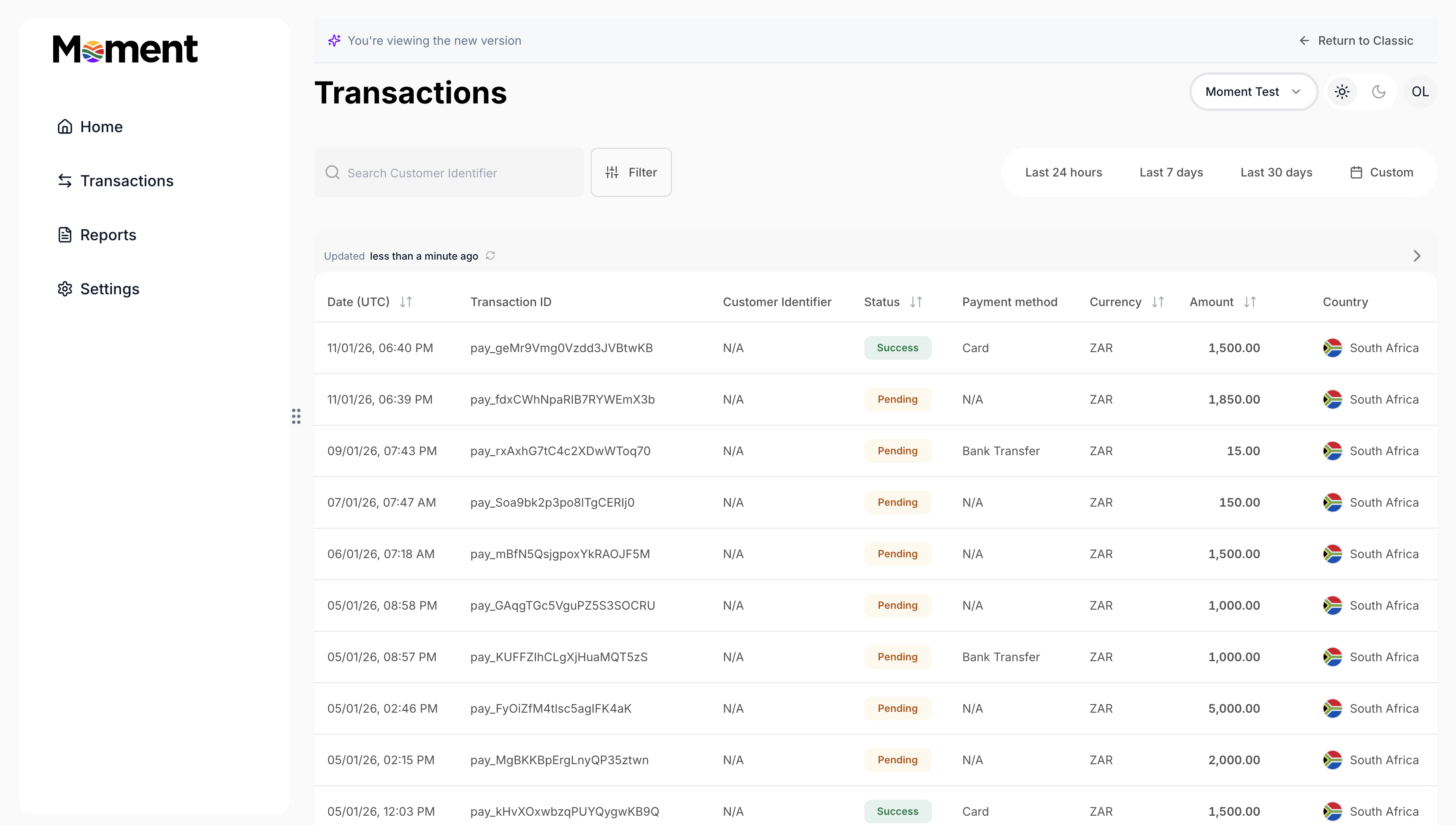
<img src="https://mintcdn.com/momentholdingslimited/ltrCqk19he2WwTGA/guides/resources/trx1.png?fit=max&auto=format&n=ltrCqk19he2WwTGA&q=85&s=51bc5ca7e19872b4db764d16670b2d34" alt="Trx1" width="3450" height="1954" data-path="guides/resources/trx1.png" />

Go to the transaction list to view all transactions in one place. The table is organized by amount, payment method, status, and more.

<img src="https://mintcdn.com/momentholdingslimited/ltrCqk19he2WwTGA/guides/resources/table.png?fit=max&auto=format&n=ltrCqk19he2WwTGA&q=85&s=1de973fa74ce78c39da6ec65b48d1c88" alt="Table" width="2744" height="488" data-path="guides/resources/table.png" />

<br />

**Filter**

Filter transactions by time frame—last 24 hours, last 7 days, last 30 days, or set a custom period to focus on what’s most relevant to you.

<img src="https://mintcdn.com/momentholdingslimited/ltrCqk19he2WwTGA/guides/resources/timefilter.png?fit=max&auto=format&n=ltrCqk19he2WwTGA&q=85&s=6aea31f2b39e65175611c1c4a6a1b3af" alt="Timefilter" title="Timefilter" style={{ width:"67%" }} width="1102" height="178" data-path="guides/resources/timefilter.png" />

<br />

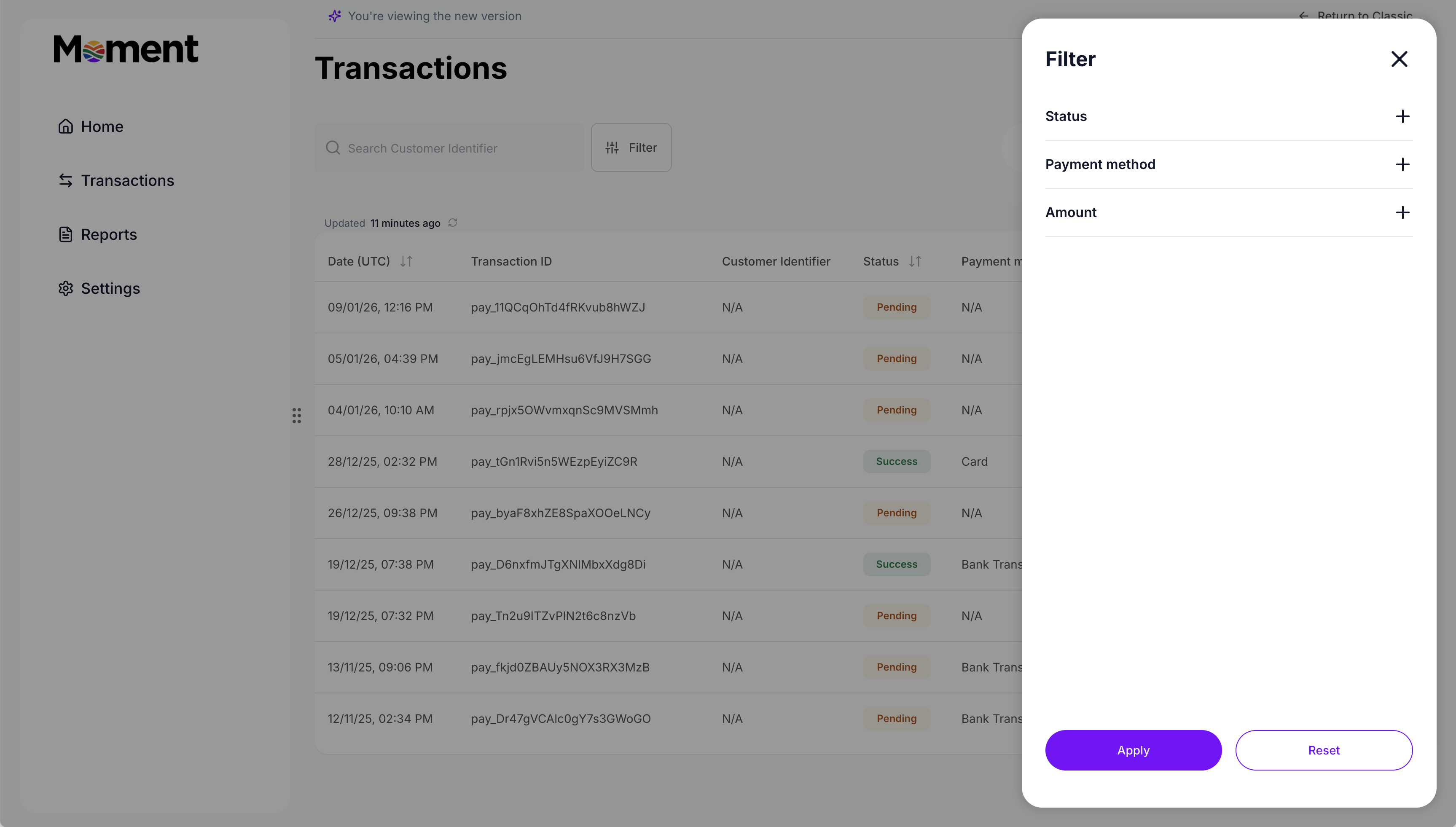
**Advanced filters**

Search for specific transactions using various identifiers to find exactly what you need quickly. Use advanced filters to narrow transactions by status, payment method, or amount.
<img src="https://mintcdn.com/momentholdingslimited/ltrCqk19he2WwTGA/guides/resources/filters.png?fit=max&auto=format&n=ltrCqk19he2WwTGA&q=85&s=9f1846a2b49e8ae01678f46f598e76df" alt="Filters" width="3454" height="1962" data-path="guides/resources/filters.png" />

<br />

**Search**

Search for specific transactions using various identifiers to find exactly what you need quickly. Use Reference ID, Customer Identifier, or any other data point available in Transaction Details.

<img src="https://mintcdn.com/momentholdingslimited/ltrCqk19he2WwTGA/guides/resources/Screenshot2026-02-18at4.14.51PM.png?fit=max&auto=format&n=ltrCqk19he2WwTGA&q=85&s=3aef6e003248aeaaefc20cab2efa16bf" alt="Screenshot2026 02 18at4 14 51PM" title="Screenshot2026 02 18at4 14 51PM" style={{ width:"67%" }} width="888" height="176" data-path="guides/resources/Screenshot2026-02-18at4.14.51PM.png" />

<br />

### Transaction Details

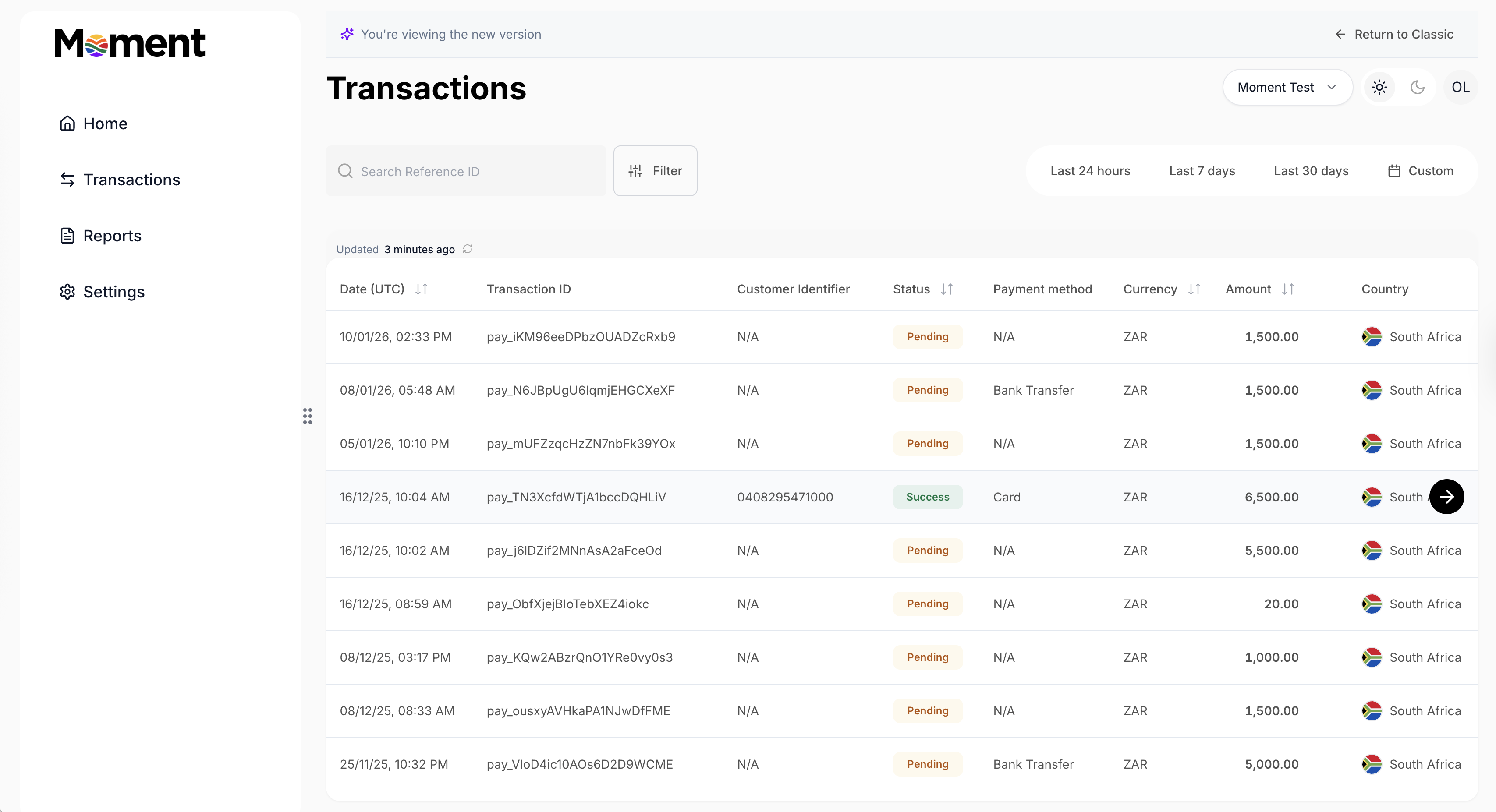
Review the transaction list to see all payments for both existing and new customers. Use the **Customer Identifier** column to distinguish them:

* If a number is present, the payment was made by an existing customer.
* If it shows **N/A**, the payment was made by a new customer through Payment Pages (if set up).
<img src="https://mintcdn.com/momentholdingslimited/ltrCqk19he2WwTGA/guides/resources/trxtablefocus.png?fit=max&auto=format&n=ltrCqk19he2WwTGA&q=85&s=846eaa505b510ddfea90475658c2a153" alt="Trx Table Focus" width="3414" height="1854" data-path="guides/resources/trxtablefocus.png" />

<br />

**Transaction details**

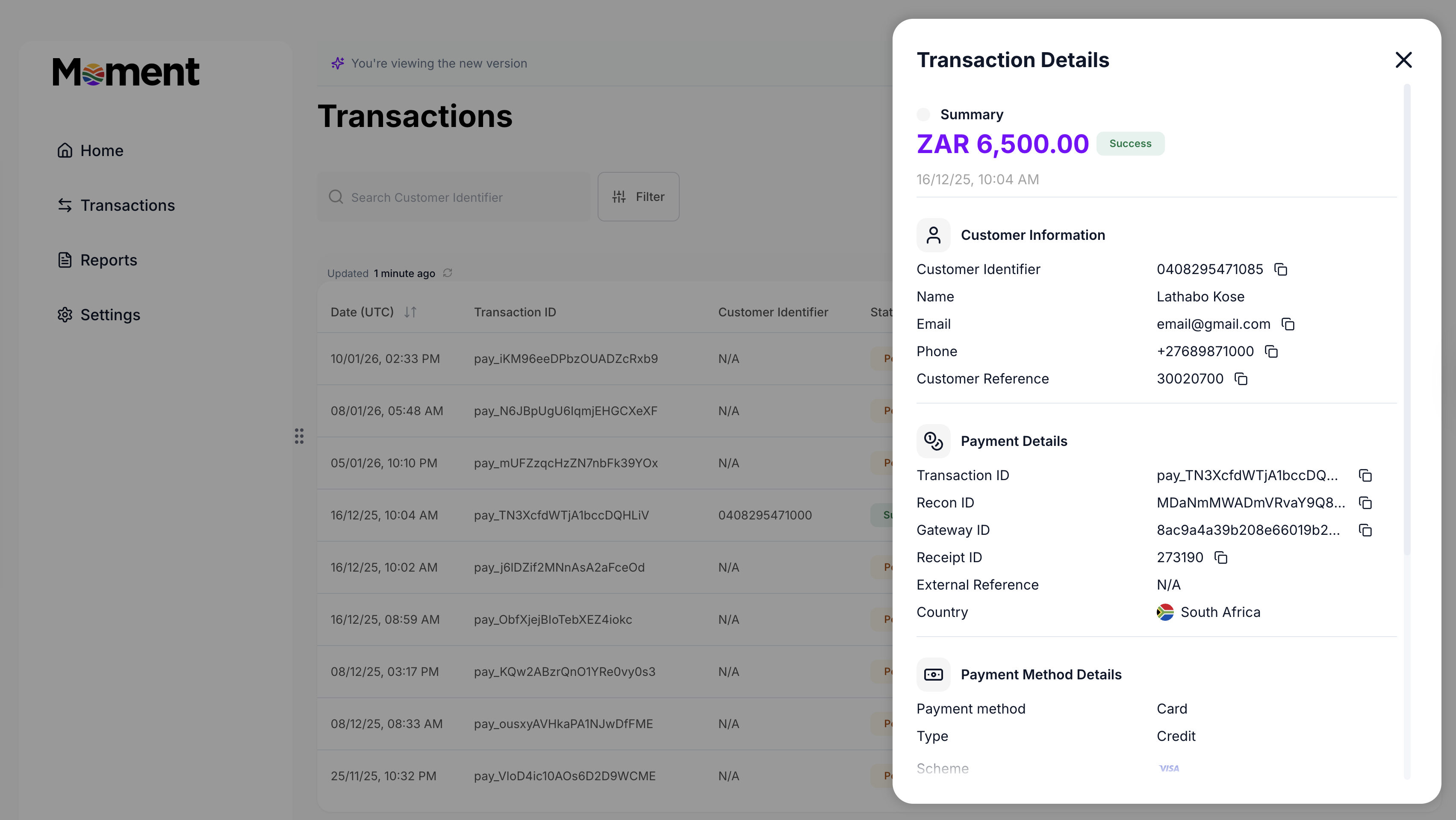
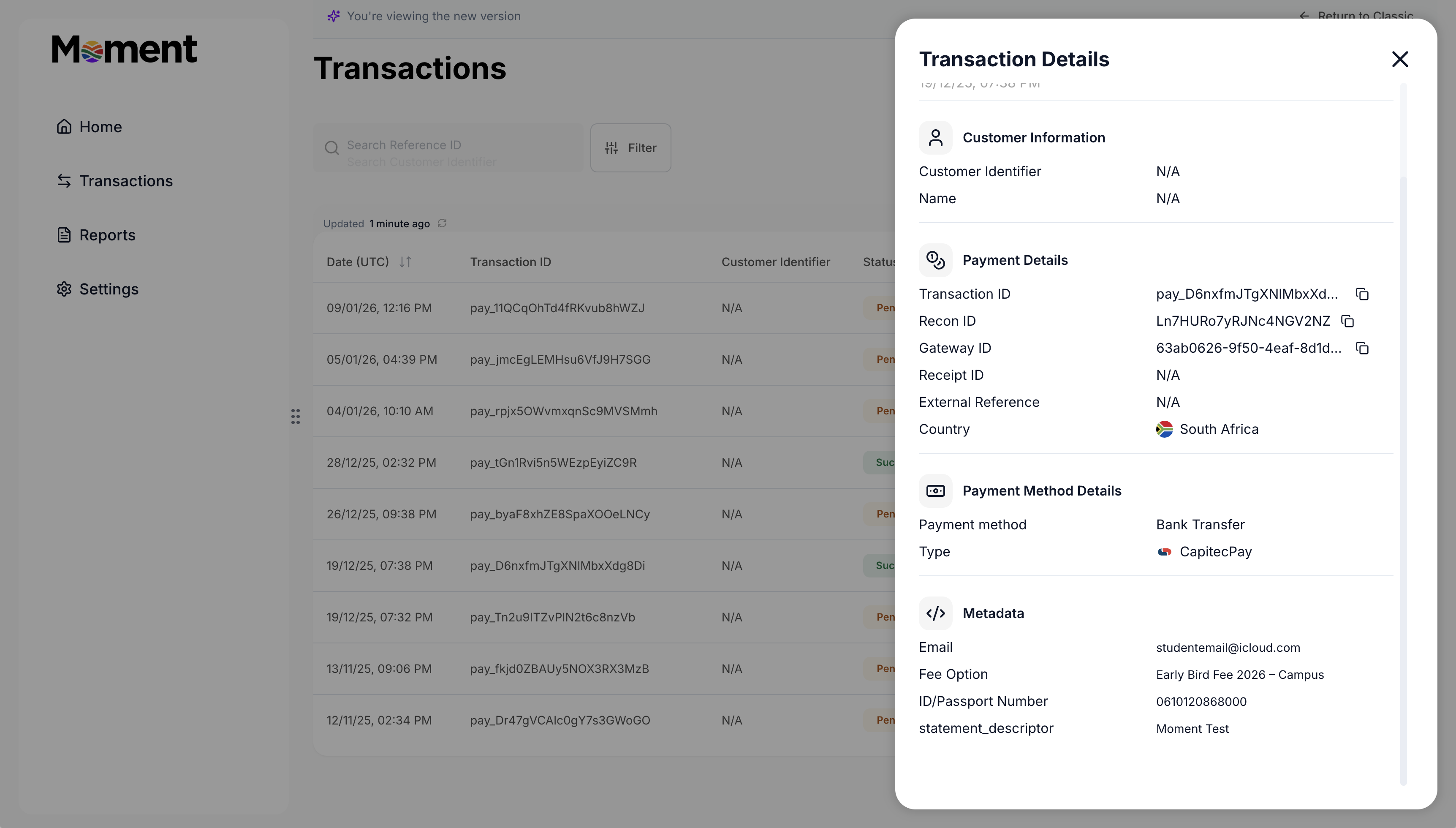
Click on any transaction in the list to view its details in a side panel. See the amount, status, timestamp, customer information, payment details, payment method information, and fulfillment status.

For **existing customers**, customer information is already filled in.
<img src="https://mintcdn.com/momentholdingslimited/ltrCqk19he2WwTGA/guides/resources/trxdetails-existing.png?fit=max&auto=format&n=ltrCqk19he2WwTGA&q=85&s=aa019caec4c7d0d8af220ec37d1b6f36" alt="Trx Details Existing" width="3406" height="1918" data-path="guides/resources/trxdetails-existing.png" />

For **new customers**, check the **Metadata** section to find the customer’s details, the payment purpose, and the business unit it relates to.
<img src="https://mintcdn.com/momentholdingslimited/ltrCqk19he2WwTGA/guides/resources/trzdetailsnew.png?fit=max&auto=format&n=ltrCqk19he2WwTGA&q=85&s=d24fe607daa6e6f6c816ac9437de2118" alt="Trz Details New" width="3448" height="1960" data-path="guides/resources/trzdetailsnew.png" />
