> ## Documentation Index
> Fetch the complete documentation index at: https://docs.momentco.io/llms.txt
> Use this file to discover all available pages before exploring further.
# Create & Manage Subscriptions
> How to set up and manage recurring billing from the Client Portal
Subscriptions let you charge customers automatically on a recurring schedule, without needing to request payment each time. Set the amount, the schedule, and any special conditions once, and Moment takes care of the rest.
## How to create a subscription
Go to **Subscriptions** in the Client Portal to see all existing subscriptions in one view: status, customer, amount, and next charge date at a glance. Click **Create Subscription** to open the setup form.
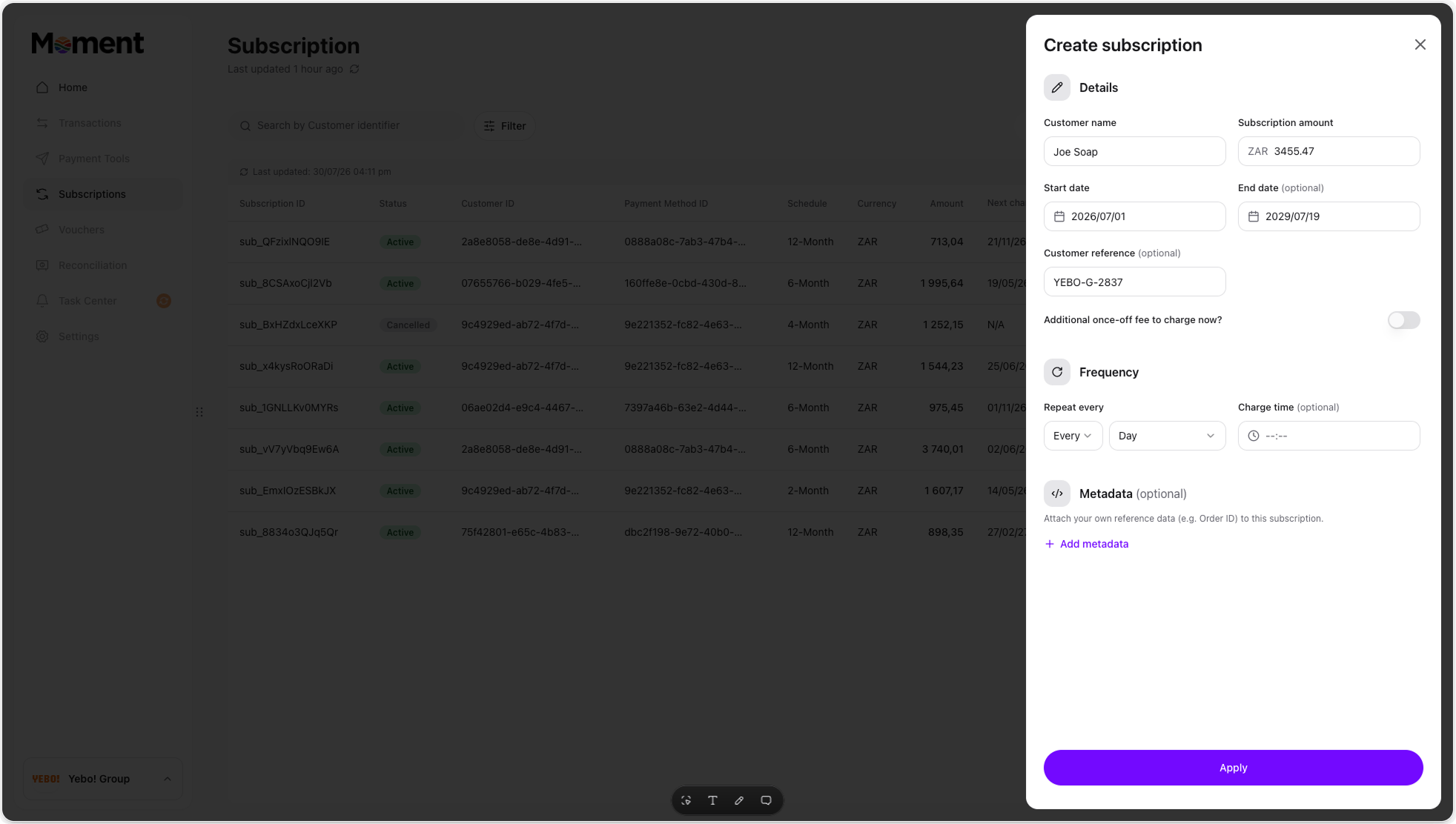 * Enter the **customer name** this subscription is for, and set the **amount** to be charged for the duration of their subscription.
* Choose how often the subscription should charge:
* **Daily**: repeats every day, or every N days.
* **Weekly**: pick one or more days of the week.
* **Monthly**: pick a day (for example "Every 2nd") or a fixed date.
* **Yearly**: pick one or more months and a day.
* Set the **first charge** date. This is when the subscription begins, and combined with the frequency, determines every future charge date.
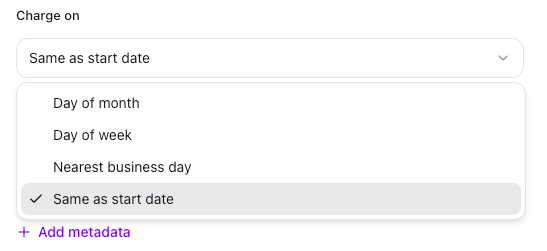
* Decide what happens if a charge date falls on a public holiday. This applies whether you're charging on a fixed day of the month or a day of the week: choose to leave it as-is, or move it to the nearest, previous, or next business day.
* Enter the **customer name** this subscription is for, and set the **amount** to be charged for the duration of their subscription.
* Choose how often the subscription should charge:
* **Daily**: repeats every day, or every N days.
* **Weekly**: pick one or more days of the week.
* **Monthly**: pick a day (for example "Every 2nd") or a fixed date.
* **Yearly**: pick one or more months and a day.
* Set the **first charge** date. This is when the subscription begins, and combined with the frequency, determines every future charge date.
* Decide what happens if a charge date falls on a public holiday. This applies whether you're charging on a fixed day of the month or a day of the week: choose to leave it as-is, or move it to the nearest, previous, or next business day.
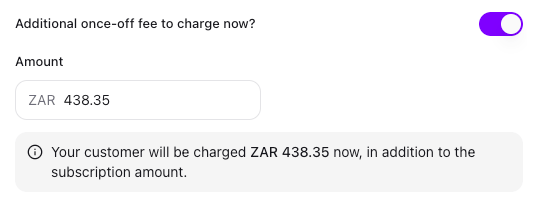
 As an optional feature, you can charge an amount now, in addition to the subscription. Use this if you need to collect a one-off amount, like a joining fee, alongside the first regular charge. Your customer is charged this amount now, in addition to the subscription amount.
 You can add metadata as key-value pairs against the subscription, for example an internal plan code, a business unit, or a reference ID from another system. Metadata isn't shown to the customer. It's for your own reference, reconciliation, and reporting. You can add multiple pairs, and edit or remove them later from the subscription's details.
Review your setup on the **Summary** screen before confirming. If your configuration matches what you intended, go ahead and create the subscription, or go back to make changes.
You can add metadata as key-value pairs against the subscription, for example an internal plan code, a business unit, or a reference ID from another system. Metadata isn't shown to the customer. It's for your own reference, reconciliation, and reporting. You can add multiple pairs, and edit or remove them later from the subscription's details.
Review your setup on the **Summary** screen before confirming. If your configuration matches what you intended, go ahead and create the subscription, or go back to make changes.
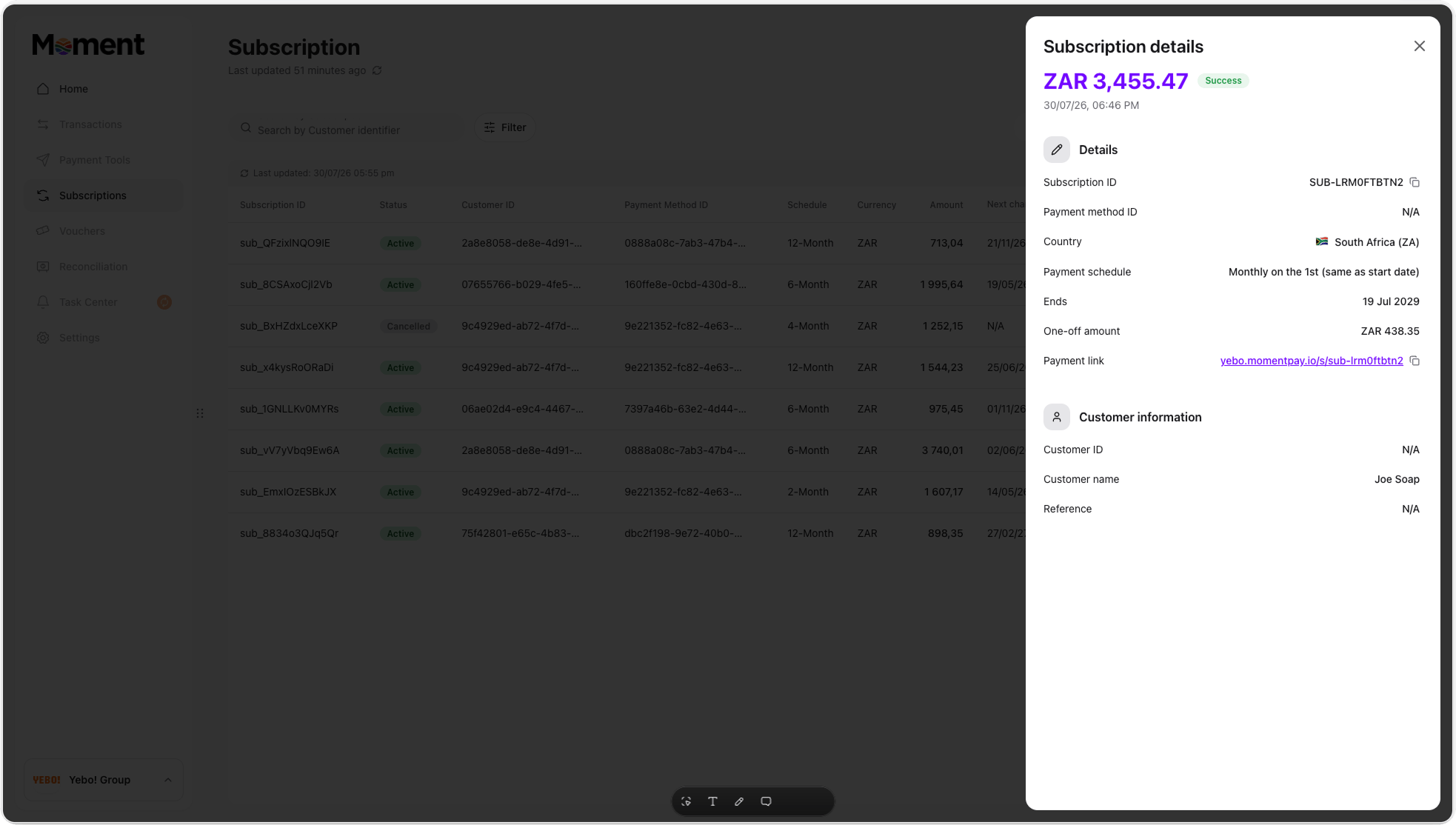
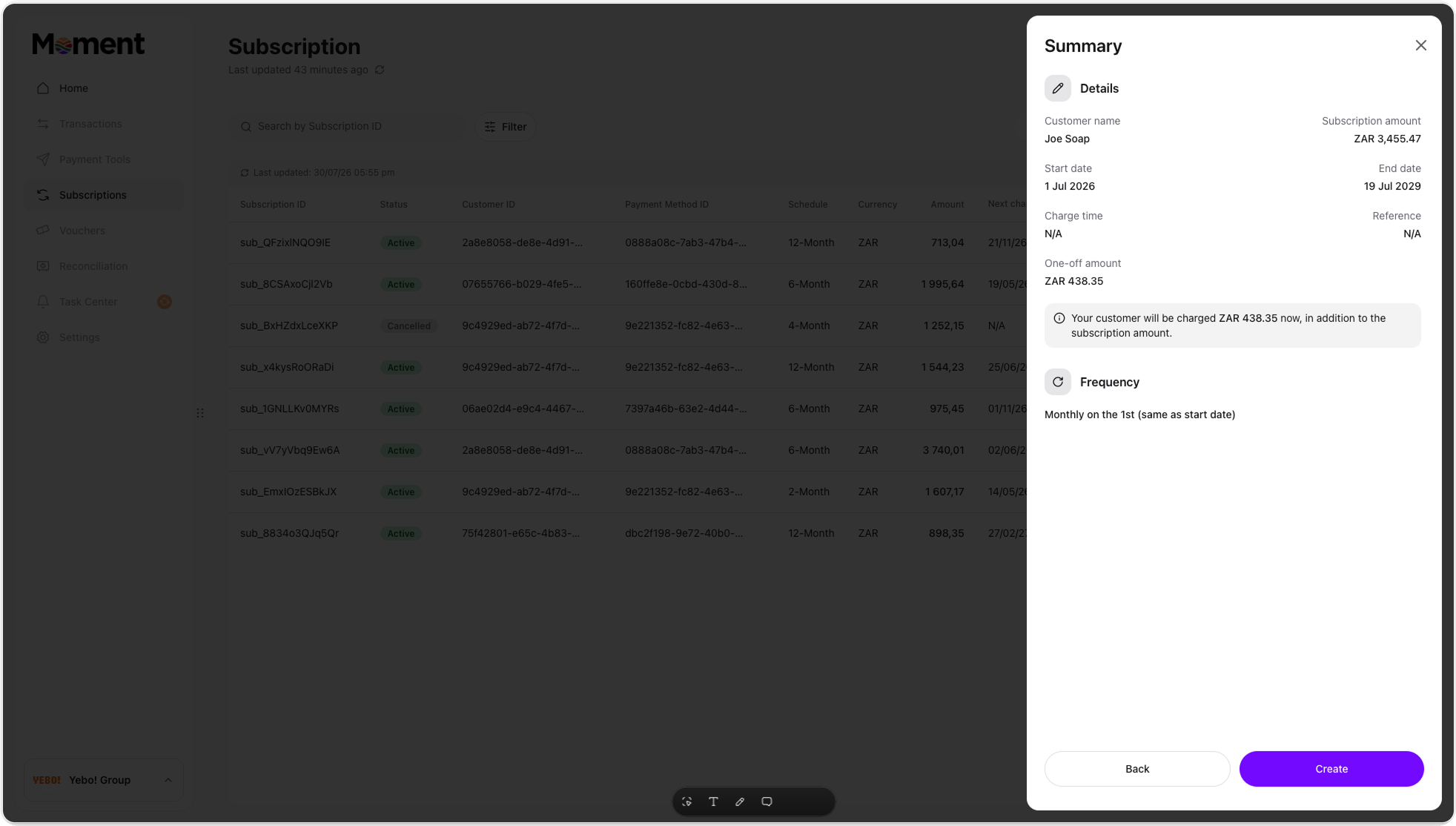 Click **Create** to create the subscription. You'll land on the **Subscription details** screen, showing the schedule, next charge date, and full payment history for that subscription going forward.
 ## Managing an existing subscription
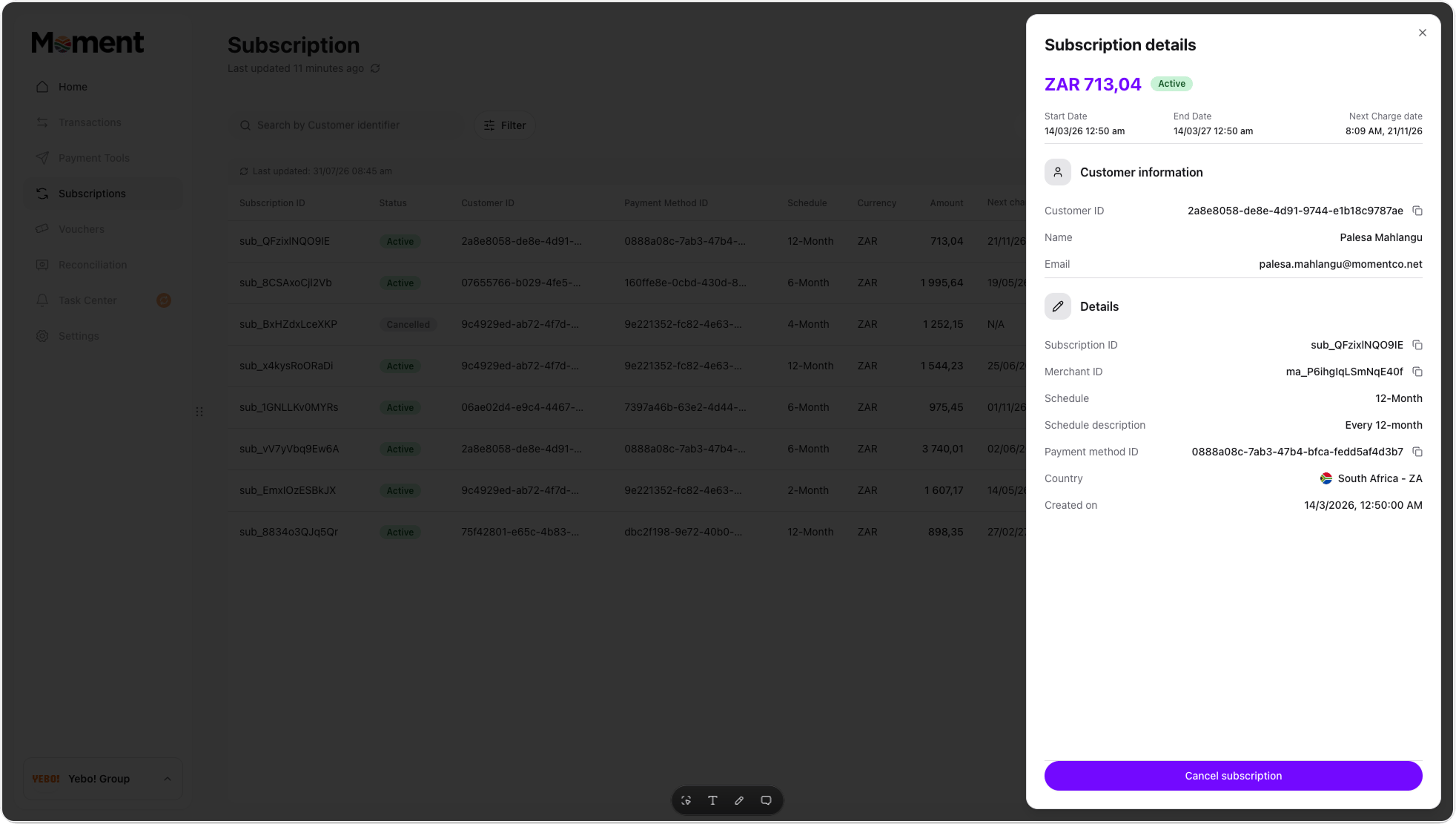
Click into any subscription from the list to view its details: schedule, status, upcoming charge, and past payment attempts. From here you can **cancel** the subscription permanently.
## Managing an existing subscription
Click into any subscription from the list to view its details: schedule, status, upcoming charge, and past payment attempts. From here you can **cancel** the subscription permanently.
 ## Good to know
As you configure a schedule, Moment checks it against a few known patterns and either offers to simplify it or blocks it outright.
### Exact equivalents: nudged, with a one-click switch
If your configuration works out to be mathematically identical to a simpler schedule, you'll see a **Switch to X** button:
| Your setup | Equivalent to |
| ------------------------------------------------------------- | ------------------------------------------- |
| Weekly, all 7 days selected | Daily |
| Daily, repeating every 7, 14, 21... days | Weekly |
| Monthly, repeating every 12, 24, 36... months | Yearly |
| Yearly, all 12 months selected | Monthly |
| Yearly, evenly spaced months (for example Jan, Apr, Jul, Oct) | Month, every N (for example every 3 months) |
You can accept the switch or dismiss it and keep your original setup. These are nudges, not requirements.
### Approximate look-alikes: drift warning only, no switch
Some configurations look like they'd match a simpler schedule but don't quite, because months vary in length. These show a warning explaining the drift, with no switch button since there's no exact equivalent to switch to:
* Daily, repeating every 28 to 31 days
* Weekly, repeating every 4 weeks
### Hard guard: the one configuration that's blocked
A yearly schedule with multiple months selected that aren't evenly spaced (for example January and March, but not the months in between) is blocked outright. It isn't a valid yearly pattern. Evenly spaced multi-month yearly schedules aren't blocked; they're handled by the nudge above instead.
### Silent normalization at submit
If you dismiss an exact-equivalent nudge and submit anyway, Moment quietly stores the simplified, equivalent version behind the scenes (for example, yearly on Jan/Apr/Jul/Oct becomes monthly, every 3, in storage). You won't see any visible change, but reporting stays consistent. This only applies to exact equivalents. Approximate look-alikes (day 28 to 31, week 4) are stored exactly as entered, drift and all.
Subscriptions make it easy to set up recurring billing once and let it run, with flexibility to adjust frequency, timing, and one-off amounts as your customers' needs change.
## Good to know
As you configure a schedule, Moment checks it against a few known patterns and either offers to simplify it or blocks it outright.
### Exact equivalents: nudged, with a one-click switch
If your configuration works out to be mathematically identical to a simpler schedule, you'll see a **Switch to X** button:
| Your setup | Equivalent to |
| ------------------------------------------------------------- | ------------------------------------------- |
| Weekly, all 7 days selected | Daily |
| Daily, repeating every 7, 14, 21... days | Weekly |
| Monthly, repeating every 12, 24, 36... months | Yearly |
| Yearly, all 12 months selected | Monthly |
| Yearly, evenly spaced months (for example Jan, Apr, Jul, Oct) | Month, every N (for example every 3 months) |
You can accept the switch or dismiss it and keep your original setup. These are nudges, not requirements.
### Approximate look-alikes: drift warning only, no switch
Some configurations look like they'd match a simpler schedule but don't quite, because months vary in length. These show a warning explaining the drift, with no switch button since there's no exact equivalent to switch to:
* Daily, repeating every 28 to 31 days
* Weekly, repeating every 4 weeks
### Hard guard: the one configuration that's blocked
A yearly schedule with multiple months selected that aren't evenly spaced (for example January and March, but not the months in between) is blocked outright. It isn't a valid yearly pattern. Evenly spaced multi-month yearly schedules aren't blocked; they're handled by the nudge above instead.
### Silent normalization at submit
If you dismiss an exact-equivalent nudge and submit anyway, Moment quietly stores the simplified, equivalent version behind the scenes (for example, yearly on Jan/Apr/Jul/Oct becomes monthly, every 3, in storage). You won't see any visible change, but reporting stays consistent. This only applies to exact equivalents. Approximate look-alikes (day 28 to 31, week 4) are stored exactly as entered, drift and all.
Subscriptions make it easy to set up recurring billing once and let it run, with flexibility to adjust frequency, timing, and one-off amounts as your customers' needs change.