> ## Documentation Index
> Fetch the complete documentation index at: https://docs.momentco.io/llms.txt
> Use this file to discover all available pages before exploring further.

# Create & Manage Payment Requests

Payment Request by Moment makes it easy to track, create, and manage payments, whether you're sending individual requests or handling them in bulk. Follow these steps to streamline your payment collection process and keep everything organized in one place.

<video controls muted loop playsInline className="w-full aspect-video rounded-xl" src="https://mintcdn.com/momentholdingslimited/SYSBVV3p9daiSw45/videos/Payment-Request-Management-Guide-(1).mp4?fit=max&auto=format&n=SYSBVV3p9daiSw45&q=85&s=03ceff95c224af516c152fd71a84500f" data-path="videos/Payment-Request-Management-Guide-(1).mp4" />

### Create a Single Payment Request

**Step 1:** Select to create a **single payment request**. Decide if you want to send it now or later.
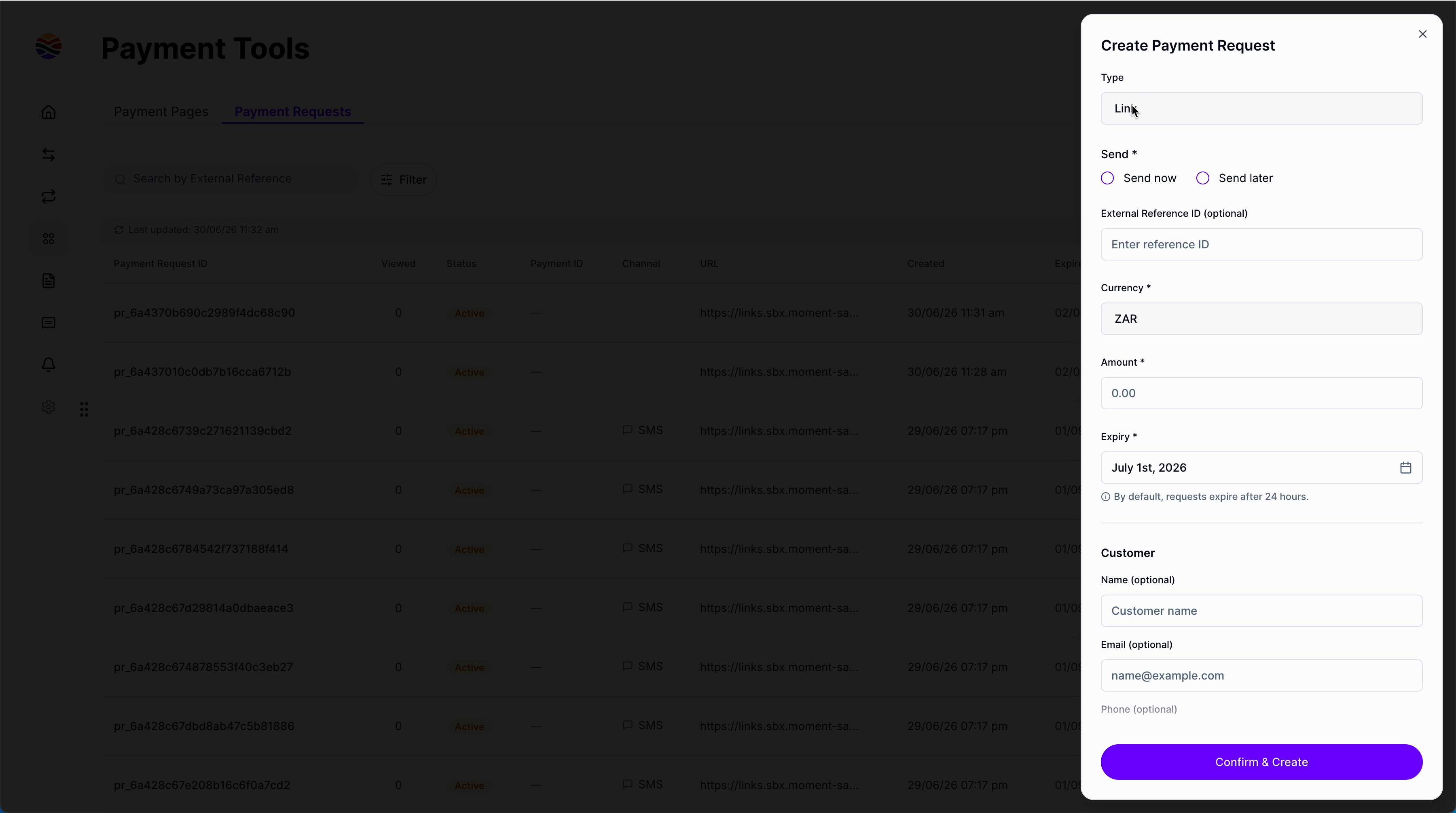
<img src="https://mintcdn.com/momentholdingslimited/6OTPl7YtIOuH2_tk/images/1_step1.png?fit=max&auto=format&n=6OTPl7YtIOuH2_tk&q=85&s=6940d4e5a6f6a5d7563628e7bf1a165a" alt="1 Step1" title="1 Step1" data-path="guides/resources/payment-requests/single-step1.png" width="3600" height="2010" data-path="images/1_step1.png" />

<br />

**Step 2:** If you're sending it right away, pick the **delivery channel** and enter the customer's **phone number**.
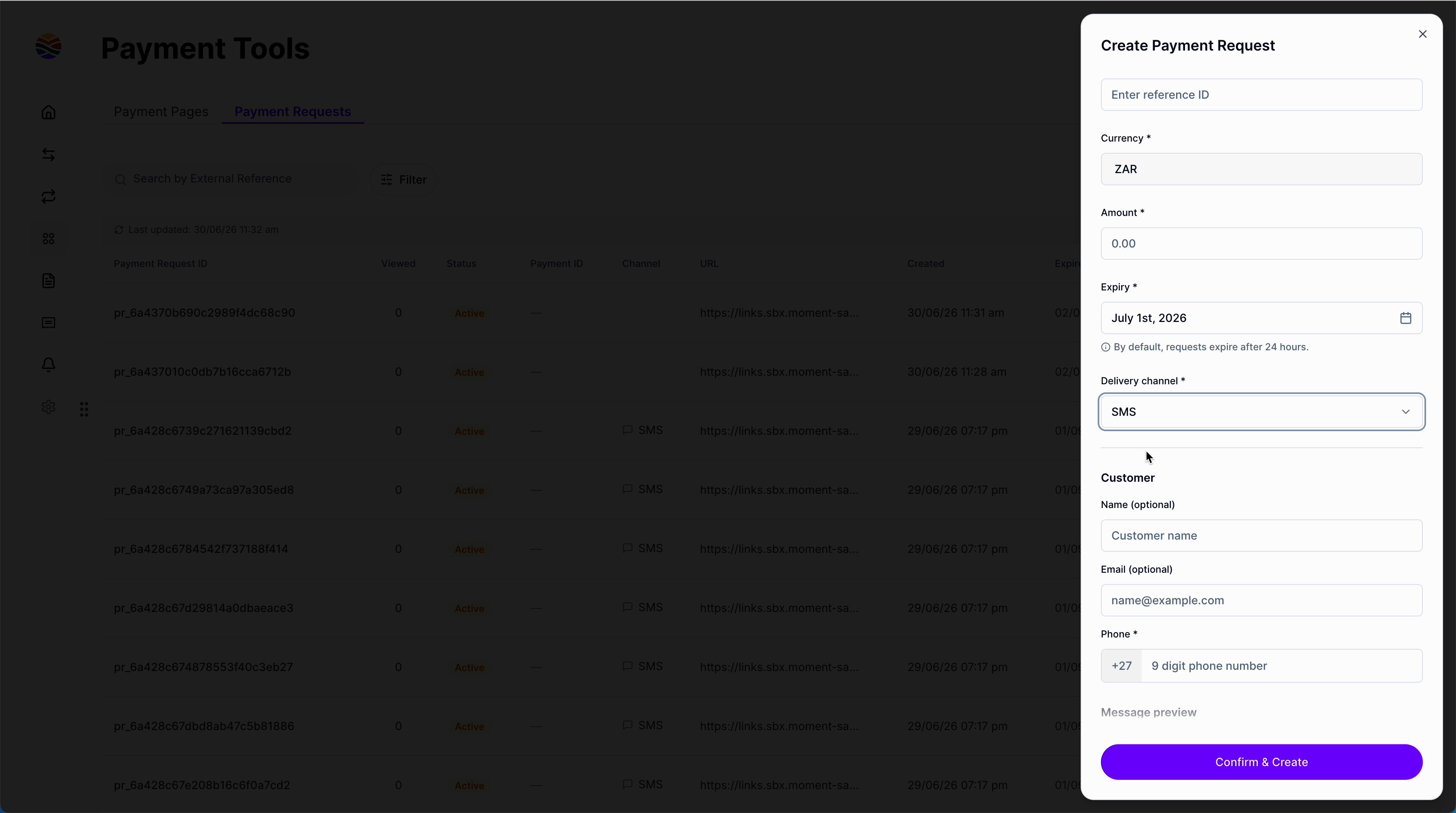
<img src="https://mintcdn.com/momentholdingslimited/6OTPl7YtIOuH2_tk/images/1_step2.png?fit=max&auto=format&n=6OTPl7YtIOuH2_tk&q=85&s=64ca8d2cfce8cd9c87fa0cfd1f2d33ab" alt="1 Step2" title="1 Step2" data-path="guides/resources/payment-requests/single-step2.png" width="3600" height="2010" data-path="images/1_step2.png" />

<br />

**Step 3:** Optionally, add an **External reference ID**. This helps you find the request later but isn't required.
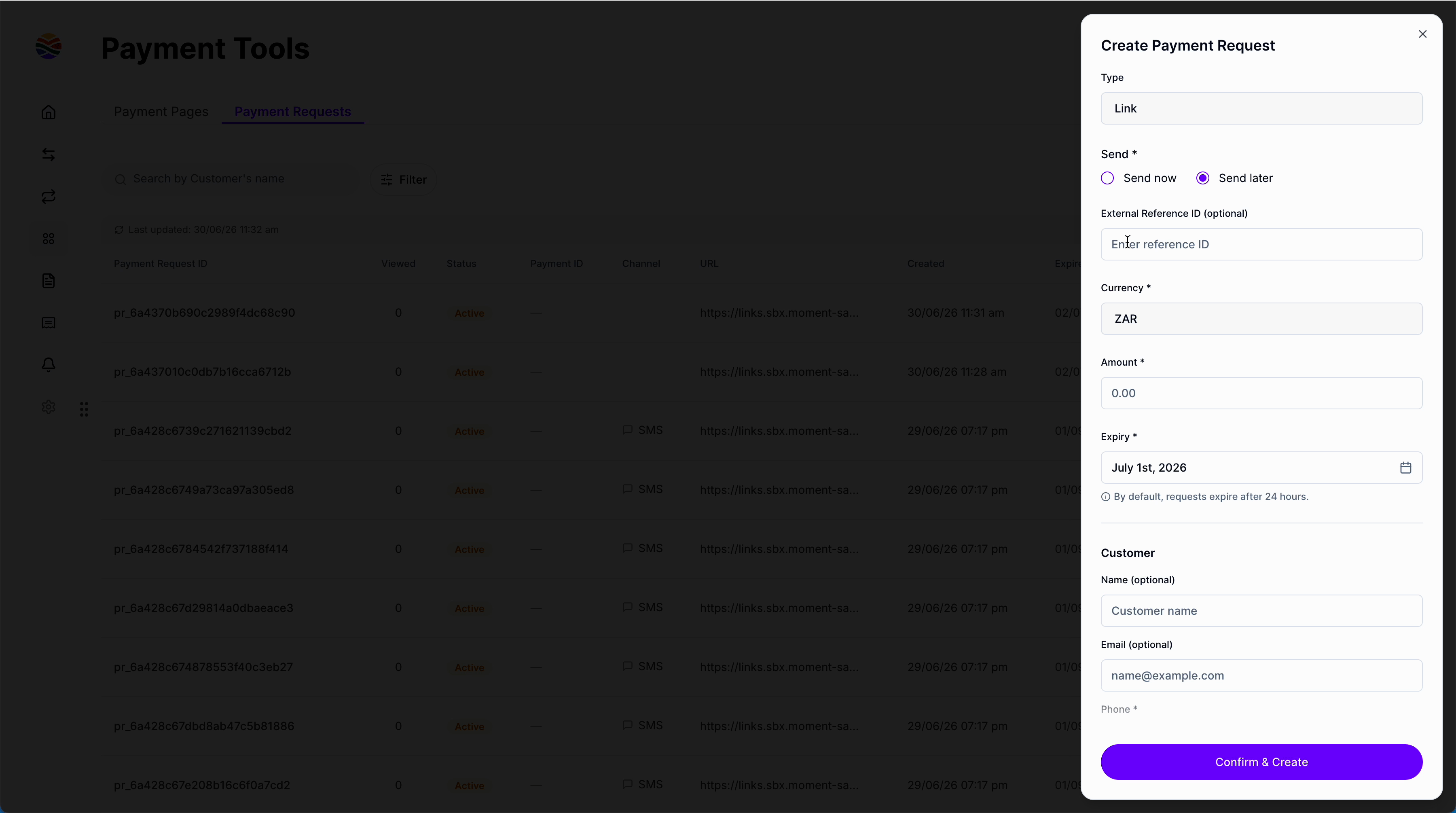
<img src="https://mintcdn.com/momentholdingslimited/6OTPl7YtIOuH2_tk/images/1_step3.png?fit=max&auto=format&n=6OTPl7YtIOuH2_tk&q=85&s=9e2a4b67f79daa11be2a46eba5af5e66" alt="1 Step3" title="1 Step3" data-path="guides/resources/payment-requests/single-step3.png" width="3600" height="2010" data-path="images/1_step3.png" />

<br />

**Step 4:** Enter the **amount**, set the **expiry date** if it shouldn't be the default 24 hours, and (optionally) include **customer information** for your records.
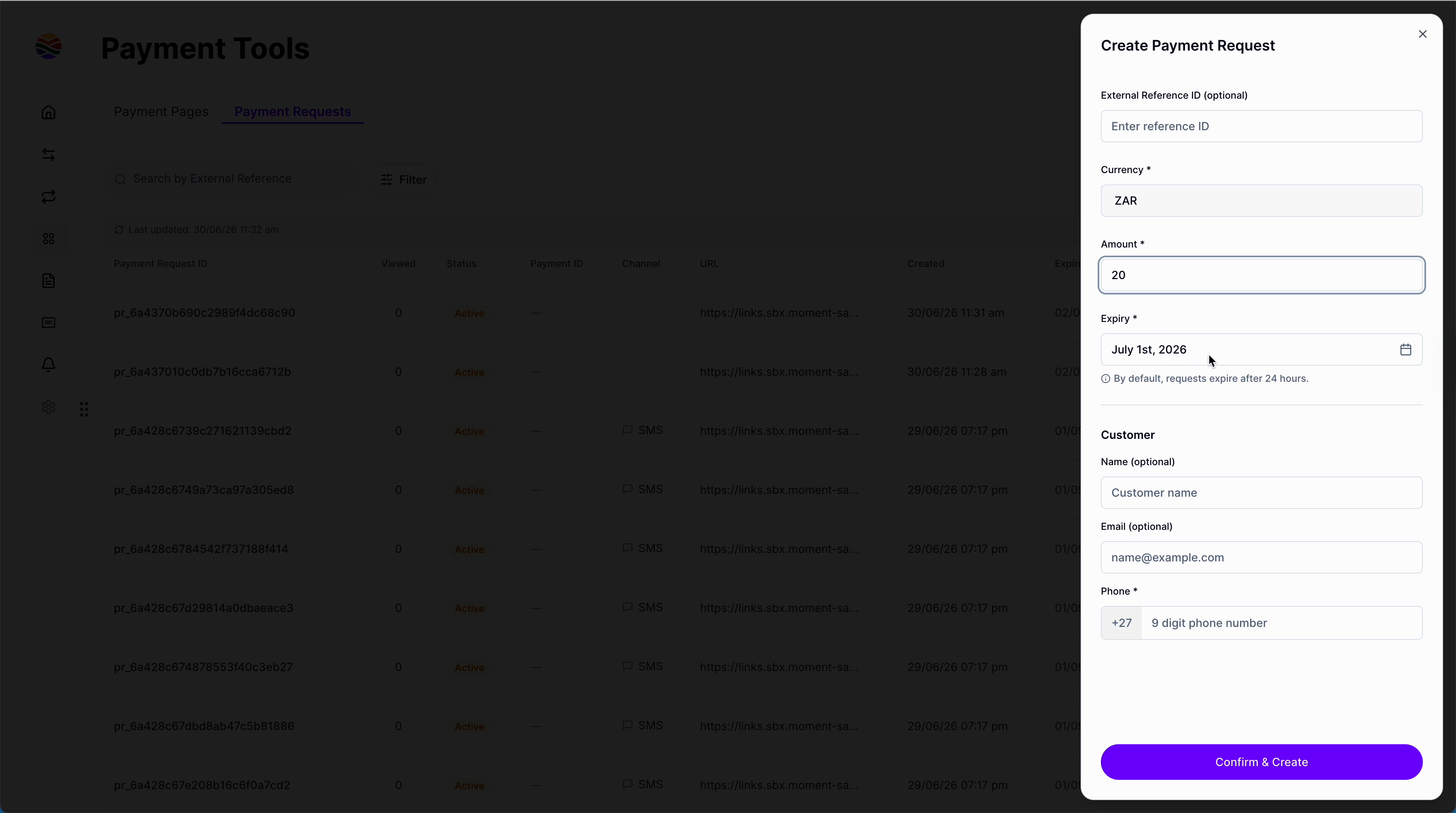
<img src="https://mintcdn.com/momentholdingslimited/6OTPl7YtIOuH2_tk/images/1_step4.png?fit=max&auto=format&n=6OTPl7YtIOuH2_tk&q=85&s=ab6b2c7bef7976e216f650c3ecdc3384" alt="1 Step4" title="1 Step4" data-path="guides/resources/payment-requests/single-step4.png" width="3600" height="2010" data-path="images/1_step4.png" />

<br />

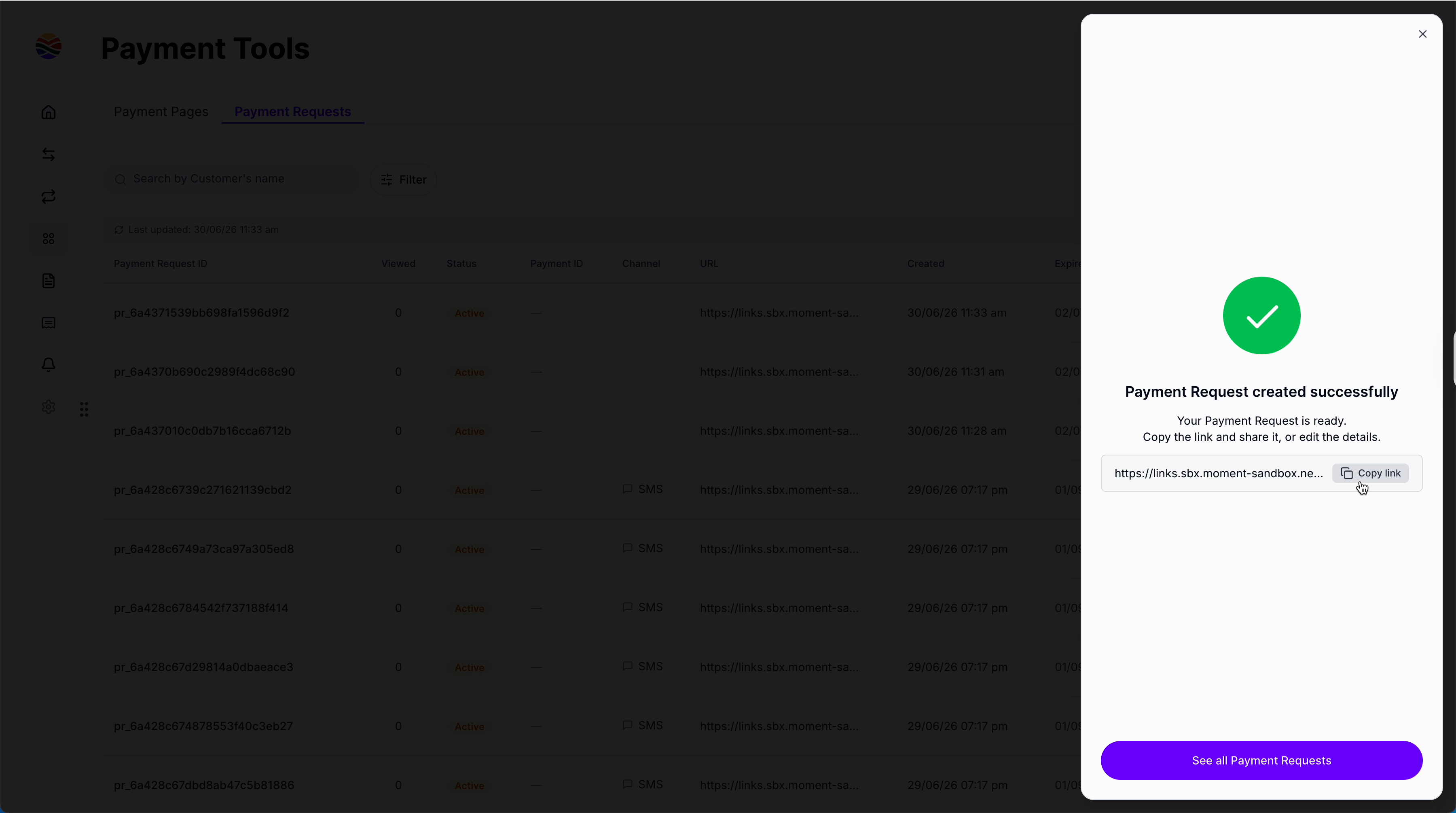
**Step 5:** After creating the request, copy the payment link to share with your customer, or go back to the payment request to edit details.
<img src="https://mintcdn.com/momentholdingslimited/6OTPl7YtIOuH2_tk/images/1_step5.png?fit=max&auto=format&n=6OTPl7YtIOuH2_tk&q=85&s=4a6906aaa0067f8068676b881283621b" alt="1 Step5" title="1 Step5" data-path="guides/resources/payment-requests/single-step5.png" width="3600" height="2010" data-path="images/1_step5.png" />

<br />

### Create Bulk Payment Requests

<br />

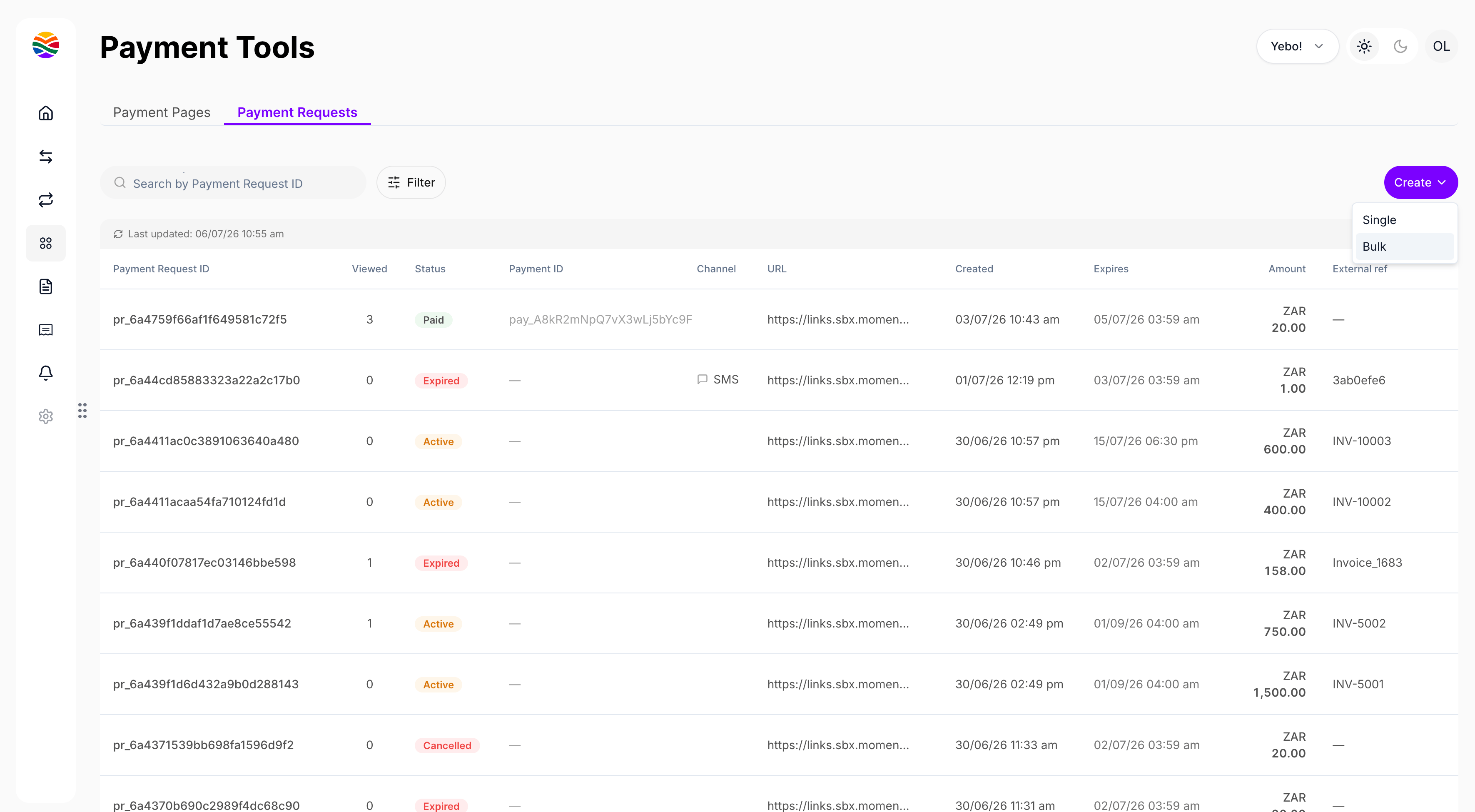
**Step 1:** Choose the **bulk creation** option. Decide whether to send the requests now or later.
<img src="https://mintcdn.com/momentholdingslimited/6OTPl7YtIOuH2_tk/images/2_step1.png?fit=max&auto=format&n=6OTPl7YtIOuH2_tk&q=85&s=fa518df39e731672c7ca7a813f8d4793" alt="2 Step1" title="2 Step1" width="3598" height="2006" data-path="guides/resources/payment-requests/bulk-step1.png" data-path="images/2_step1.png" />

<br />

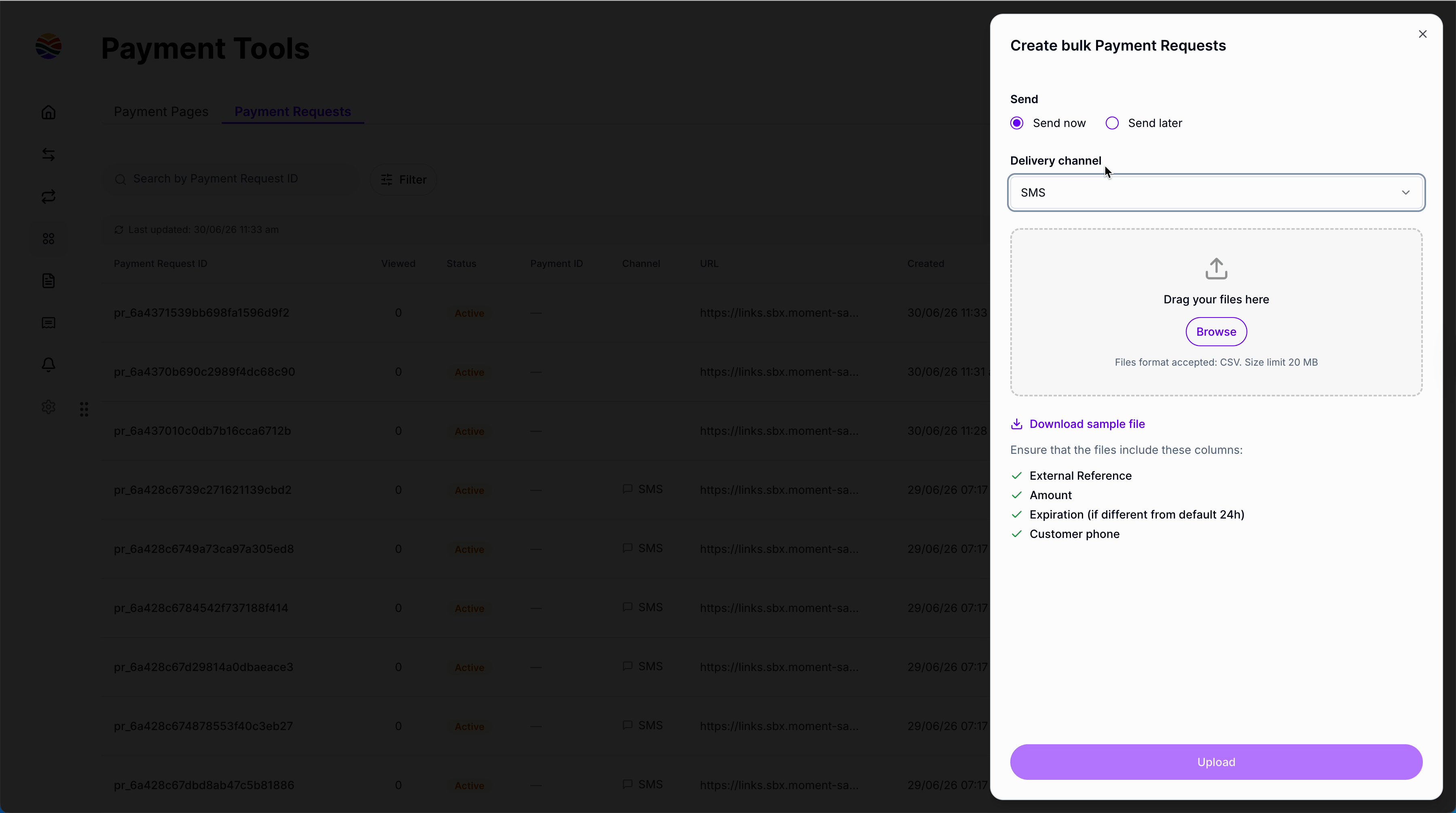
**Step 2:** To send requests right away by **SMS**, make sure your upload file includes a **phone number** for each entry.
<img src="https://mintcdn.com/momentholdingslimited/6OTPl7YtIOuH2_tk/images/2_step2.png?fit=max&auto=format&n=6OTPl7YtIOuH2_tk&q=85&s=a0e7dfccd4fd85af96bca38dabdd4e43" alt="2 Step2" title="2 Step2" data-path="guides/resources/payment-requests/bulk-step2.png" width="3600" height="2010" data-path="images/2_step2.png" />

<br />

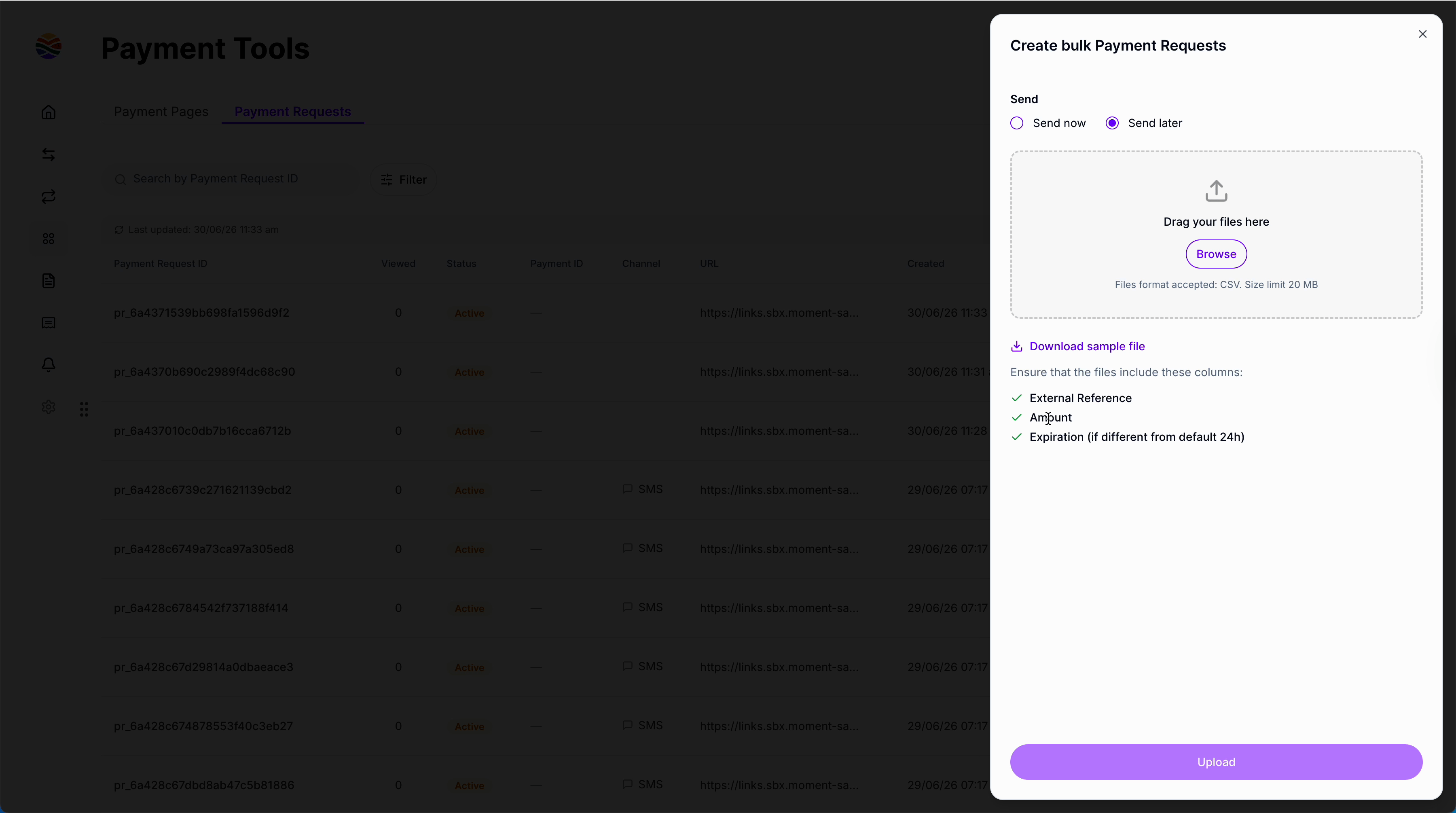
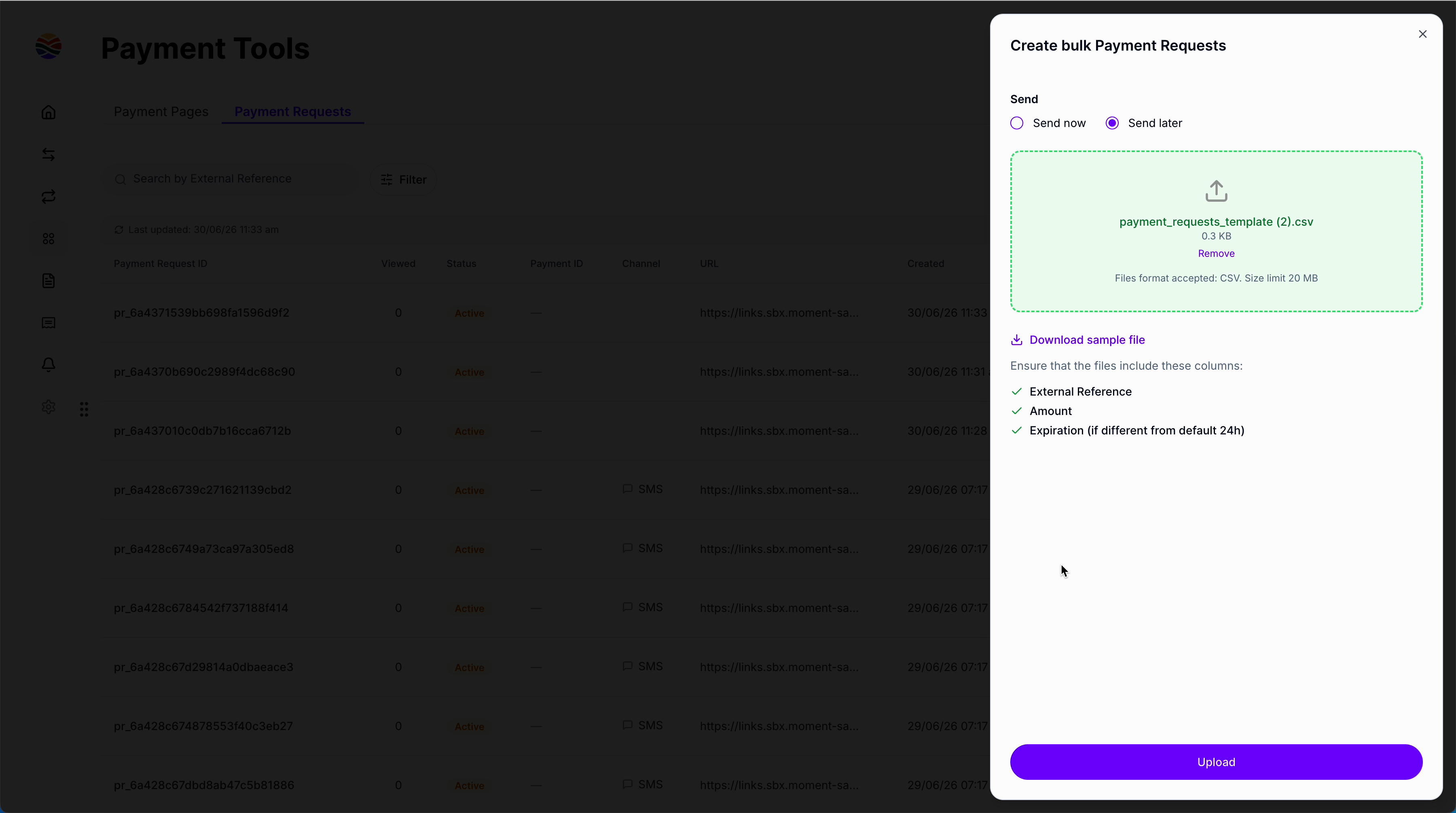
**Step 3:** If sending later, your file still must have all necessary details like **External reference**, **Amount**, and **Expiry date** (if not the default).
<img src="https://mintcdn.com/momentholdingslimited/6OTPl7YtIOuH2_tk/images/2_step3.png?fit=max&auto=format&n=6OTPl7YtIOuH2_tk&q=85&s=7dd48977c1e584cc28e43b968f3640c4" alt="2 Step3" title="2 Step3" data-path="guides/resources/payment-requests/bulk-step3.png" width="3600" height="2010" data-path="images/2_step3.png" />

<br />

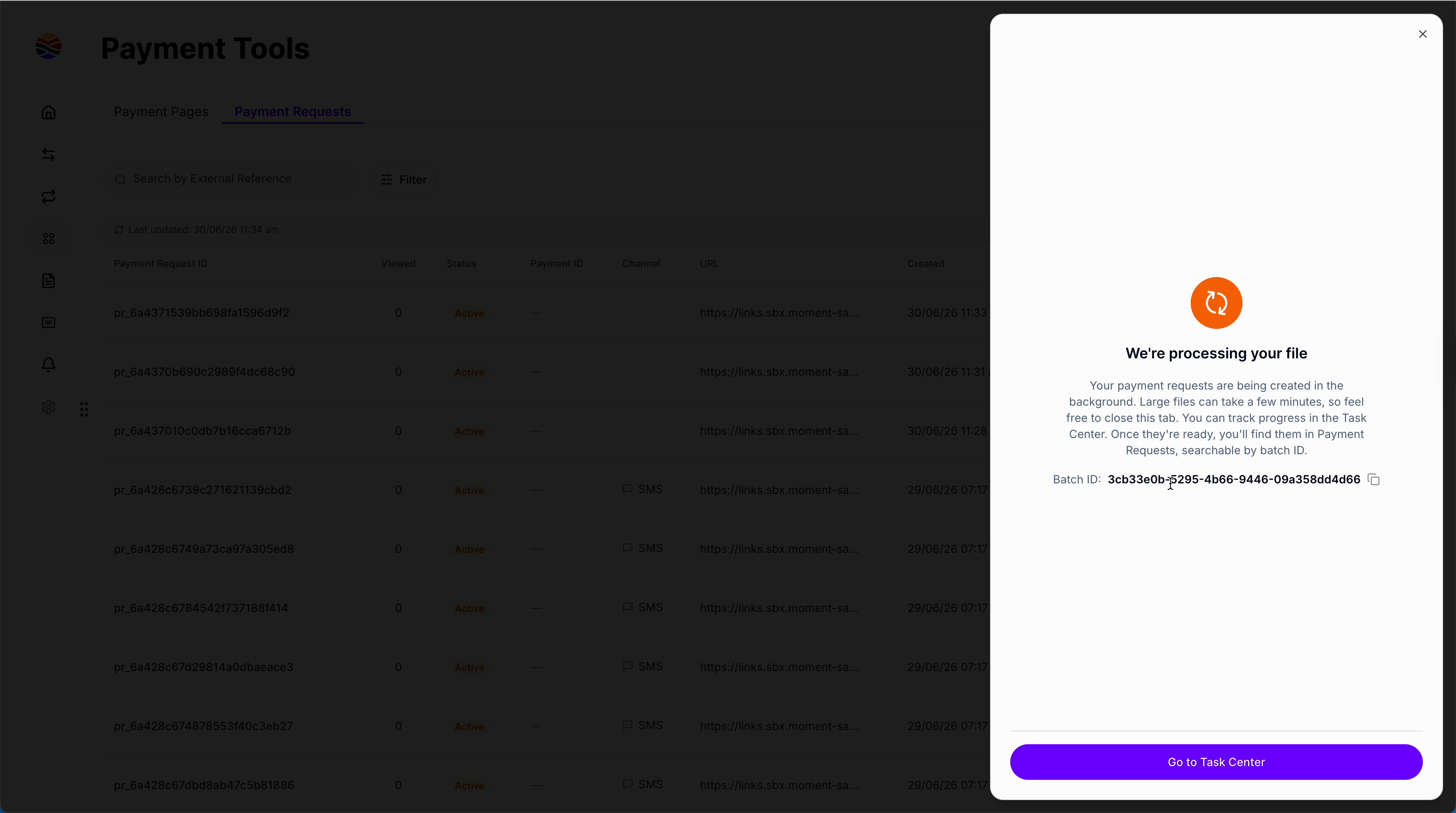
**Step 4:** Upload your file. It will be processed and appear in the **Task center** once ready.
<img src="https://mintcdn.com/momentholdingslimited/6OTPl7YtIOuH2_tk/images/2_step4.png?fit=max&auto=format&n=6OTPl7YtIOuH2_tk&q=85&s=b13bca462c61fff0b5c4feb3d9829856" alt="2 Step4" title="2 Step4" data-path="guides/resources/payment-requests/bulk-step4.png" width="3600" height="2010" data-path="images/2_step4.png" />

<br />

**Step 5:** Search payment requests in bulk by **batch ID** to manage or review their status.
<img src="https://mintcdn.com/momentholdingslimited/6OTPl7YtIOuH2_tk/images/2_step5.png?fit=max&auto=format&n=6OTPl7YtIOuH2_tk&q=85&s=934bb7880c7ccc3800d20f11399cd21e" alt="2 Step5" title="2 Step5" data-path="guides/resources/payment-requests/bulk-step5.png" width="3600" height="2010" data-path="images/2_step5.png" />

<br />

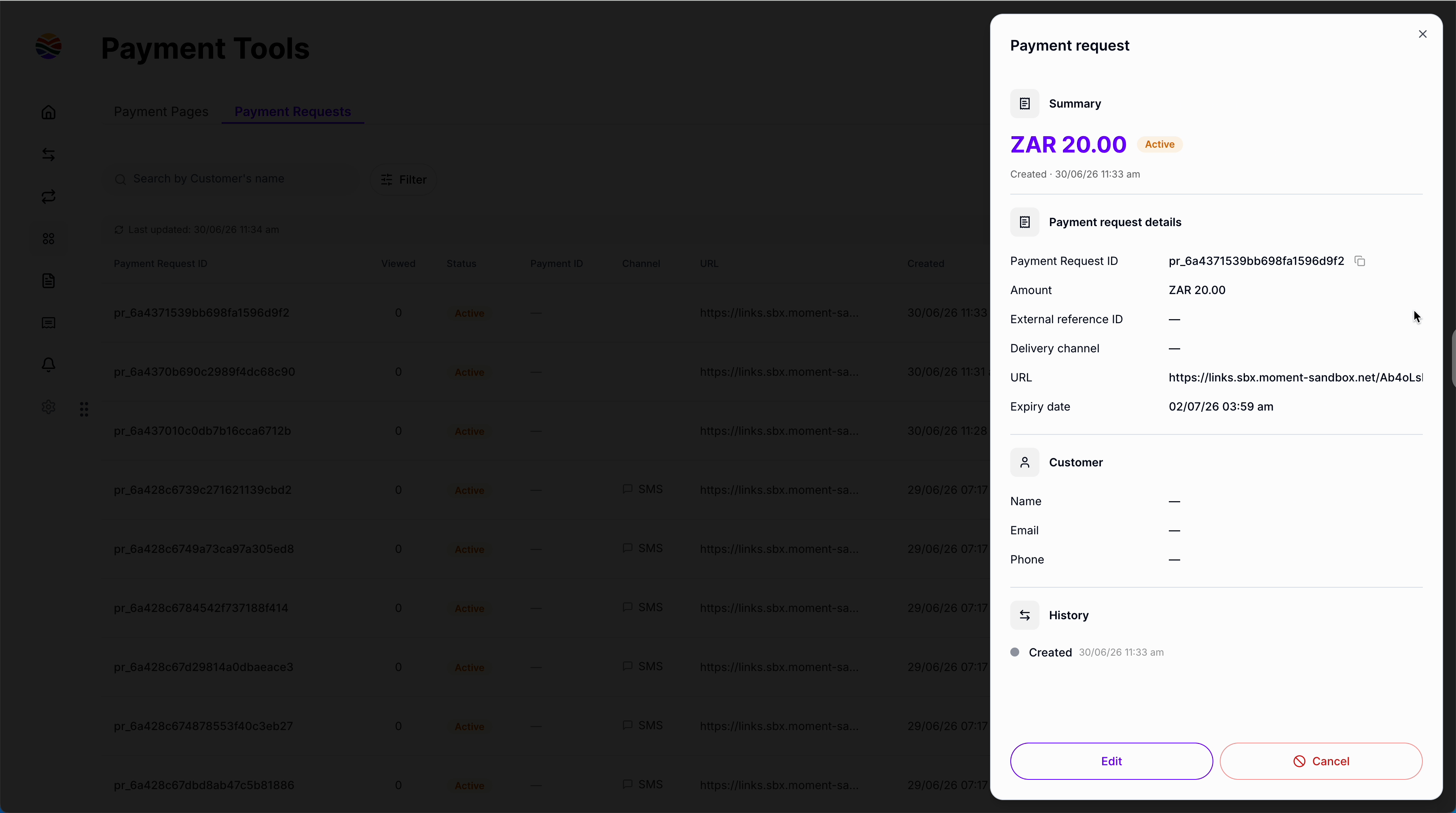
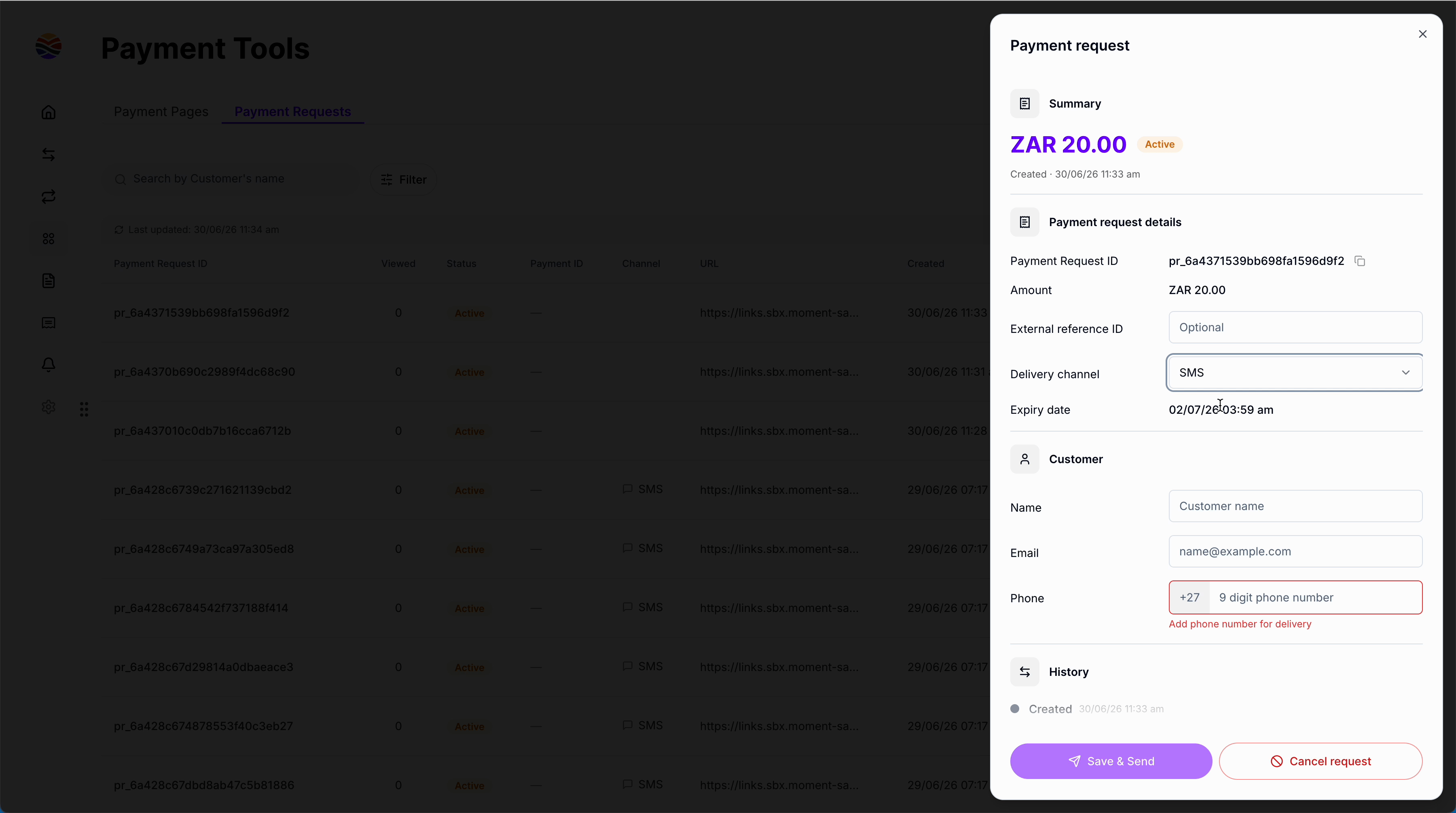
**Step 6:** Review each payment request created in the batch, check the summary, and add missing information one by one if needed, like the delivery channel or the customer's phone number.
<img src="https://mintcdn.com/momentholdingslimited/6OTPl7YtIOuH2_tk/images/2_step6.png?fit=max&auto=format&n=6OTPl7YtIOuH2_tk&q=85&s=aae69f32d8c57a761c96d140bd920a9b" alt="2 Step6" title="2 Step6" data-path="guides/resources/payment-requests/bulk-step7.png" width="3600" height="2010" data-path="images/2_step6.png" />

<br />

<img src="https://mintcdn.com/momentholdingslimited/6OTPl7YtIOuH2_tk/images/2_step6b.png?fit=max&auto=format&n=6OTPl7YtIOuH2_tk&q=85&s=980f51db703abf3735393c6da73b92b2" alt="2 Step6b" title="2 Step6b" data-path="guides/resources/payment-requests/bulk-step7.png" width="3600" height="2010" data-path="images/2_step6b.png" />

<br />

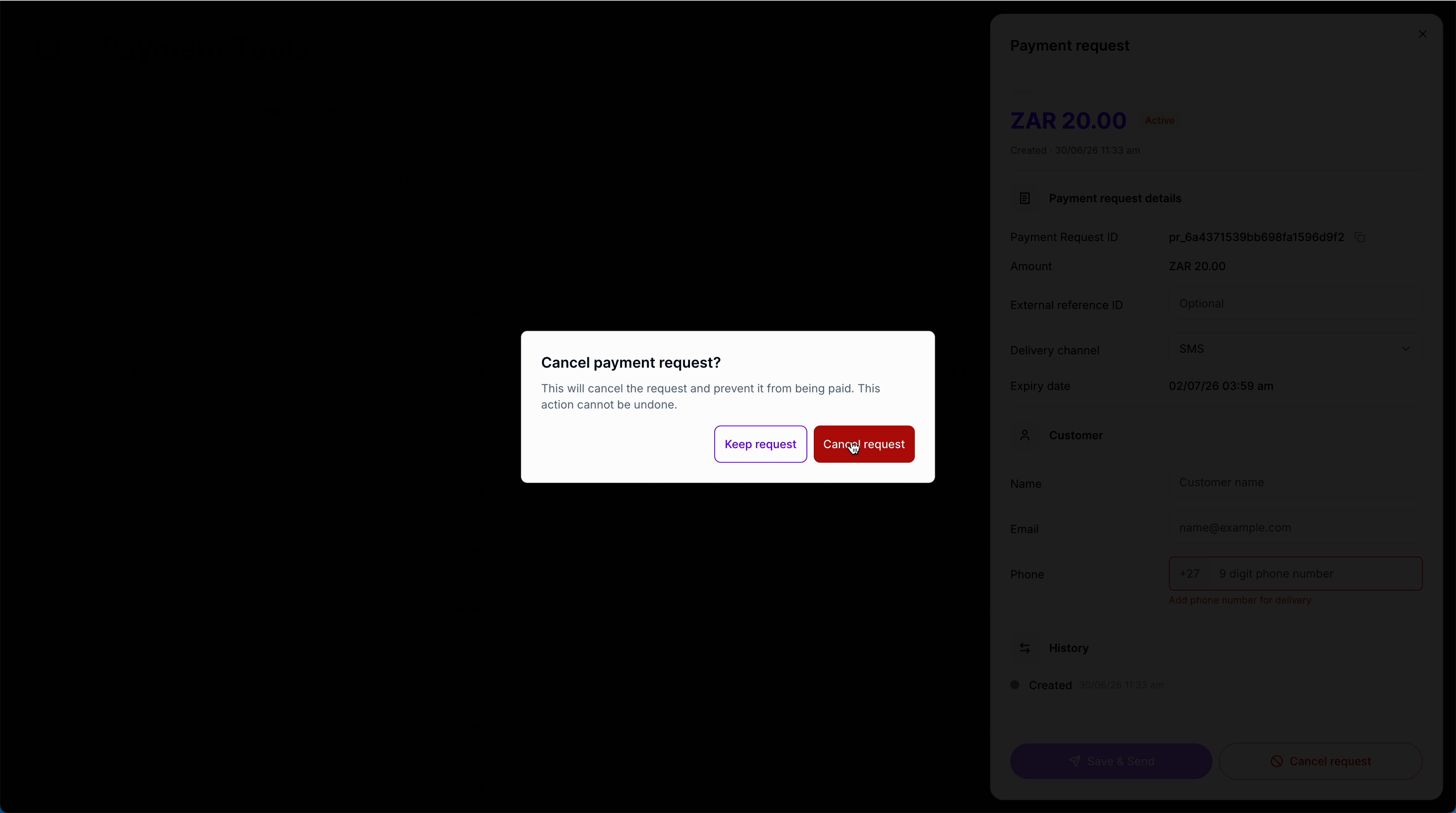
**Step 7:** If you need to cancel a payment request, simply select the option to cancel it.
<img src="https://mintcdn.com/momentholdingslimited/6OTPl7YtIOuH2_tk/images/2_step7.png?fit=max&auto=format&n=6OTPl7YtIOuH2_tk&q=85&s=c600005126d753a6e63e6a7e030c04c6" alt="2 Step7" title="2 Step7" data-path="guides/resources/payment-requests/bulk-step7.png" width="3600" height="2010" data-path="images/2_step7.png" />

<br />

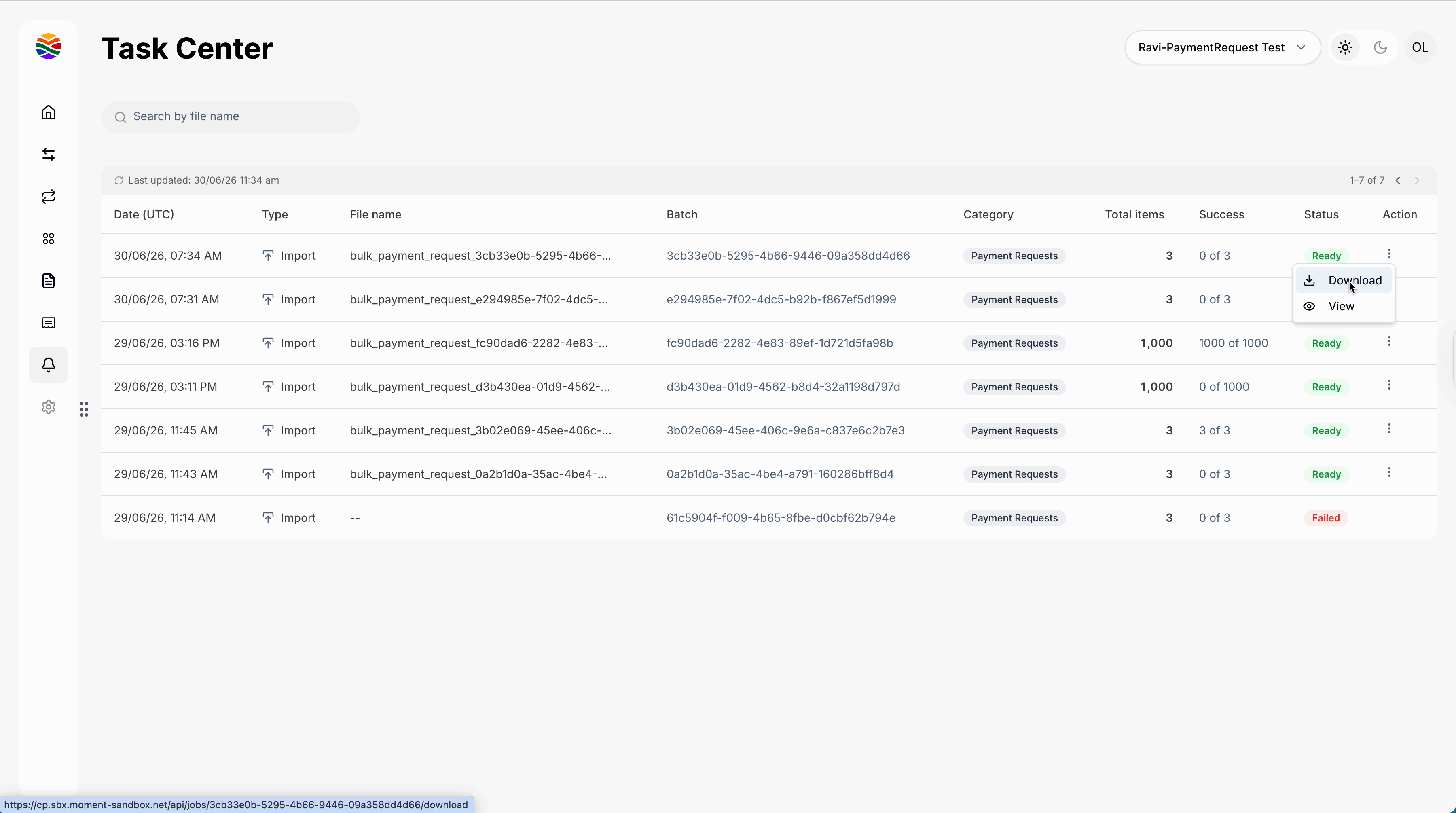
**Step 8:** Monitor your batch uploads in the **Task center**, see their completion status, and download payment requests if necessary.

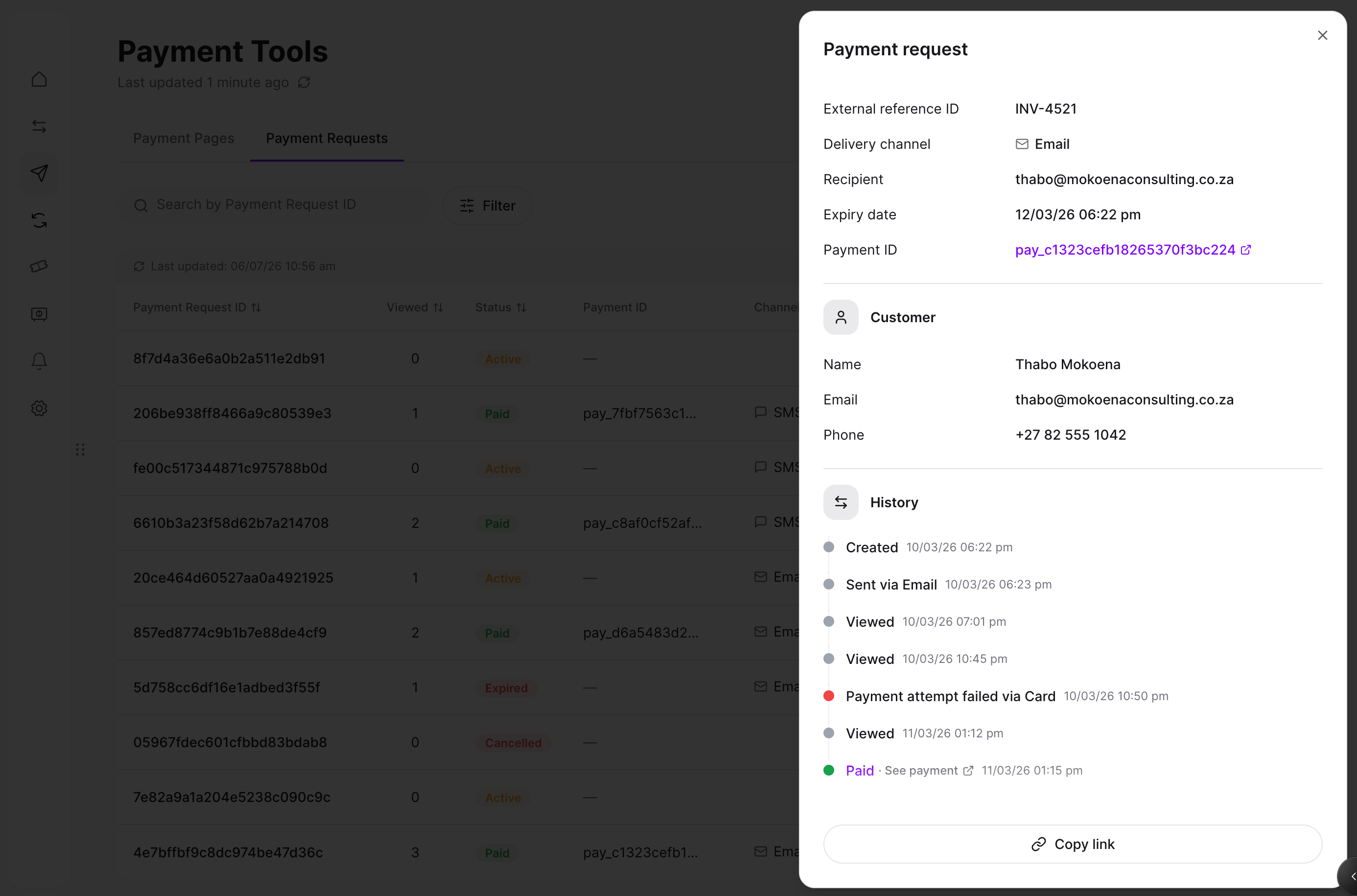
**Step 9:** Every payment request has a history with statuses.
<img src="https://mintcdn.com/momentholdingslimited/6OTPl7YtIOuH2_tk/images/step9.png?fit=max&auto=format&n=6OTPl7YtIOuH2_tk&q=85&s=d695c38de155ae7d67cc4832f80a070b" alt="Step9" title="Step9" width="3598" height="2006" data-path="guides/resources/payment-requests/bulk-step9-history.png" data-path="images/step9.png" />

<br />

**Step 10: Task Center and batch statuses**

* **Processing**: The batch has been received and is being validated; the output file is being generated.
* **Ready**: The batch was processed successfully. This means the output file was generated, not that every row succeeded. Check the downloaded file to confirm which payment requests were created and which rows failed.
* **Failed**: The batch could not be processed. Check the file and resubmit, or contact support if this persists.
<img src="https://mintcdn.com/momentholdingslimited/6OTPl7YtIOuH2_tk/images/2_step10.png?fit=max&auto=format&n=6OTPl7YtIOuH2_tk&q=85&s=19e54e05ec5b19bc8be74cfcf00b3891" alt="2 Step10" title="2 Step10" data-path="guides/resources/payment-requests/bulk-step10-statuses.png" width="3600" height="2010" data-path="images/2_step10.png" />

<br />

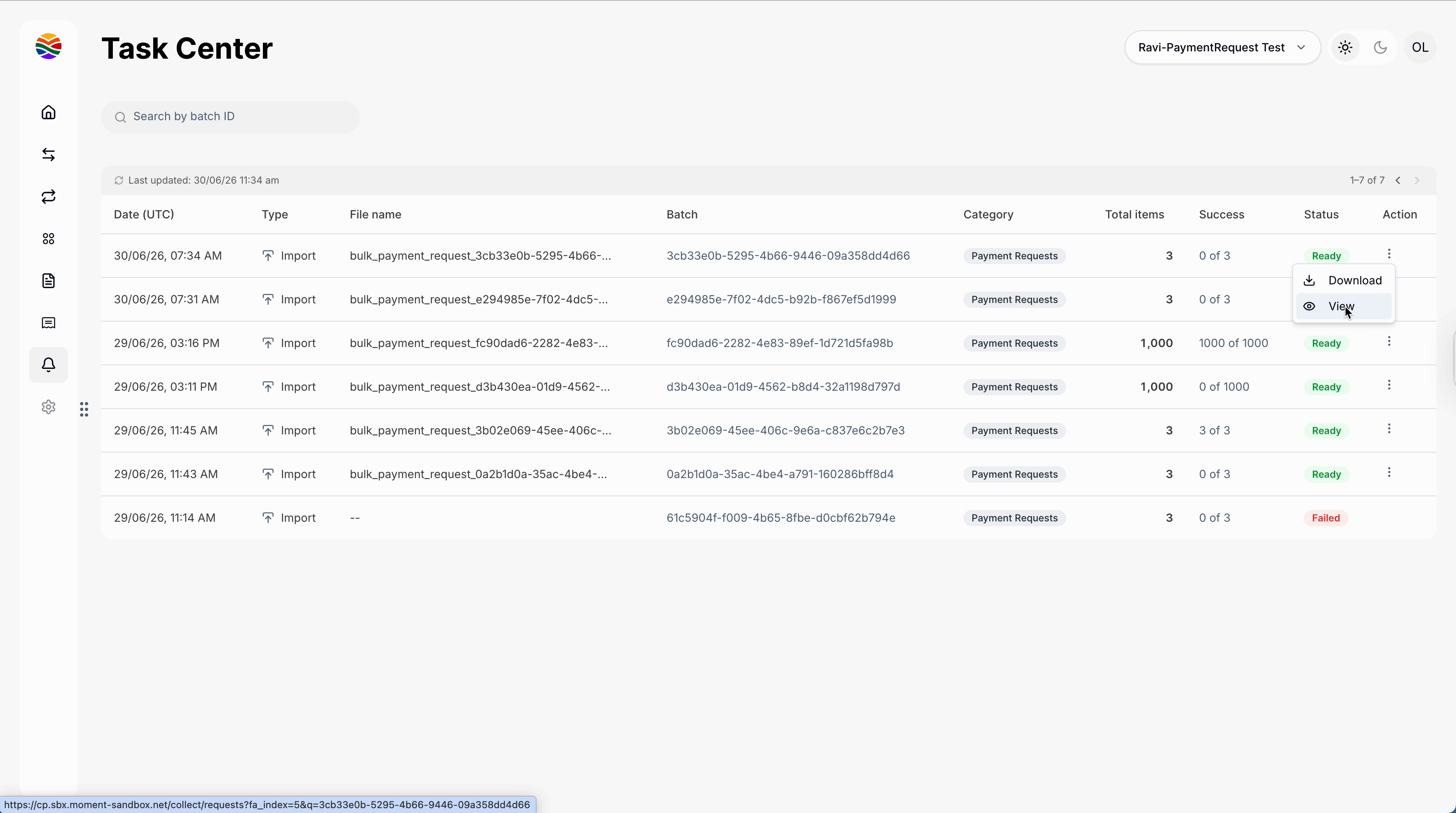
**Step 11: Downloading a batch**

Download the batch to get payment request links for each row, so you can send them yourself, along with the failure reason for any row that didn't succeed.
<img src="https://mintcdn.com/momentholdingslimited/6OTPl7YtIOuH2_tk/images/2_step11.png?fit=max&auto=format&n=6OTPl7YtIOuH2_tk&q=85&s=a0884cfbd3287f8eeae5c68165ceb188" alt="2 Step11" title="2 Step11" data-path="guides/resources/payment-requests/bulk-step11-download.png" width="3600" height="2010" data-path="images/2_step11.png" />

<br />

### Viewing & Filtering Payment Requests

<br />

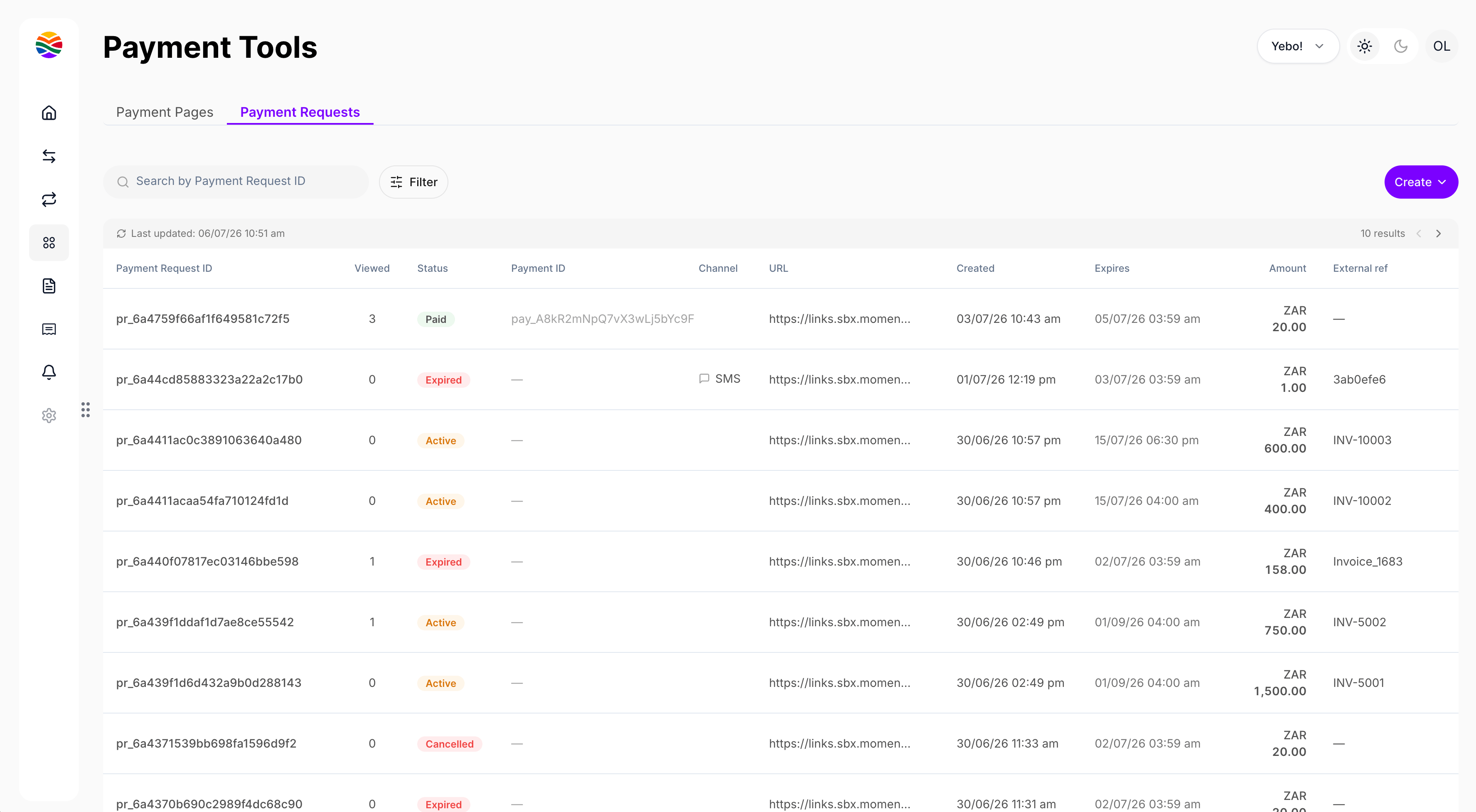
**Step 1:** Open the **Payment tools** page and find the **Payment Request** tab. The table lists all your payment requests, so you can keep track of every request you've created so far.
<img src="https://mintcdn.com/momentholdingslimited/6OTPl7YtIOuH2_tk/images/Screenshot-2026-07-06-at-10.52.40-AM.png?fit=max&auto=format&n=6OTPl7YtIOuH2_tk&q=85&s=ac39001b485da72e66befe7f73b277f5" alt="Screenshot 2026 07 06 At 10 52 40 AM" title="Screenshot 2026 07 06 At 10 52 40 AM" width="3598" height="2006" data-path="guides/resources/payment-requests/table-overview.png" data-path="images/Screenshot-2026-07-06-at-10.52.40-AM.png" />

<br />

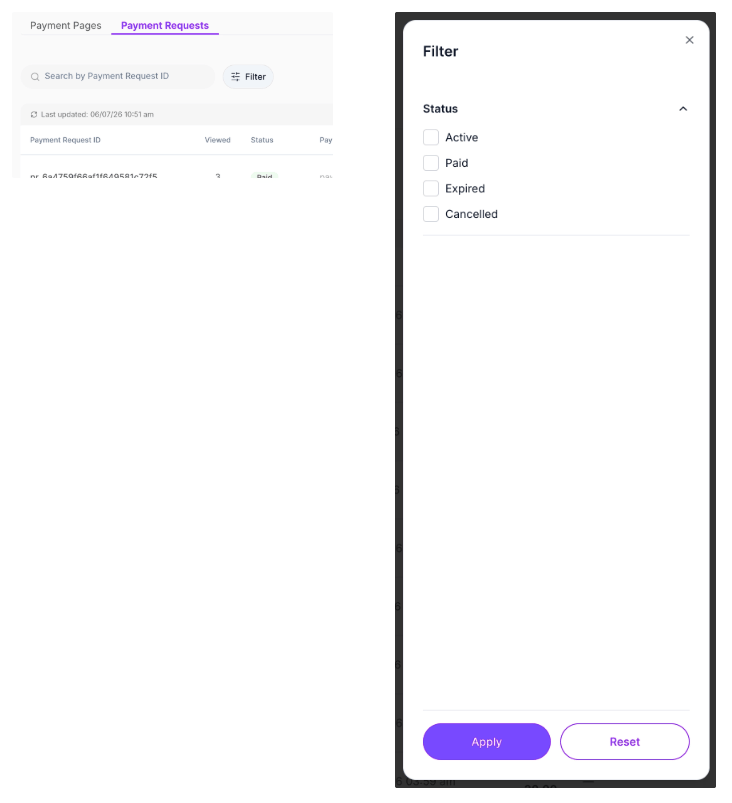
**Step 2:** Use the search bar to find payment requests by different identifiers. Filter your list by the **status** of each payment request to narrow down what you need.
<img src="https://mintcdn.com/momentholdingslimited/6OTPl7YtIOuH2_tk/images/Screenshot-2026-07-13-at-20.49.54.png?fit=max&auto=format&n=6OTPl7YtIOuH2_tk&q=85&s=a358abd2430acca79179425110b6f0d6" alt="Screenshot 2026 07 13 At 20 49 54" title="Screenshot 2026 07 13 At 20 49 54" width="3598" height="2006" data-path="guides/resources/payment-requests/single-or-bulk.png" className="mx-auto" style={{ width:"87%" }} data-path="images/Screenshot-2026-07-13-at-20.49.54.png" />

<br />

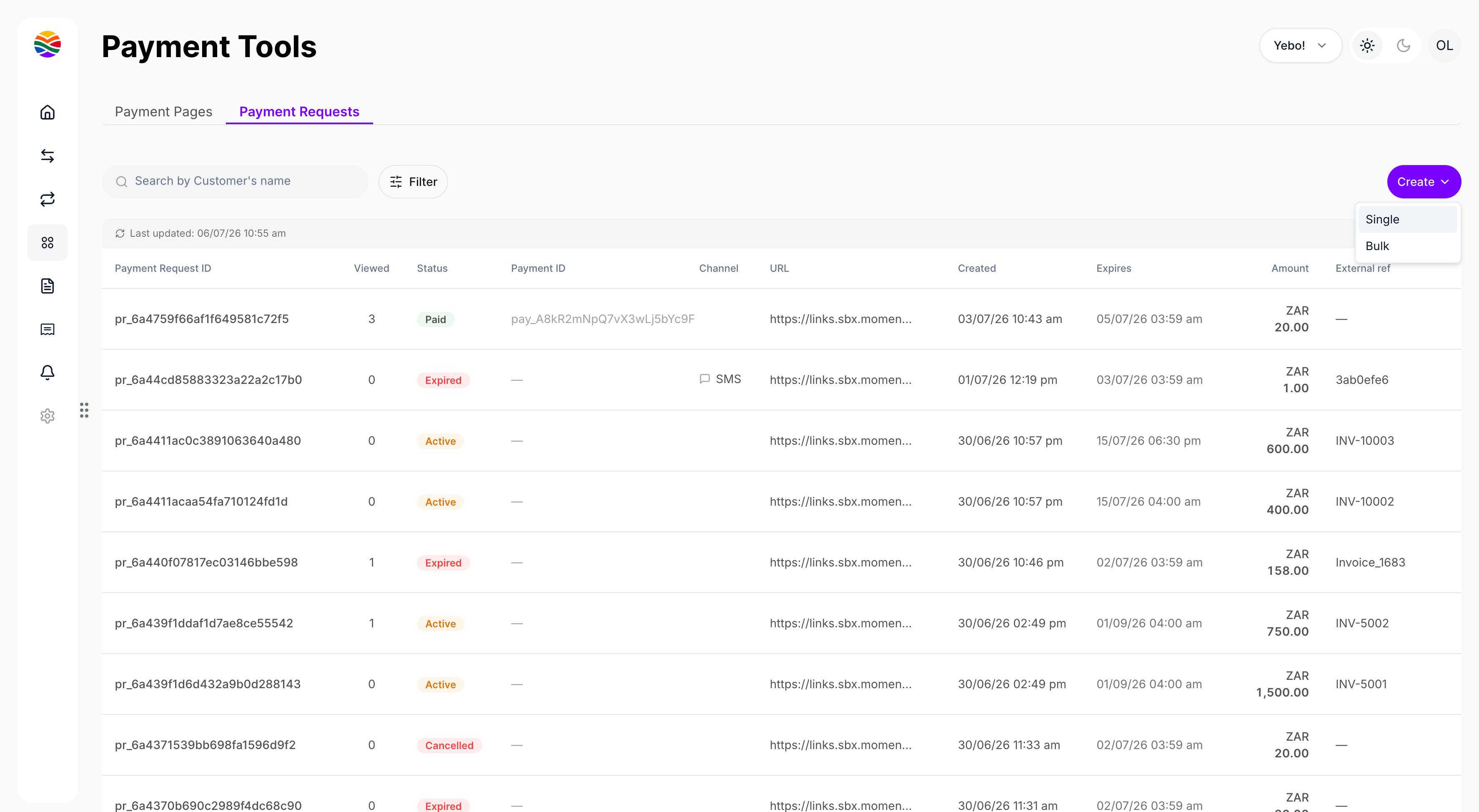
**Step 3:** To create a new payment request, choose whether you want to make a **single request** or create them **in bulk**.
<img src="https://mintcdn.com/momentholdingslimited/6OTPl7YtIOuH2_tk/images/Screenshot-2026-07-06-at-10.55.27-AM.png?fit=max&auto=format&n=6OTPl7YtIOuH2_tk&q=85&s=86407de680ccbd44d7a3cd8333d99ccd" alt="Screenshot 2026 07 06 At 10 55 27 AM" title="Screenshot 2026 07 06 At 10 55 27 AM" width="3598" height="2006" data-path="guides/resources/payment-requests/single-or-bulk.png" data-path="images/Screenshot-2026-07-06-at-10.55.27-AM.png" />

<br />

Managing payment requests with Moment keeps your collections simple, organized, and trackable, whether it's just one payment or hundreds at once. Enjoy faster, smoother payment collection!
