> ## Documentation Index
> Fetch the complete documentation index at: https://docs.momentco.io/llms.txt
> Use this file to discover all available pages before exploring further.

# Checkout

Customers can land on checkout from multiple entry points, including the **Payment Sessions API**, **EBP**, a **Payment Page**, or a **Payment Request**. Checkout then guides them to select a payment method, showing only the options enabled by the merchant’s configuration.

<Columns cols={2}>
  <div style={{ paddingTop: "8.5rem" }}>
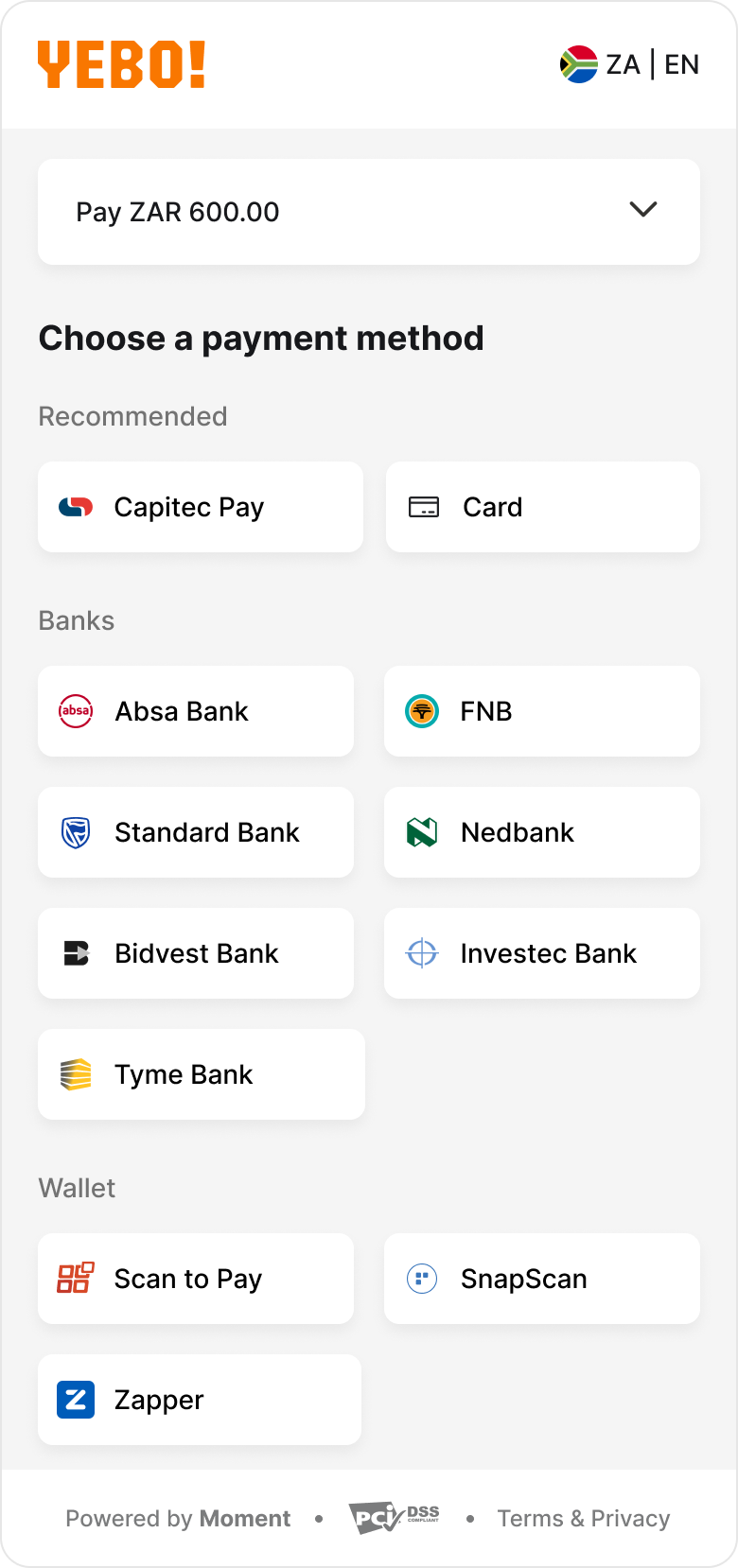
    At the top of the checkout page, the customer sees the total amount they are about to pay (for example, **Pay ZAR 600.00**).

    Checkout displays only the payment methods enabled by the configuration and supported in the customer’s region.

    Available categories may include:

    * Cards
    * Banks
    * EFTs
    * Wallets
    * Pay-in-person

    To proceed, the customer taps a payment method and is redirected to the corresponding payment flow.
  </div>

  <div style={{ paddingTop: "4.5rem" }}>
    <img src="https://mintcdn.com/momentholdingslimited/ltrCqk19he2WwTGA/guides/resources/image-3.png?fit=max&auto=format&n=ltrCqk19he2WwTGA&q=85&s=aca8c7940e120b08d5e9423b985c6b7b" alt="Image" width="780" height="1658" data-path="guides/resources/image-3.png" />
  </div>
</Columns>

## Categories of payment method flows

### **Capitec pay**

Capitec Pay is a bank redirect method that allows customers to approve payments securely within the Capitec app.

After selecting **Capitec Pay**, the customer is redirected to Capitec’s web experience.

<Columns cols={2}>
  <div style={{ paddingTop: "8.5rem" }}>
    <br />

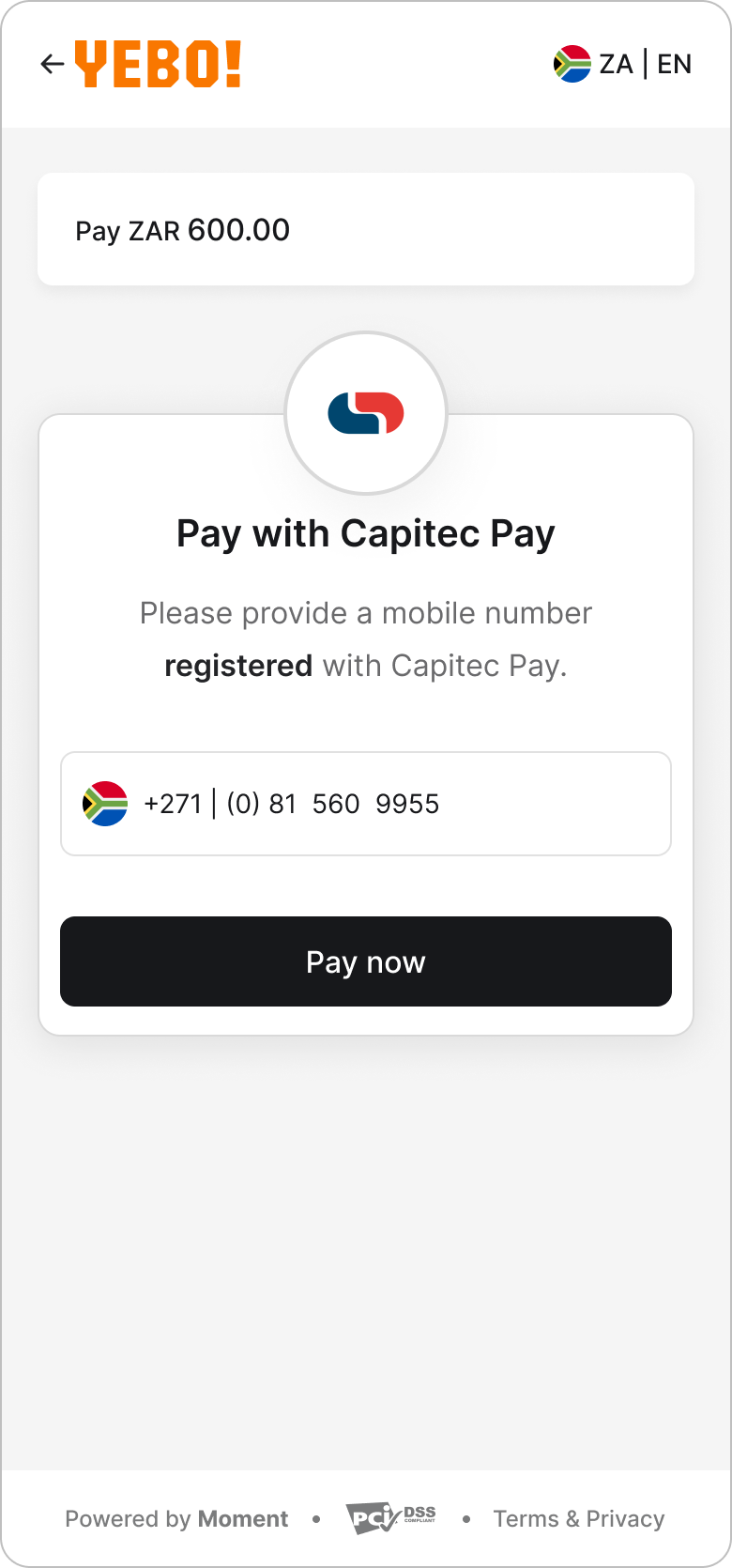
    **Step 1: Enter phone number**

    The customer enters their Capitec Pay number to initiate the request.

    * The customer can navigate back before initiating the request.
  </div>

  <div style={{ paddingTop: "4.5rem" }}>
    <img src="https://mintcdn.com/momentholdingslimited/ltrCqk19he2WwTGA/guides/resources/image1.png?fit=max&auto=format&n=ltrCqk19he2WwTGA&q=85&s=ca8f95afa42e61da90ddfe3482ab1051" alt="Image 1" width="780" height="1670" data-path="guides/resources/image1.png" />
  </div>
</Columns>

<Columns cols={2}>
  <div style={{ paddingTop: "8.5rem" }}>
    <br />

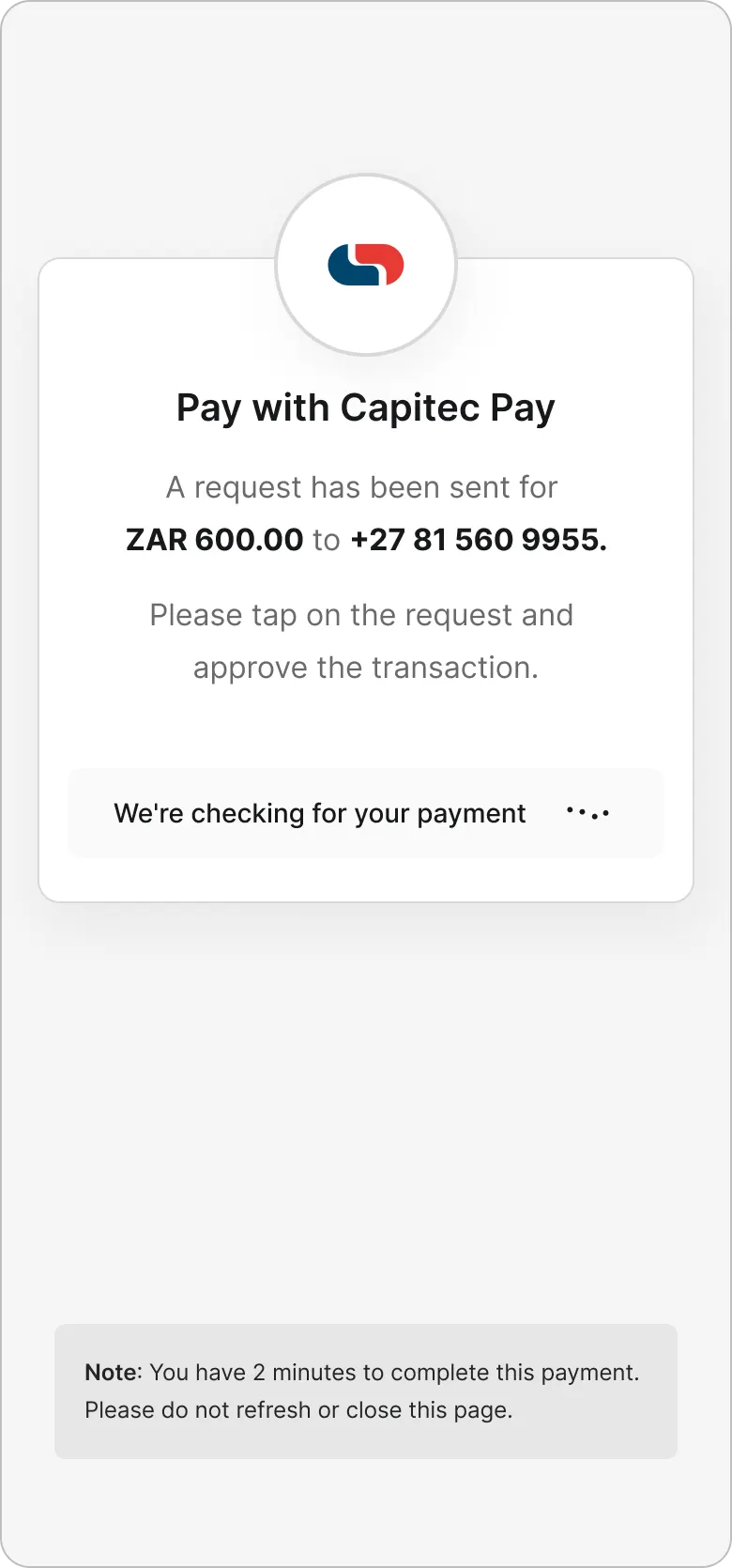
    **Step 2: Confirmation**

    A confirmation screen indicates that a push notification has been sent to the Capitec app. The customer must approve the payment within 3 minutes.

    * Once initiated, the request cannot be cancelled from this flow.
    * Checkout polls for status updates until the payment is successful or expires.
  </div>

  <div style={{ paddingTop: "4.5rem" }}>
    <img src="https://mintcdn.com/momentholdingslimited/ltrCqk19he2WwTGA/guides/resources/image2.png?fit=max&auto=format&n=ltrCqk19he2WwTGA&q=85&s=46d6be133b2313487a799490e84e144d" alt="Image 2" width="780" height="1670" data-path="guides/resources/image2.png" />
  </div>
</Columns>

### Banks - EFT

EFT allows customers to make payments through their bank’s online or mobile banking.

After selecting **EFT**, the customer proceeds through bank selection and redirection.

<Columns cols={2}>
  <div style={{ paddingTop: "8.5rem" }}>
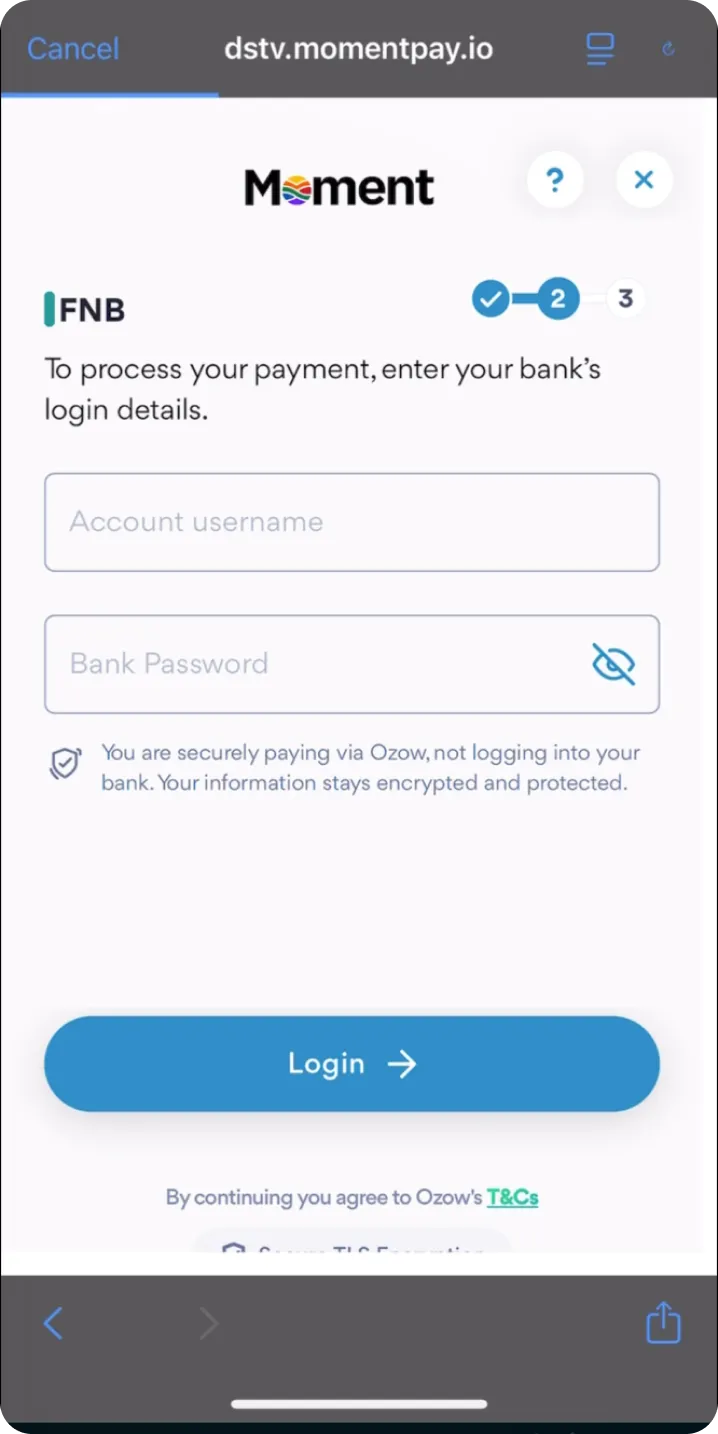
    **Redirect to bank**

    <br />

    After selecting a bank at the first step of checkout, the customer is redirected to to the bank’s secure online or mobile banking environment to log in and approve the payment. (see FNB example)

    <br />

    Only merchant-enabled and region-supported banks are displayed. Once redirected, the approval process takes place entirely within the bank’s system.
  </div>

  <div style={{ paddingTop: "4.5rem" }}>
    <img src="https://mintcdn.com/momentholdingslimited/ltrCqk19he2WwTGA/guides/resources/image3.png?fit=max&auto=format&n=ltrCqk19he2WwTGA&q=85&s=0a145888a043dd25ddeed8c8a9993bbb" alt="Image 3" width="718" height="1434" data-path="guides/resources/image3.png" />
  </div>
</Columns>

### Wallets

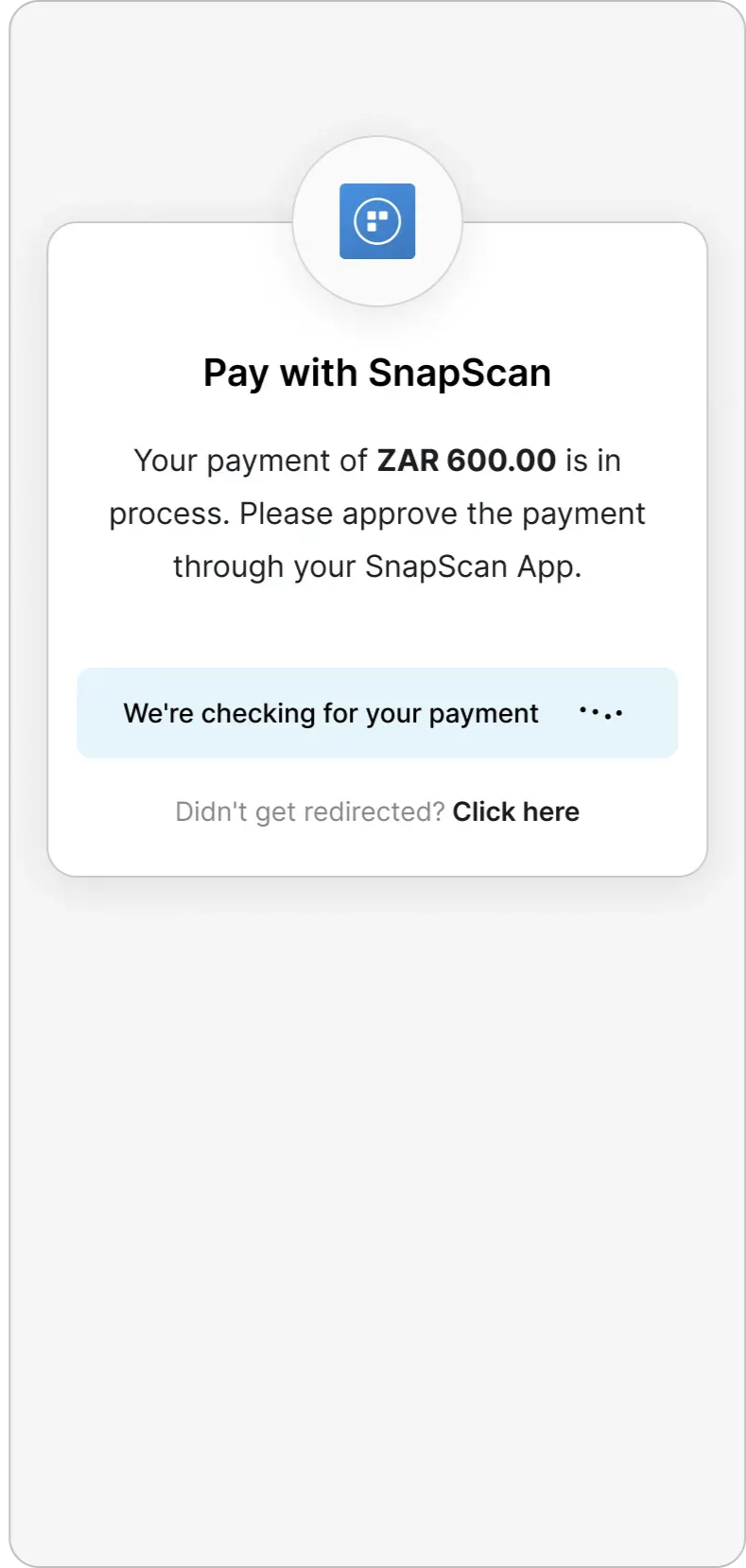
Wallet-based methods such as **SnapScan**, **Zapper**, and **Scan to Pay** follow a redirect flow

<Columns cols={2}>
  <div style={{ paddingTop: "8.5rem" }}>
    <br />

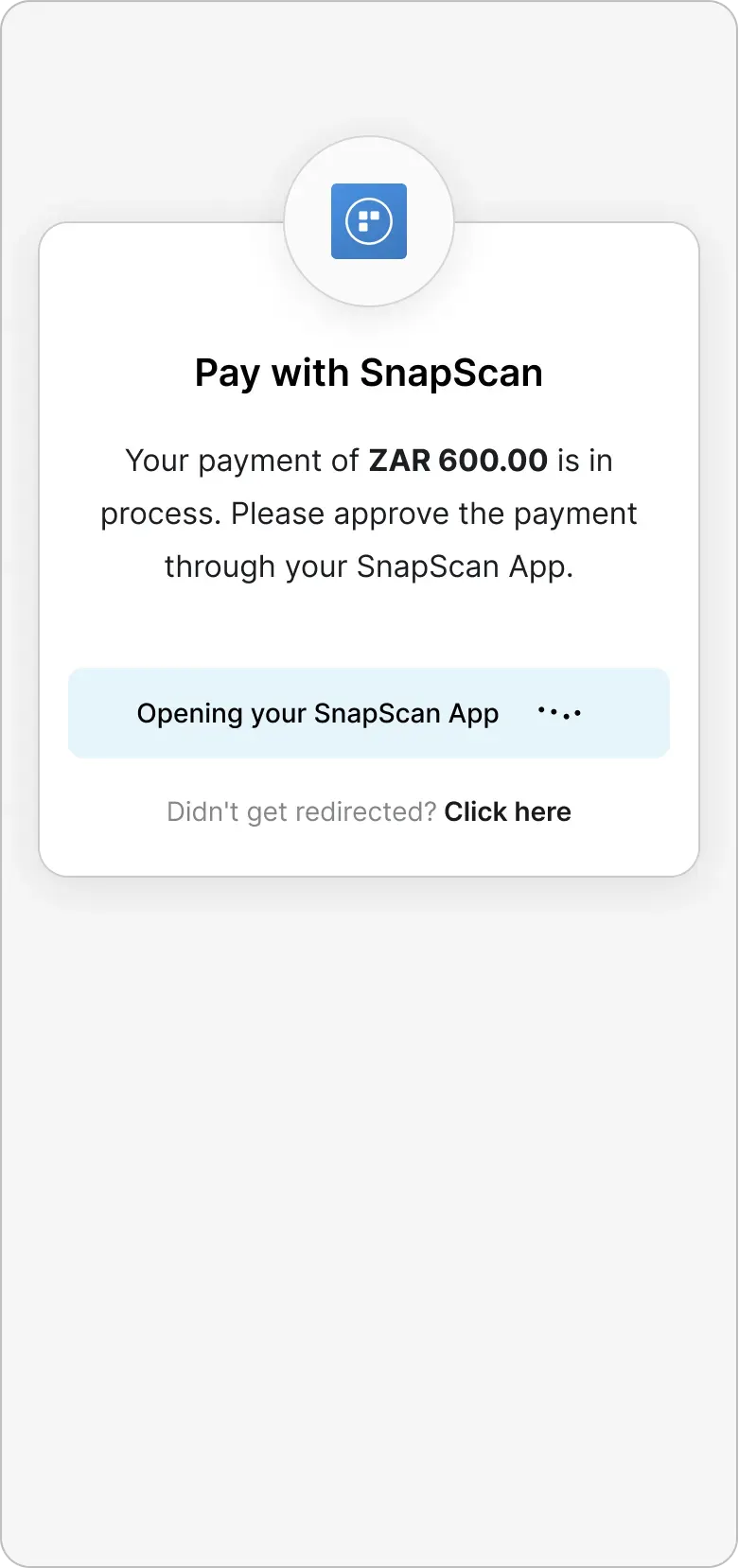
    **Step 1: Redirect to wallet (e.g. Snapscan)**

    <br />

    The customer is transferred to the wallet app or wallet web experience to review and approve the transaction.
  </div>

  <div style={{ paddingTop: "4.5rem" }}>
    <img src="https://mintcdn.com/momentholdingslimited/ltrCqk19he2WwTGA/guides/resources/2eea239f-86a3-4a55-8158-c9e2f373c594.png?fit=max&auto=format&n=ltrCqk19he2WwTGA&q=85&s=36b0dbab940895e2543805acd407922e" alt="2eea239f 86a3 4a55 8158 C9e2f373c594" width="781" height="1658" data-path="guides/resources/2eea239f-86a3-4a55-8158-c9e2f373c594.png" />
  </div>
</Columns>

<Columns cols={2}>
  <div style={{ paddingTop: "8.5rem" }}>
    <br />

    **Step 2: Approval and status handling**

    <br />

    Once the payment request is initiated, it cannot be cancelled from the checkout flow.

    <br />

    Checkout pulls for transaction status and automatically updates until the payment is successful or expires.

    <br />

    After approval (or expiry), the customer is returned to checkout with the final transaction status.
  </div>

  <div style={{ paddingTop: "4.5rem" }}>
    <img src="https://mintcdn.com/momentholdingslimited/ltrCqk19he2WwTGA/guides/resources/e662d03e-1e1c-4df1-8530-914557c03785.png?fit=max&auto=format&n=ltrCqk19he2WwTGA&q=85&s=18f955d34fa0fae7e40de22b1b1897bf" alt="E662d03e 1e1c 4df1 8530 914557c03785" width="789" height="1658" data-path="guides/resources/e662d03e-1e1c-4df1-8530-914557c03785.png" />
  </div>
</Columns>

### **Instructions-Only Payment Methods**

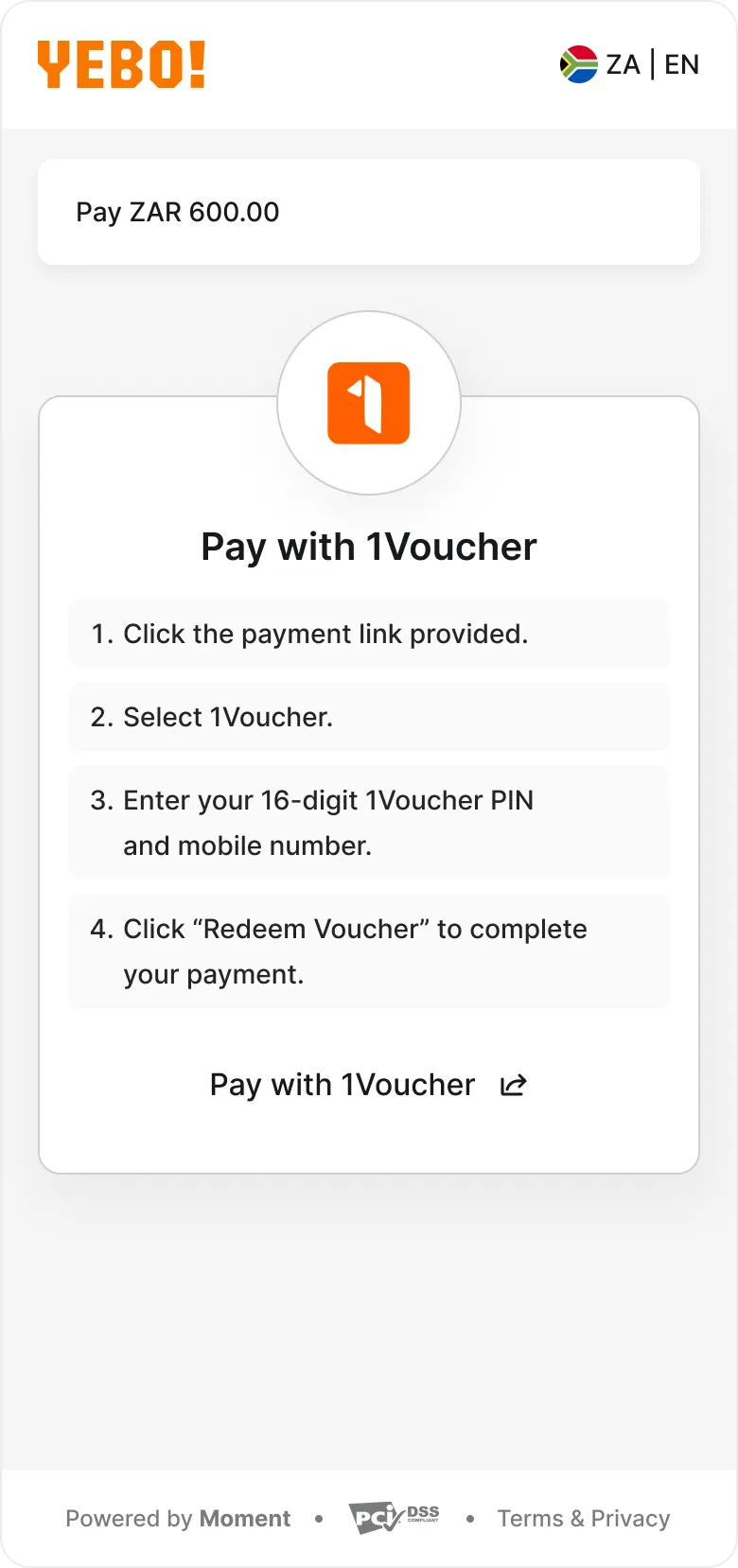
Some payment methods are **instructions-only**: instead of completing payment in checkout, the customer is shown clear instructions for completing the payment in an external channel (for example, a voucher flow, USSD, in-app steps, or an offline action).

<Columns cols={2}>
  <div style={{ paddingTop: "8.5rem" }}>
    <br />

    **Step 1: Instructions**

    <br />

    After selecting an instructions-only method, the customer sees the steps they need to follow to complete the payment. Depending on the method, they may also be redirected to a partner page or provider flow.

    <br />

    **Step 2: Completion and status handling**

    <br />

    Checkout monitors the payment status (where supported) and updates automatically until the payment is successful, failed, or expires. The customer then sees the final status in checkout.
  </div>

  <div style={{ paddingTop: "4.5rem" }}>
    <img src="https://mintcdn.com/momentholdingslimited/ltrCqk19he2WwTGA/guides/resources/image4.png?fit=max&auto=format&n=ltrCqk19he2WwTGA&q=85&s=15b72e28422b77c431813c47df956197" alt="Image 4" width="780" height="1658" data-path="guides/resources/image4.png" />
  </div>
</Columns>

### **Pay in person**

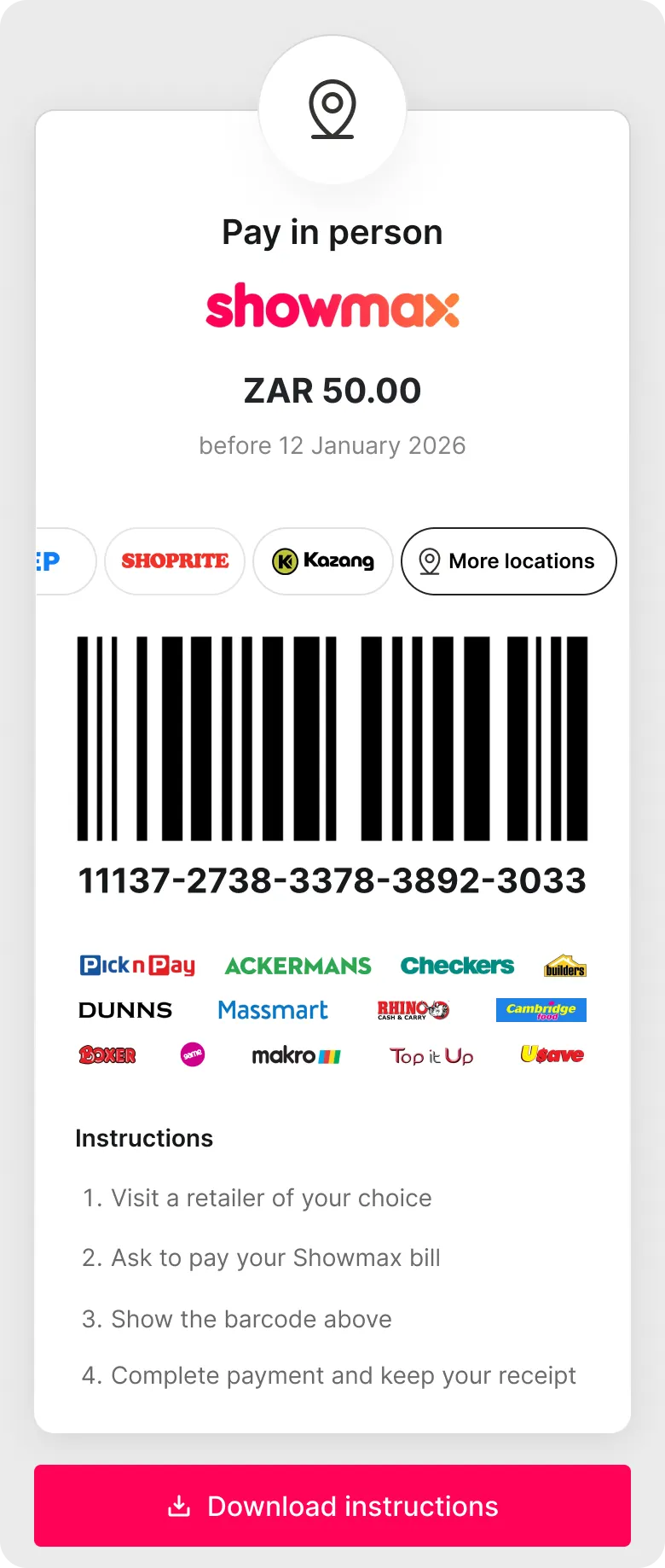
Pay-in-person enables customers to complete payment offline at a supported retailer or agent. [See full list here →](https://docs.momentco.io/documentation/network/in-person-network)

<Columns cols={2}>
  <div style={{ paddingTop: "8.5rem" }}>
    <br />

    **Step 1: Choose retailer or agent**

    <br />

    The customer selects a merchant-enabled retailer or agent.

    <br />

    Only configured retailers are displayed.

    <br />

    **Step 2: Review payment details**

    <br />

    The customer sees:

    * Payment amount
    * Merchant name and branding
    * Payment deadline (if applicable)
    * Barcode or Numerical Code for in-store payment

    <br />

    The barcode or code is presented at the till to complete payment.
  </div>

  <div style={{ paddingTop: "4.5rem" }}>
    <img src="https://mintcdn.com/momentholdingslimited/ltrCqk19he2WwTGA/guides/resources/image5.png?fit=max&auto=format&n=ltrCqk19he2WwTGA&q=85&s=f9a7fbcee09cd18012dad857970913cf" alt="Image 5" width="780" height="1838" data-path="guides/resources/image5.png" />
  </div>
</Columns>

## Payment Status

<Columns cols={2}>
  <div style={{ paddingTop: "8.5rem" }}>
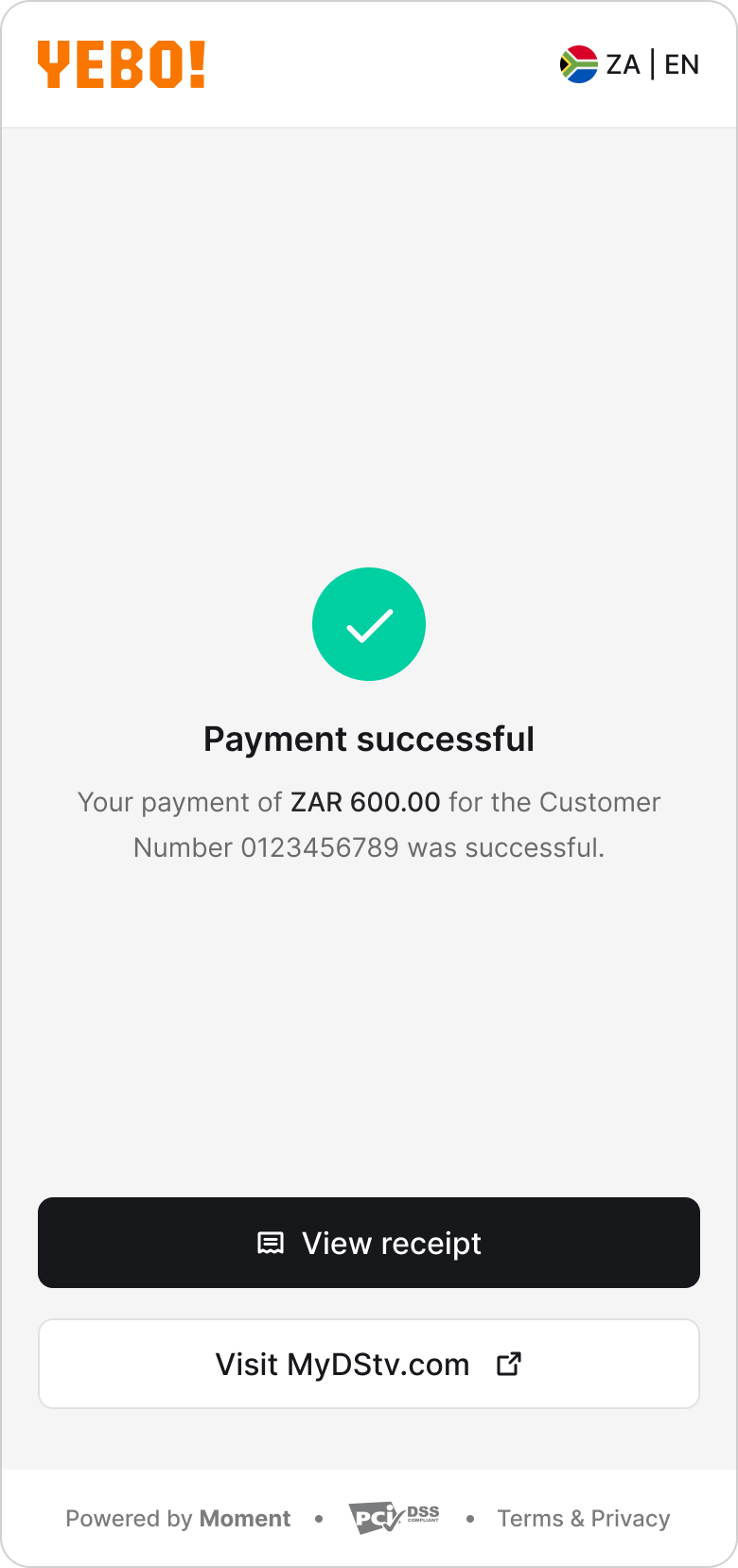
    **Successful Payment**

    <br />

    After approval within the relevant flow, the customer is redirected to:

    <br />

    * The merchant-defined success URL, or
    * The Moment success screen (see screenshot)
  </div>

  <div style={{ paddingTop: "4.5rem" }}>
    <img src="https://mintcdn.com/momentholdingslimited/ltrCqk19he2WwTGA/guides/resources/image6.png?fit=max&auto=format&n=ltrCqk19he2WwTGA&q=85&s=8a0c3129f4c3d7781300b7a5d965cc90" alt="Image 6" width="780" height="1658" data-path="guides/resources/image6.png" />
  </div>
</Columns>

<Columns cols={2}>
  <div style={{ paddingTop: "8.5rem" }}>
    <br />

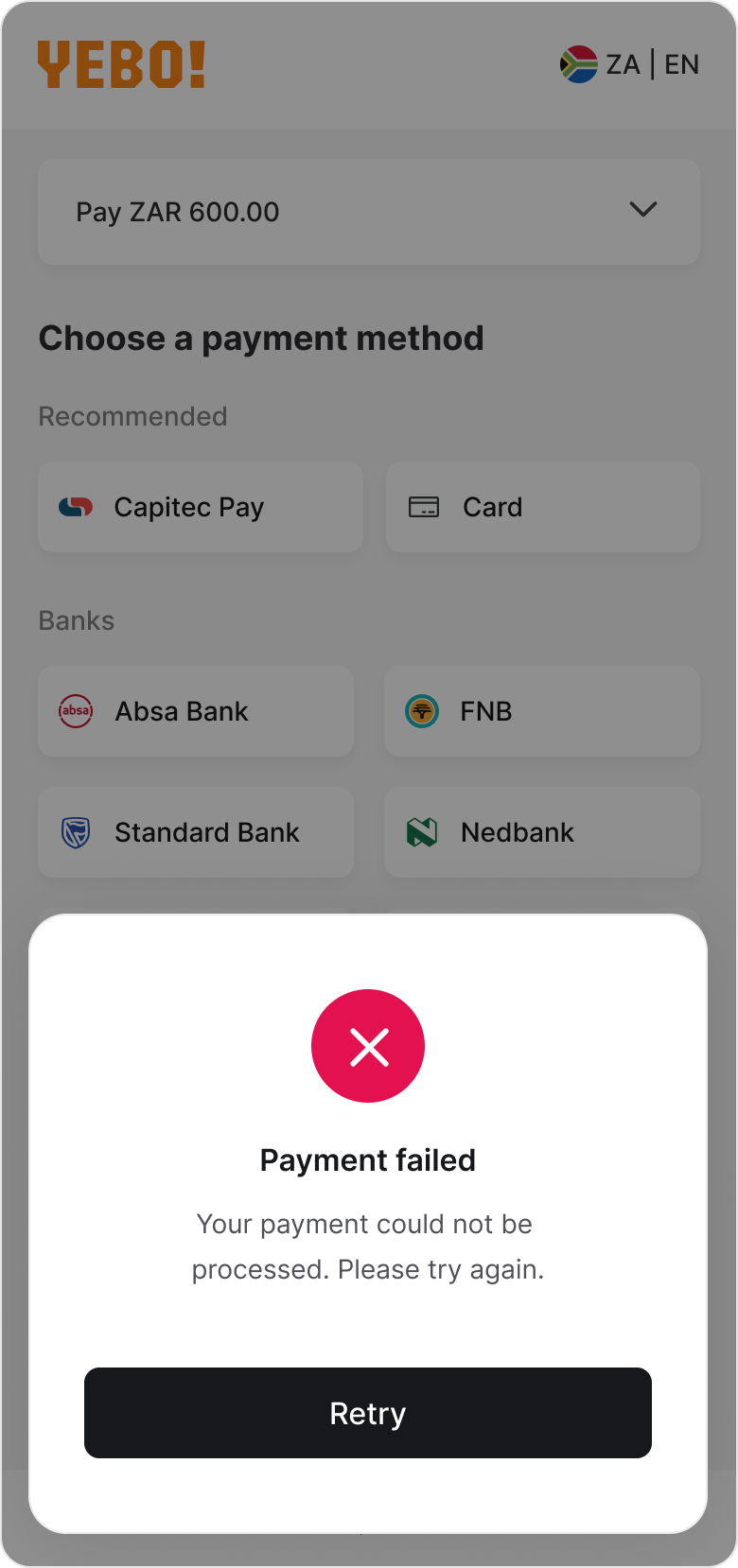
    **Failed or Expired Payment**

    <br />

    If the payment fails or expires:

    * The customer is returned to checkout.
    * A status message is displayed.
    * The customer may retry or select a different payment method.
  </div>

  <div style={{ paddingTop: "4.5rem" }}>
    <img src="https://mintcdn.com/momentholdingslimited/ltrCqk19he2WwTGA/guides/resources/image7.png?fit=max&auto=format&n=ltrCqk19he2WwTGA&q=85&s=bf8d5eaeba7fe0e59cb74dd088bb74bf" alt="Image 7" width="780" height="1658" data-path="guides/resources/image7.png" />
  </div>
</Columns>