> ## Documentation Index
> Fetch the complete documentation index at: https://docs.momentco.io/llms.txt
> Use this file to discover all available pages before exploring further.
# Quickstart: Integrate Specific Payment Methods
Merchants can control which payment methods appear on the hosted checkout using the Payment Sessions API.\
\
By default, Moment Checkout displays every payment method enabled for the merchant and available for the session's country and currency. This guide shows how to limit the checkout to a specific method or a subset of methods, and how to pre-select one method so the customer is taken directly into that payment method's flow\
\
There are two typical integration patterns:
* **Moment-hosted payment method selection:** Moment Checkout displays the payment methods specified in `visible_payment_methods` and allows the customer to select how they want to pay. Moment Checkout manages both payment method selection and payment collection. This is the standard integration pattern.
* **Merchant-controlled payment method selection:** The merchant displays the payment methods and allows the customer to select how they want to pay within their own checkout. The merchant then creates a Payment Session for the selected payment method and redirects the customer to Moment Checkout to complete the payment.
\
This guide builds on the [One-Time Payments quickstart](https://docs.momentco.io/api-reference/getting-started/quickstart-one-time-payments). If you have not created a one-time payment session before, start there.
## Prerequisites
* A test API key. See [Authentication](https://docs.momentco.io/api-reference/getting-started/authentication).
* Familiarity with creating a one-time payment session and launching the hosted checkout. See [Quickstart: One-Time Payments](https://docs.momentco.io/api-reference/getting-started/quickstart-one-time-payments).
## How it works
When you create a payment session, the response includes a `session_url` that renders the Moment hosted checkout. Without any additional configuration, the checkout lists all payment methods supported for the merchant and that transaction.\
\
To control this list, pass the `visible_payment_methods` array inside `options.checkout_options` when you create the session. To pre-select one of those methods, add `selected_payment_method`.
If you pass only one payment method in the `visible_payment_methods` array, then by default that payment method will be pre-selected and the user will be taken straight into that payment method's journey.
For example, if `card` is the only payment method passed in `visible_payment_methods` field then the user will be taken straight to the card information page to enter their card details.
## **1. Moment-hosted payment method selection**
Use this pattern when you want Moment Checkout to manage both payment method selection and payment collection.\
\
Create a Payment Session with the payment methods you want to make available in `visible_payment_methods`, then redirect the customer to the returned `session_url`.\
\
Moment Checkout displays the available payment methods and allows the customer to select how they want to pay. The customer remains within the hosted checkout while completing the payment and, where additional attempts are available, can retry or select another payment method without returning to your checkout.\
\
This is the standard integration pattern and provides the simplest integration because Moment Checkout manages the complete payment experience.
```mermaid theme={"system"}
sequenceDiagram
participant Customer
participant MerchantCheckout as Merchant Checkout
participant MerchantServer as Merchant Server
participant MomentAPI as Moment Payment Sessions API
participant MomentCheckout as Moment Checkout
Customer->>MerchantCheckout: Clicks pay
MerchantCheckout->>MerchantServer: Request payment session
MerchantServer->>MomentAPI: Create Payment Session with visible_payment_methods
MomentAPI-->>MerchantServer: Return session_url
MerchantServer-->>MerchantCheckout: Return session_url
MerchantCheckout->>MomentCheckout: Redirect customer
MomentCheckout->>Customer: Display available payment methods
Customer->>MomentCheckout: Select payment method and complete payment
MomentCheckout-->>Customer: Show payment result
MomentCheckout-->>MerchantCheckout: Redirect to return_url
```
### Step 1: Restrict the visible payment methods
Add `visible_payment_methods` to `options.checkout_options`. Pass an array of the payment method types you want to display. Only these methods will appear on the checkout.
For example, to support Capitec Pay (`capitec_pay`) and Card (`card`):
```shellscript theme={"system"}
curl -X POST https://api.momentpay.net/collect/payment_sessions \
-H "Authorization: Bearer sk_test_YOUR_SECRET_KEY" \
-H "Content-Type: application/json" \
-d '{
"amount": 10000,
"currency": "ZAR",
"type": "one_time",
"options": {
"checkout_options": {
"visible_payment_methods": ["capitec_pay", "card"]
}
}
}'
```
The response is the same as a standard one-time session. The `id` can be used to match the webhook event.
```json theme={"system"}
{
"id": "ps_kfAWZgfQIoeG0q",
"status": "active",
"payment_status": "unpaid",
"payment_outcome": "not_started",
"amount": 10000,
"currency": "ZAR",
"session_url": "https://checkout.momentpay.net/ckt802zEb2P2uS4Ql",
"created_at": "2025-03-18T14:06:51.149Z",
"updated_at": "2025-03-18T14:06:51.149Z"
}
```
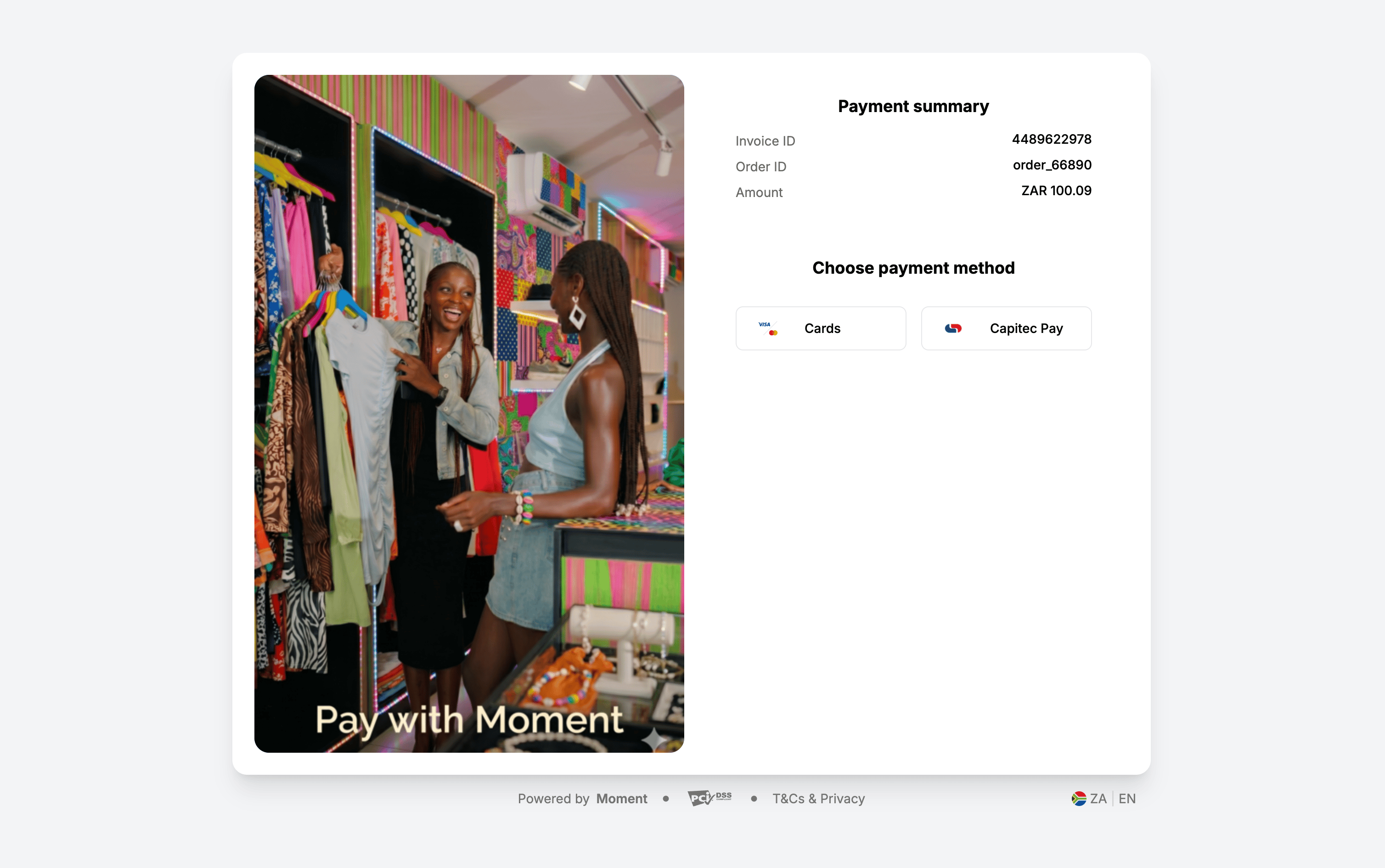
Redirect the customer to the `session_url` returned when the Payment Session is created. The checkout will be restricted as follows:
 ### Step 2 (optional): Pre-select a payment method
When `visible_payment_methods` contains more than one method, you can pre-select one of them with `selected_payment_method`. The pre-selected method is applied by default when the checkout loads, and the customer is taken directly into that payment method's journey without having to choose it on the payment method selection screen.
```json theme={"system"}
"options": {
"checkout_options": {
"visible_payment_methods": ["capitec_pay", "card"],
"selected_payment_method": "capitec_pay"
}
}
```
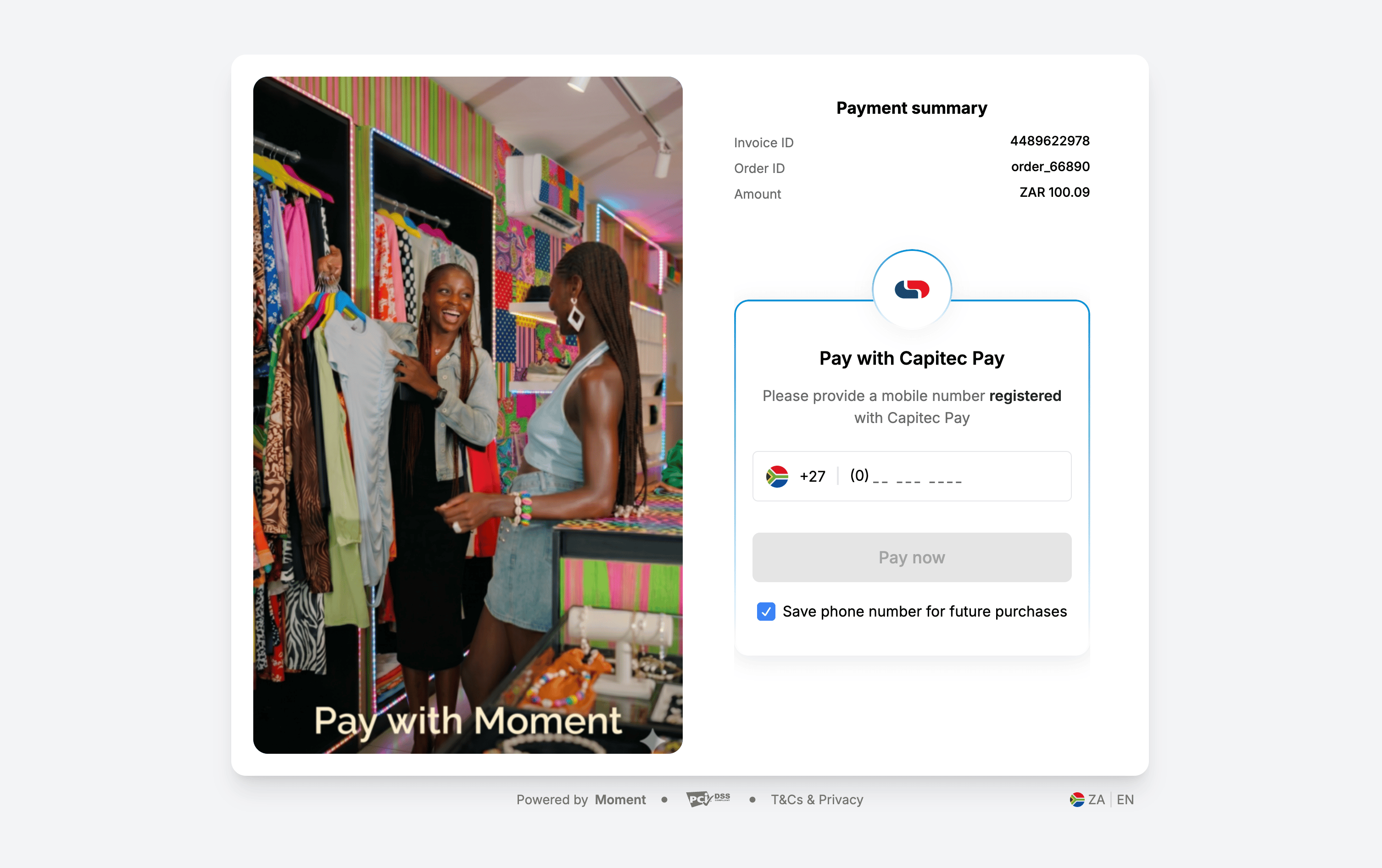
The checkout will directly present the Capitec Pay (`capitec_pay`) payment method, but the Card (`card`) payment method remains available if the customer chooses that instead:
### Step 2 (optional): Pre-select a payment method
When `visible_payment_methods` contains more than one method, you can pre-select one of them with `selected_payment_method`. The pre-selected method is applied by default when the checkout loads, and the customer is taken directly into that payment method's journey without having to choose it on the payment method selection screen.
```json theme={"system"}
"options": {
"checkout_options": {
"visible_payment_methods": ["capitec_pay", "card"],
"selected_payment_method": "capitec_pay"
}
}
```
The checkout will directly present the Capitec Pay (`capitec_pay`) payment method, but the Card (`card`) payment method remains available if the customer chooses that instead:
 ## **2. Merchant-controlled payment method selection**
Use this pattern when you want to manage payment method selection within your own checkout while using Moment Checkout to complete the payment.\
\
Your checkout displays the available payment methods and allows the customer to select how they want to pay. When the customer proceeds with a selected payment method, create a Payment Session with that method as the only value in `visible_payment_methods`.\
\
Because only one payment method is visible, Moment Checkout opens directly into the selected payment method’s flow without displaying the payment method selection screen.\
\
Set `max_attempts` to `1` so control returns to your checkout after the selected payment attempt succeeds or fails. Your checkout can then display the payment outcome or allow the customer to select another payment method.
```mermaid theme={"system"}
sequenceDiagram
participant Customer
participant MerchantCheckout as Merchant Checkout
participant MerchantServer as Merchant Server
participant MomentAPI as Moment Payment Sessions API
participant MomentCheckout as Moment Checkout
MerchantCheckout->>Customer: Display available payment methods
Customer->>MerchantCheckout: Select payment method
MerchantCheckout->>MerchantServer: Request session for selected method
MerchantServer->>MomentAPI: Create Payment Session
## **2. Merchant-controlled payment method selection**
Use this pattern when you want to manage payment method selection within your own checkout while using Moment Checkout to complete the payment.\
\
Your checkout displays the available payment methods and allows the customer to select how they want to pay. When the customer proceeds with a selected payment method, create a Payment Session with that method as the only value in `visible_payment_methods`.\
\
Because only one payment method is visible, Moment Checkout opens directly into the selected payment method’s flow without displaying the payment method selection screen.\
\
Set `max_attempts` to `1` so control returns to your checkout after the selected payment attempt succeeds or fails. Your checkout can then display the payment outcome or allow the customer to select another payment method.
```mermaid theme={"system"}
sequenceDiagram
participant Customer
participant MerchantCheckout as Merchant Checkout
participant MerchantServer as Merchant Server
participant MomentAPI as Moment Payment Sessions API
participant MomentCheckout as Moment Checkout
MerchantCheckout->>Customer: Display available payment methods
Customer->>MerchantCheckout: Select payment method
MerchantCheckout->>MerchantServer: Request session for selected method
MerchantServer->>MomentAPI: Create Payment Session
visible_payment_methods: [selected_method]
max_attempts: 1
MomentAPI-->>MerchantServer: Return session_url
MerchantServer-->>MerchantCheckout: Return session_url
MerchantCheckout->>MomentCheckout: Redirect customer
MomentCheckout->>Customer: Open selected payment method flow
Customer->>MomentCheckout: Complete payment attempt
alt Payment succeeds
MomentCheckout-->>MerchantCheckout: Redirect to return_url
MerchantCheckout->>Customer: Display payment confirmation
else Payment fails
MomentCheckout-->>MerchantCheckout: Redirect to return_url
MerchantCheckout->>Customer: Display payment methods
Customer->>MerchantCheckout: Select another payment method
MerchantCheckout->>MerchantServer: Request a new Payment Session
MerchantServer->>MomentAPI: Create new Payment Session
for newly selected method
MomentAPI-->>MerchantServer: Return new session_url
MerchantServer-->>MerchantCheckout: Return new session_url
MerchantCheckout->>MomentCheckout: Redirect customer
end
```
This pattern allows you to own the payment method selection experience while using Moment Checkout to complete the selected payment method flow.
### **Step 1: Display payment methods in your checkout**
Display the payment methods you want to make available using your own checkout interface.
Your integration is responsible for determining which payment methods to display and mapping each option to its corresponding Moment payment method type.
### **Step 2: Create a Payment Session for the selected payment method**
When the customer selects a payment method and proceeds to pay, create a Payment Session from your server.
Pass the selected payment method as the only value in `visible_payment_methods` and set `max_attempts` to `1`.
For example, if the customer selects Capitec Pay:
```shellscript highlight={1} theme={"system"}
curl -X POST https://api.momentpay.net/collect/payment_sessions \
-H "Authorization: Bearer sk_test_YOUR_SECRET_KEY" \
-H "Content-Type: application/json" \
-d '{
"amount": 10000,
"currency": "ZAR",
"type": "one_time",
"options": {
"checkout_options": {
"visible_payment_methods": ["capitec_pay"],
"max_attempts": 1,
"return_url": "https://merchant.example/checkout/order_123/payment-result"
}
},
"external_reference": "order_123"
}'
```
The response is the same as a standard one-time session. The `id` can be used to match the webhook event.
```json theme={"system"}
{
"id": "ps_kfAWZgfQIoeG0q",
"status": "active",
"payment_status": "unpaid",
"payment_outcome": "not_started",
"amount": 10000,
"currency": "ZAR",
"session_url": "https://checkout.momentpay.net/ckt802zEb2P2uS4Ql",
"created_at": "2025-03-18T14:06:51.149Z",
"updated_at": "2025-03-18T14:06:51.149Z"
}
```
Redirect the customer to the `session_url` returned when the Payment Session is created. The checkout will directly present the Capitec Pay (`capitec_pay`) payment method as the only option:
### **Step 3: Handle the customer’s return**
After the payment attempt succeeds or fails, Moment Checkout redirects the customer to the configured `return_url`.
When the customer returns, retrieve the Payment Session to display the latest payment status. Use webhooks as the authoritative source for asynchronous payment status updates.
If the payment was unsuccessful, you can allow the customer to select the same or a different payment method from your checkout. When the customer proceeds again, create a new Payment Session using the newly selected payment method (as per the earlier step above).
## Supported payment method types
Pass any of the following string values in `visible_payment_methods`:
```text theme={"system"}
card
instant_eft
mtn_momo
tigopesa
ecocash
airtel_money
telecel_cash
masterpass
capitec_pay
mpesa
snapscan
quickteller
zamtel
at_money
zapper
scantopay
quickteller_cards
opay
palmpay
pocket
mukuru
quickteller_cards_verve
```
**Rules** for `visible_payment_methods:`
* It is an array of strings.
* The visible payment methods must be a strict subset of the enabled payment methods for the merchant account.
* When not specified all payment methods enabled for the merchant account and available for the session's country and currency are visible.
* If you pass only one payment method, then by default that payment method will be pre-selected and the user will be taken straight into that payment method's journey.
**Rules** for `selected_payment_method:`
* It is a string and accepts one value only.
* The value must also be present in `visible_payment_methods`.
* It applies only when `visible_payment_methods` contains more than one entry.
## Match payment methods to the currency
The methods you request must be valid for the session's country and currency. For example, a session created in `ZAR` must list methods supported in South Africa.
If any method in `visible_payment_methods` is not supported for the session's currency, the request fails with `400 Bad Request`. See [Payment Methods](https://docs.momentco.io/api-reference/getting-started/payment-methods) for the methods available per country and currency.
## Launch the checkout, handle the webhook, and test
Launching the checkout, handling the `payment_session.completed` webhook, verifying the signature, and testing are identical to the standard flow. See [Quickstart: One-Time Payments](https://docs.momentco.io/api-reference/getting-started/quickstart-one-time-payments) for these steps.